Amazon FBA Mastery: A Complete Guide to Starting, Scaling, and Optimizing Your E-Commerce Business
Learn how to start, manage, and scale your Amazon FBA business with practical strategies for product research, listing optimization, FBA fees, inventory management, advertising, and long-term growth.
Amazon FBA lets you run a real ecommerce business without operating your own warehouse. Amazon stores your inventory, ships every order, and handles customer service, so you can focus on picking the right products and building a brand people trust. Listing a product is easy; winning at FBA still takes a strategy.
This guide walks you through the whole process, from choosing your first product to scaling into a lasting brand. You’ll find the exact steps, tools, and 2026 fee updates you need, whether you’re launching your first FBA business or fine-tuning one that’s already running.
What is Amazon FBA?
FBA stands for Fulfillment by Amazon. A powerful service that allows sellers to store their inventory in Amazon’s warehouses, while Amazon takes care of picking, packing, shipping, and customer service for every order.
Instead of handling logistics yourself, you ship your products to Amazon’s fulfillment centers, and from there, Amazon manages the rest, including fast Prime shipping, returns, and 24/7 support.
How FBA Works:
Here’s how it works in practice: you ship your products to an Amazon warehouse, where they’re stored securely until a customer places an order. Amazon then picks, packs, and ships the item, and handles any returns or product questions that come up afterward. That’s exactly why private label and wholesale sellers gravitate toward FBA; it frees them up to focus on the brand instead of the logistics.
Key Amazon FBA Perks:
Your products get the Prime badge instantly, putting them in front of more than 200 million Prime members who shop with fast, free shipping in mind. Amazon handles delivery in 1 to 2 days, and buyers trust Amazon’s branding on shipping and returns more than they’d trust an unfamiliar seller’s.
FBA sellers also tend to win the Buy Box more often and see fewer shipping-related complaints, since Amazon’s own fulfillment network is doing the heavy lifting. Add in easier access to Sponsored Ads placement and Brand Registry tools, and you get the infrastructure of a global logistics operation without owning a single warehouse.
Getting Started with Amazon FBA
The positive aspect of starting an Amazon business through Fulfillment by Amazon (FBA) is that beginning the process proves easier than anticipated.
FBA allows you to concentrate on brand development and product selection while Amazon manages both warehouse storage and delivery operations and customer support services.
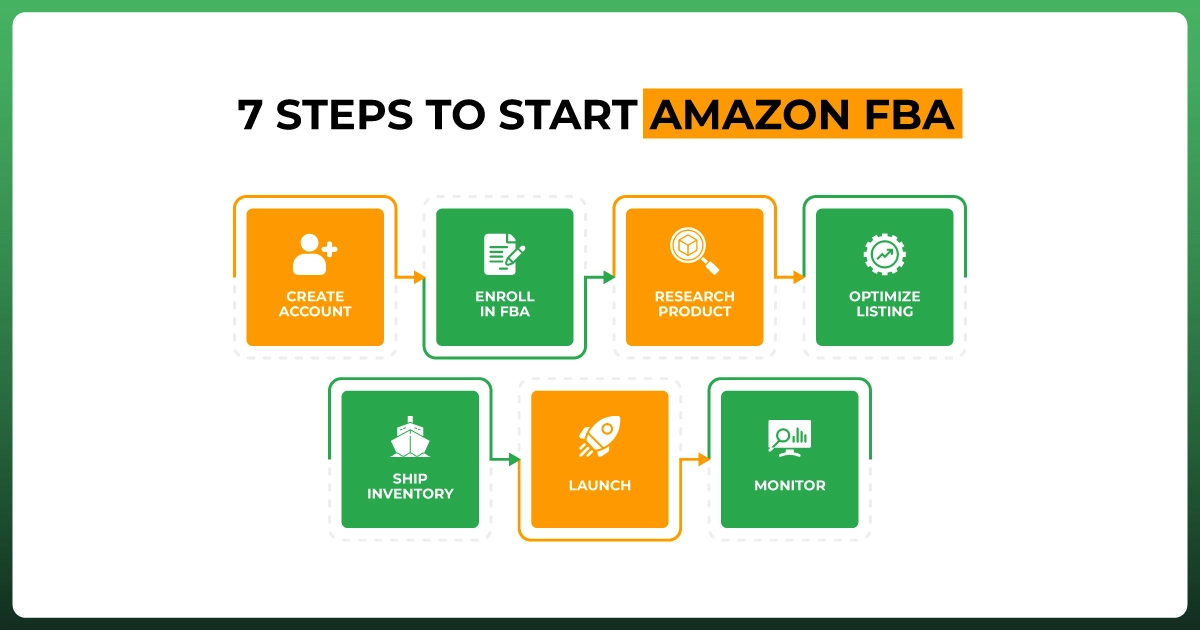
Here’s how to get started with Amazon FBA:
Step 1: Create Your Amazon Seller Account
Go to sellercentral.amazon.com and sign up for a Professional Seller Account ($39.99/month). You’ll need:
Business or individual details
Valid ID and phone number
Bank account & credit card
Tax information (SSN or EIN)
Pro Tip: Use a dedicated business email and keep your documentation ready; Amazon often verifies your identity via video.
Step 2: Enroll in Amazon FBA
After creating your account, go to your Seller Central dashboard, click "Settings" > "Fulfillment by Amazon", and enroll in the FBA program.
This unlocks the ability to send inventory to Amazon warehouses and have Amazon handle order fulfillment.
Step 3: Research & Source a Product
Use tools like:
Helium 10 Black Box or Jungle Scout Product Database
Analyze demand, competition, and margins. Use Keepa or JS Sales Estimator to check sales history. Once you find a winning product, see our full walkthrough on finding profitable products to sell on Amazon before you source it from Alibaba or a local manufacturer. Order samples before committing.
Step 4: Create and Optimize Your Listing
Create your product listing inside Seller Central and make sure to:
Include an SEO-friendly title and bullet points
Use high-quality images (white background + lifestyle)
Add backend keywords using tools like Helium 10 Scribbles
Enroll in Brand Registry for A+ Content if you own a trademark
Step 5: Ship Your Inventory to Amazon FBA
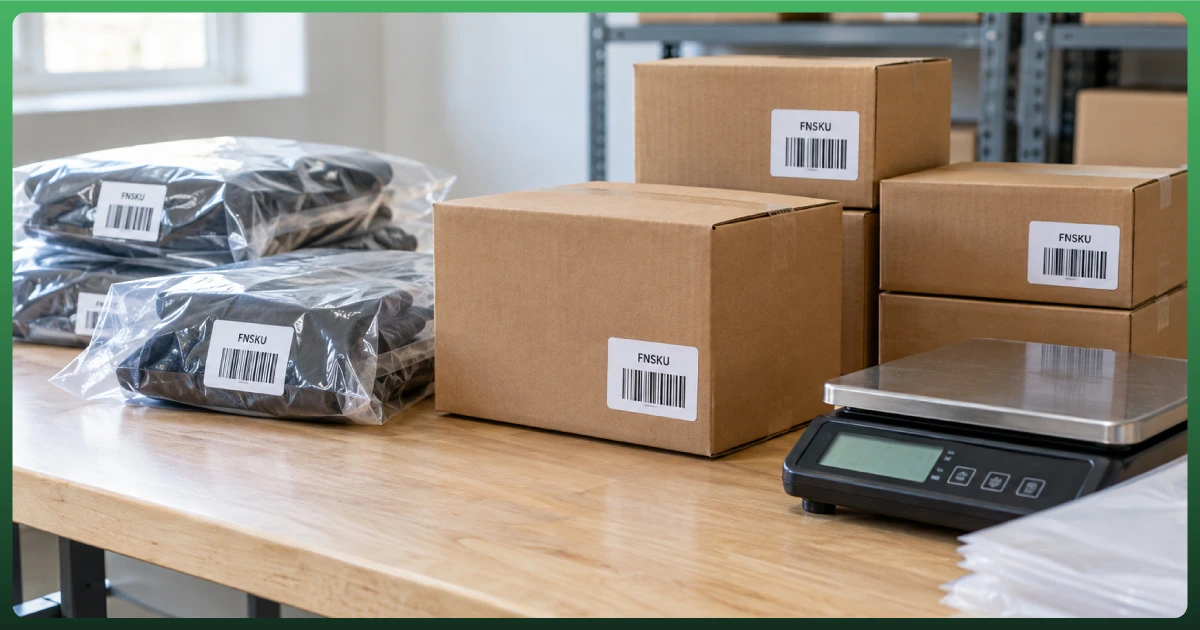
Label your products with FNSKU barcodes (Amazon provides these)
Create a shipment plan inside Seller Central
Send your units to the designated Amazon fulfillment center
You can prep the items yourself or use Amazon's FBA Prep Services.
Step 6: Launch & Promote Your Product
Run Amazon PPC campaigns to drive initial sales
Use Amazon Vine (if you’ve enrolled in Brand Registry) to get early reviews
Track performance using Helium 10 Profits or JS Sales Analytics
Step 7: Monitor, Optimize, and Scale
Once live, monitor:
Inventory levels (use Inventory Dashboard)
Conversion rate, clicks, and returns
Review health and customer feedback
Note: Use Helium 10 Alerts to get notified about listing changes, hijackers, or suppressed products.
Finding Profitable Products to Sell
Selecting the appropriate product stands as the key element for developing an Amazon business that achieves success. The thousands of new sellers each month face product selection as their defining factor for either success or failure during their FBA journey.
The positive aspect is this: 2026 presents better opportunities for people to identify profitable products with minimal competition by using the correct tools and methods. For a step-by-step walkthrough, see our guide to finding products to sell on Amazon.
So the essential qualities of a profitable product are
1. Ideal Price Range: $20–$70
This range hits the sweet spot.
Products under $20 often leave very little room for profit after Amazon takes its cut.
Products over $70 can scare off buyers and are harder to sell unless you have an established brand.
But between $20 and $70, you can still make a healthy margin, offer value, and convert well, especially with ads.
Think about it: A $29.99 yoga block set gives you more flexibility than a $9.99 one, especially after FBA fees and shipping costs.
2. Lightweight, Small, and Easy to Ship
Big, bulky items eat into your margins fast. And heavy products mean high FBA fees.
Stick with items that are:
Under 2 lbs (around 1 kg)
Smaller than a shoebox
Durable enough to avoid damage during transit
Note: Keep your shipping costs down and your packaging simple. Amazon rewards efficient sellers.
3. High Demand, Low Competition
Lots of people want it (300+ monthly sales)
But not too many sellers offer it (under 200 reviews on page 1)
Use tools like Helium 10 Black Box or Jungle Scout’s Product Tracker to spot these “sweet spot” products where there’s clear demand but room to compete.
Note: Long-tail keywords like "compact spice rack for small kitchens" often reveal niche product opportunities.
4. Simple to Understand, Easy to Use
As tempting as it might be to sell something high-tech, it usually means:
Higher returns
More customer complaints
Potential quality control issues
Focus on products that are:
Non-electronic
Don’t require instructions or support
Easy to demonstrate visually in your listing or A+ Content
For example, a reusable silicone food bag is easier to handle (and profit from) than a rechargeable kitchen scale.
5. No Legal Risks or Restrictions
Before placing that first order, double-check:
Is it trademarked? (Search USPTO.gov or use Helium 10’s IP Alert)
Is it patented? (Avoid anything with a unique mechanical design unless you’re sure)
Is it in a gated category? (Like supplements, baby products, or medical gear)
If the answer to any of the above is yes and you’re just starting out, it’s best to look for something simpler and safer.
6. Has Room for Differentiation
A profitable product should leave space for improvement.
Add a useful bundle item?
Offer better packaging?
Use branded inserts or guides?
Choose a color variation no one else offers.
These tweaks help you stand out without spending more, and they also improve customer experience, which leads to more reviews and fewer returns.
Example: Instead of selling a basic resistance band, sell a set with a workout chart and carrying pouch. Now it’s giftable, valuable, and different.
Choosing a profitable product isn’t about luck; it’s about data, simplicity, and smart positioning. Once you find a product that checks these boxes, you’ll have something worth launching, branding, and scaling.
Amazon Product Research Tools & Tips
Most struggling Amazon sellers fail because they choose unsuitable products instead of failing due to bad marketing strategies.
The selection of a product that seems appealing at first becomes a financial risk because it faces strong competition, low profit margins, and short selling seasons. Each successful Amazon brand launches its operations by conducting proper product analysis through necessary tools to achieve success.
Best Amazon Product Research Tools for FBA Sellers
1. Helium 10
A full-suite toolkit for serious Amazon sellers. Helium 10 is one of the most advanced (and most used) product research tools on the market. If you're focused on private label or brand-building, this tool gives you a data advantage.
Black Box: Search for product ideas using filters like price, monthly sales, review count, competition, and category. You can find hidden gems that most sellers miss.
Xray (Chrome Extension): Instantly analyze real-time data while browsing Amazon listings, including revenue, sales trends, and profitability.
Trendster: Spot seasonal trends and growth patterns over time, perfect for finding evergreen products.
2. Jungle Scout
Beginner-friendly research for validating product ideas fast. Jungle Scout is trusted by over 500,000 sellers and is especially beginner-friendly.
Product Database: Search and filter Amazon’s entire catalog to identify profitable product opportunities.
Opportunity Finder: Discover low-competition, high-demand niches based on keyword trends.
Sales Estimator: Estimate how many units a product sells per month to calculate profitability.
3. Keepa
Analyze pricing and demand over time. Keepa helps you avoid seasonal or "spike" products that don't sell consistently. It provides:
Price history charts (over months or years)
Best Seller Rank (BSR) movement to see consistent demand
Visual insights on sales dips, price wars, or sudden competition
4. Google Trends & Pinterest Trends
External trend data that reveals what's heating up before it hits Amazon. These tools help you discover product ideas before they saturate the Amazon marketplace.
Google Trends: Check if interest in a product is rising or declining globally.
Pinterest Trends: Ideal for finding seasonal home, beauty, and lifestyle product ideas.
How to Use These Tools Like a Professional
1. Don't Just Chase Sales; Study the Competition
Review count (products under 200 reviews = easier to rank)
Image quality (low-quality = opportunity to stand out)
Descriptions and bullet points (poor copy = room for optimization)
A+ Content usage (if it's missing, that's your edge)
2. Check Keyword Demand First
Before you fall in love with a product, make sure people are actually searching for it. Use Helium 10 Magnet or Jungle Scout Keyword Scout
Look for keywords with at least 1,000+ monthly searches and low competition
Avoid products with demand from only 1–2 keywords; it's harder to scale
3. Look for Evergreen Products
Avoid fads like "TikTok gadgets" or "holiday-only items" unless you're dropshipping or doing seasonal arbitrage.
Products with year-round demand
No steep sales spikes and crashes
Consistent ranking for core keywords
Keepa and Trendster help you spot these patterns fast.
4. Run the Numbers Before You Order
Never order a product just because the revenue looks high. Use a profitability calculator (available in Helium 10 or Seller Central) to account for:
Cost of goods (including shipping from supplier)
FBA storage & fulfillment fees
PPC advertising spend
Refund and return rate buffer
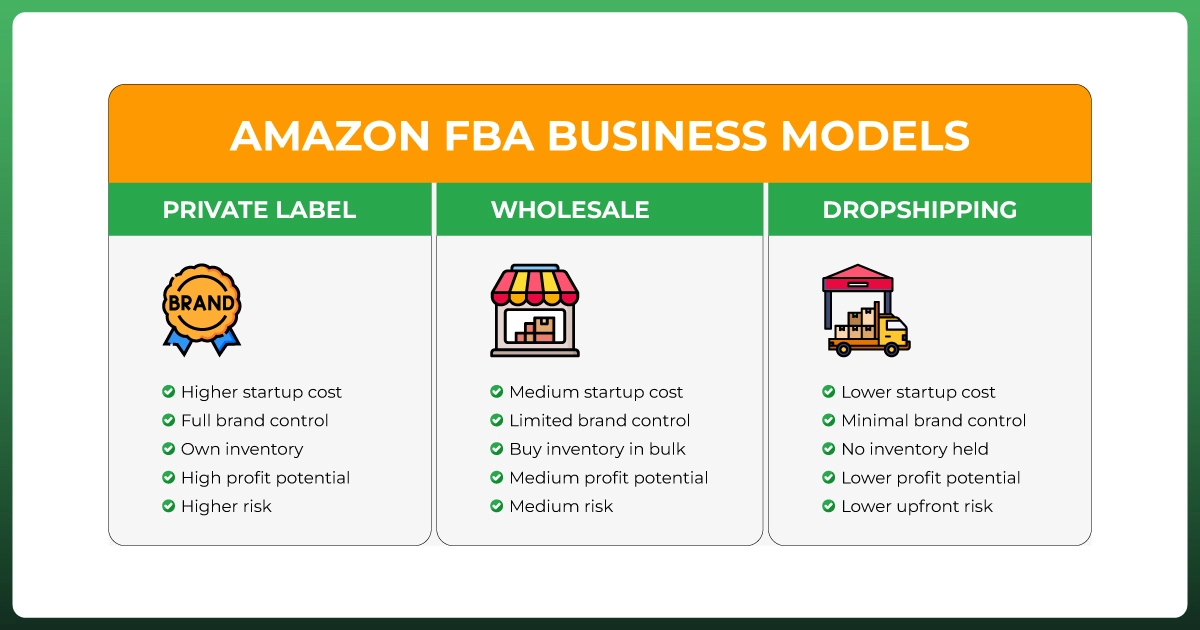
Private Label vs Wholesale vs Dropshipping: Which Amazon Business Model Is Right
A business model selection stands as the most important decision you make for launching your Amazon operation.
The choice between Private Label, Wholesale, and Dropshipping enables you to establish your brand or sell established products to customers, while Dropshipping provides inventory-free market testing opportunities.
Each business model includes various advantages and disadvantages that work best in specific scenarios, while your choice must consider financial resources, objectives, and risk tolerance.
The upcoming explanation focuses on essential distinctions through practical and clear standards.
1. Private Label (PL)
Build your own brand, control the customer experience
What it is:
Create a branded version of an existing product (usually sourced from manufacturers on Alibaba or similar). You own the brand, the packaging, and the listing.
Best for: Experienced sellers who want steady volume, less branding hassle, and are good at logistics and relationship-building.
3. Dropshipping
Sell without holding inventory
What it is:
List a product on Amazon, but instead of storing inventory, the supplier ships the item directly to the customer after you make a sale.
How it works:
List supplier products on your Amazon store
Customer places an order
Forward it to the supplier, who ships it
Keep the margin
Pros:
Very low startup cost
No inventory or warehousing
Test many products quickly
Easier entry into Amazon selling
Cons:
Strict Amazon policies for dropshipping
Poor shipping times or quality can hurt your metrics
No branding control
Lower margins and high competition
Risk of account suspension if done incorrectly
Best for: Beginners with low capital who want to learn the system or sellers validating new product ideas before going into private label.
Here is the Comparison Chart for it.
Model
Startup Cost
Profit Margin
Control Over Branding
Risk Level
Scaling Potential
Private Label
Medium–High
High (30–50%)
Full
Medium–High
High
Wholesale
Medium
Medium (10–25%)
Low
Medium
Medium–High
Dropshipping
Low
Low (5–15%)
None
High
Low–Medium
Understanding Amazon FBA Costs & Fees
The path to success for FBA sellers demands a complete understanding of their financial numbers because it serves as an absolute requirement.
New sellers frequently miscalculate their profits through product cost and selling price calculations only, even though Amazon charges multiple fees for product storage, handling, and delivery.
This analysis examines various product costs to help sellers focus on essential expenses, which will protect their profit margins.
Here’s what that hands-off fulfillment actually costs, updated for the 2026 fee schedule.
Key Amazon FBA Fees Explained
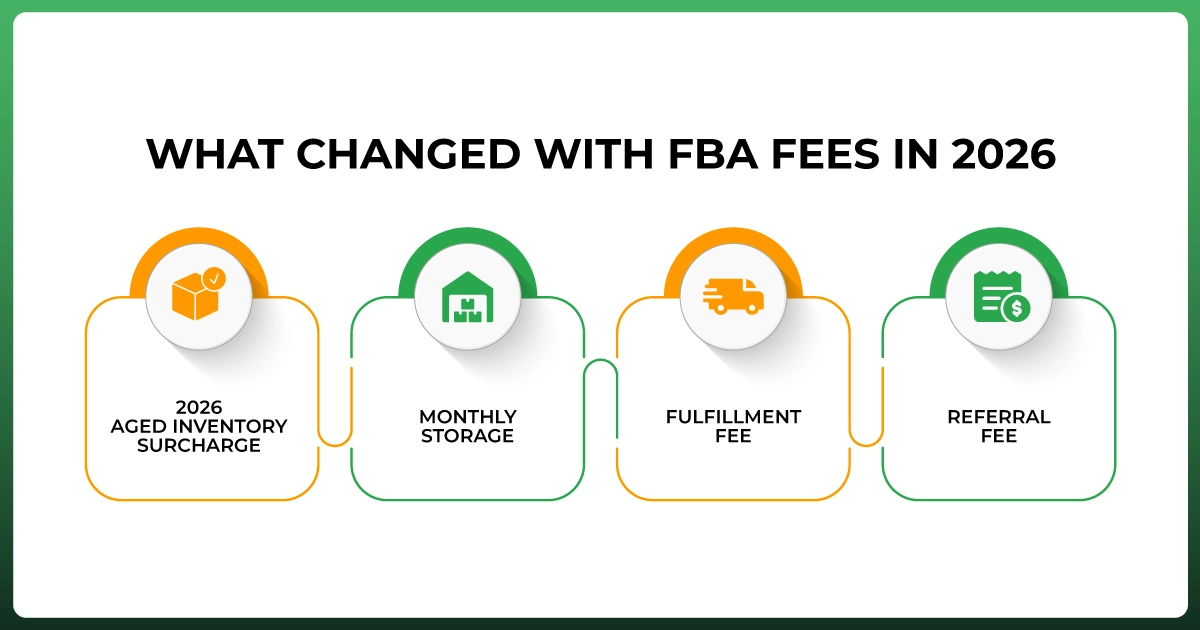
Here are the core FBA fees all sellers should understand in 2026:
1. FBA Fulfillment Fees
This is the fee Amazon charges per unit to pick, pack, and ship your product to the customer.
It's based on:
Size tier (standard or oversized)
Weight
Whether the item is apparel or non-apparel
Example (Standard-Size, Non-Apparel):
Small item (8–10 oz): roughly $3.30–$3.80 per unit after the 2026 rate card and fuel surcharge
Medium item (12–16 oz): roughly $4.60–$4.80 per unit, including the 2026 fuel and logistics surcharge
2. Monthly Storage Fees
Amazon charges monthly fees for storing your inventory at its fulfillment centers.
Jan–Sep: ~$0.78 per cubic foot (standard-size items)
Oct–Dec (Q4): ~$2.40 per cubic foot (due to holiday demand)
This is one of the biggest changes for 2026: the old rule that inventory only got hit with extra fees after 365 days is gone. Amazon now applies an aged inventory surcharge starting at 181 days in the fulfillment center, roughly six months instead of a year, and it stacks with your regular monthly storage fee rather than replacing it. The surcharge steps up the longer a unit sits, reaching its steepest tier once stock passes the 12-month mark.
Avoid it by monitoring inventory age in Seller Central and clearing slow movers with a promotion, bundle, or removal order well before the 181-day mark, not after. See Amazon’s own 2026 fee update for the full schedule.
4. Referral Fees
Amazon takes a percentage of each sale, called the referral fee typically
15% of the selling price for most categories, with a $0.30 minimum per item
Some categories like apparel or jewelry may go up to 17%–20%
Referral fees did not change for 2026. One exception worth knowing: apparel priced under $15 pays a discounted 5% referral fee, and apparel between $15 and $20 pays 10%.
5. Optional Fees to Be Aware Of
Labeling/Prep Service Fees: If you want Amazon to prep or label your products
Removal or Disposal Fees: If you want inventory removed from Amazon's warehouses
Returns Processing Fees: For categories with free returns (like clothing)
What Changed With FBA Fees in 2026
Amazon raised fulfillment fees by an average of $0.08 per unit starting January 15, 2026, then layered a 3.5% fuel and logistics surcharge on top of every US fulfillment fee starting April 17, 2026. A couple of other 2026 changes are worth pricing into your next product:
Inbound placement fee: applies if you ship to a single fulfillment center instead of Amazon’s recommended split. Ship the optimized way and this fee is $0.00.
Low inventory level fee: kicks in once your days of supply drop below 28, so running too lean on stock now costs you per unit sold, not just in lost sales.
None of these are dramatic alone, but they add up across a catalog. Run your numbers through Amazon’s free FBA Revenue Calculator before committing to a product.
Tools like Helium 10 Inventory Protector and Restock Suggestions help avoid overstocking and long-term fees.
3. Bundle Strategically: Create product bundles to increase AOV (average order value) while keeping fulfillment costs flat.
4. Factor in PPC Costs. Don't forget your ad spend. Your true profit = sale minus (FBA fees + product cost + ads).
Shipping & Prep for FBA
Getting your products to Amazon the right way. Once you've sourced your product and calculated your profit margins, the next big step is getting your inventory into Amazon's warehouses properly prepped, packaged, and shipped.
So what you need to know to successfully prep and ship products to Amazon FBA is explained below.
What Is FBA Shipment & Prep?
In simple terms, you send your inventory to Amazon, and they take care of the rest. Like storage, delivery, returns, and customer service.
But Amazon has strict packaging, labeling, and shipping requirements, and not following them can cost you time and money. So the steps are-
Step 1: Understand Amazon FBA Prep Requirements
Amazon wants each unit to arrive ready to be sold with no rework on their end. Your prep responsibilities may include:
Labeling
Each product unit must have a scannable FNSKU label (unique to your product)
You can apply these yourself or pay Amazon ~$0.30/unit to label them for you
Packaging
Use poly bags for items with loose parts or soft fabric
Include suffocation warnings on poly bags if they're over 5 inches
Keep items clean, sealed, and damage-free
Use bubble wrap or boxes for fragile items
Bundling & Multipacks
Bundled items must be sold together as one unit
Use "Sold as Set" or "Do Not Separate" stickers if needed
Step 2: Create Your Shipment in Seller Central
Here's how to properly ship inventory into FBA:
1. Go to Inventory > Manage FBA Shipments
Click "Send to Amazon"
Select the product(s) and quantities you want to ship
2. Choose Your Prep and Labeling Options
Amazon will ask: Will you prep/label the item, or do you want Amazon to do it?
3. Select Shipping Method
SPD (Small Parcel Delivery) for small shipments (UPS is preferred)
LTL (Less Than Truckload) for large, palletized shipments
Amazon often offers deep UPS discounts for small shipments; take advantage.
Step 3: Pack According to Amazon's Box Rules
If you're doing your own prep, pack carefully:
Max weight per box: 50 lbs (unless a single item exceeds this)
Max box size: 25" x 20" x 15"
Include box content info via 2D barcodes or manual upload
Add FBA shipping labels to each box (generated by Amazon)
FBA prep and shipping is a basic task every seller does, but when executed right, it minimizes product disruptions, protects sell metrics, and smooths product flow.
Make sure you are compliant whether you pack from your garage or engage with a 3PL. Amazon is not a flexible seller, so if your processes are consistent, compliance will come easily, and scaling becomes easier too.
FBA Shipping Guidelines & Requirements
Following Amazon's FBA shipping guidelines will help you avoid additional fees and product losses.
The final step of getting your shipment to the correct warehouse remains a sensitive process because Amazon will reject any shipments that contain errors, along with misplaced inventory or misplaced labels.
This article contains a summary of the FBA shipment process. When using a 3PL or prep center for your shipment preparation, they will follow the exact procedures outlined here.
Here are the step-by-step shipping guidelines for Amazon FBA:
1. Use Amazon's "Send to Amazon" Workflow
All FBA shipments must be created within your Seller Central account.
Go to Inventory > Send to Amazon
Add the products and quantities you're sending
Choose your prep and labeling preferences
Confirm your ship-from address
Amazon will assign you one or more fulfillment centers to ship to
2. Shipping Options: SPD vs LTL vs FTL
Amazon accepts 3 types of shipments. Here are the flowcharts below.
Method
Description
Best For
SPD (Small Parcel Delivery)
Individual boxes via UPS, FedEx, DHL
Small-to-medium shipments
LTL (Less Than Truckload)
Palletized freight, shared truck space
Bulk shipments, 150+ lbs
FTL (Full Truckload)
Full truck used only for your shipment
Very large, high-volume shipments
3. FBA Box Labeling Requirements
Each box in your shipment must have two labels:
FBA Shipping Label (box-level) provided by Amazon during the shipment creation
Carrier Shipping Label if using SPD, UPS, FedEx, etc.
Label rules:
Must be printed clearly and placed flat on the box
No tape over barcodes
Use laser printers, not inkjet
Labels must match box contents exactly (use box content info)
4. Box and Packaging Requirements
To protect your products (and your seller rating), Amazon requires:
Standard box size: Max 25" x 20" x 15"
Max box weight: 50 lbs (unless a single unit exceeds this)
Boxes must be sealed securely with strong tape
No reused or damaged boxes
For oversized or heavy products:
Add "Team Lift" or "Mechanical Lift" labels if over 50 lbs or 100 lbs
Use sturdy double-wall boxes
5. Pallet Requirements (for LTL/FTL)
If you're shipping pallets (less than truckload or full truckload):
Use 40"x48" 4-way access wooden pallets
Max pallet height: 72 inches (including pallet)
Secure with clear plastic stretch wrap
Add pallet labels on all 4 sides
Freight appointments may be required. Amazon will guide you through this during shipment creation.
View performance under Inbound Performance Summary
This ensures you stay ahead of any receiving delays or issues.
Working with Amazon FBA Prep Services
When it comes to selling on Amazon FBA, you've probably noticed that prepping the inventory, labeling, bundling, and packaging can easily become a full-time job. That's why Amazon FBA prep services exist.
FBA prep services let businesses focus on what matters most by handling the physical work for every order, freeing sellers to focus on higher-value tasks like product evaluation, advertising, and business growth.
Whether you are an overseas first-time seller or a growing brand looking to streamline your operations, this guide will assist you in understanding prep services for Amazon FBA work.
What Is an FBA Prep Service?
An FBA prep service is a third-party company that:
Receives your inventory (often from your supplier)
Inspects items for quality
Labels them with FNSKU or other Amazon-required stickers
Packs and bundles units as needed
Ships the prepped inventory directly to Amazon fulfillment centers
Benefits of Using an FBA Prep Center
1. Save Time: No more spending hours printing labels or repacking goods, especially helpful if you're managing your business solo.
2. Ideal for International Sellers: If you're sourcing products from China or anywhere else, prep centers based in the U.S. can receive shipments locally, prep everything per Amazon's rules, and forward it quickly to Amazon FBA.
3. Ensure Compliance: Prep centers are experts in Amazon's strict packaging, labeling, and shipping rules. This minimizes the risk of:
Rejected inventory
Delayed receiving
Extra fees
4. Scale Faster: By outsourcing prep, you can handle more SKUs, larger shipments, and seasonal volume without burning out.
What Do FBA Prep Services Cost?
Pricing varies based on:
Item size and complexity
Volume (how many units/month)
Extra services (bundling, storage, etc.)
Typical costs per unit:
FNSKU labeling: $0.20 – $0.50
Bundling/Kitting: $0.50 – $1.00
Polybagging: $0.30 – $0.60
Inspection: Included or $0.10 – $0.30
Where Are These Prep Centers Located?
Most prep centers are in tax-free states (like Oregon, Delaware, or Montana) to help sellers avoid sales tax on inbound goods. Common locations:
Oregon
New Hampshire
Montana
California (for West Coast fulfillment)
Texas or New Jersey (for faster FBA transit zones)
You can also find prep centers near major Amazon fulfillment centers to save on inbound shipping costs.
What to Look for in a Good Prep Service
When choosing a prep center, consider:
Amazon experience & compliance knowledge
Fast turnaround times (1–3 days max)
Real-time inventory tracking or portal access
Responsive support and clear pricing
NDA or confidentiality agreement (especially if you're doing private label)
Check Google reviews, Reddit feedback, or Facebook seller groups for real testimonials.
Is It Safe to Use a Prep Center?
Yes, as long as you vet them carefully and work with a professional company that understands Amazon's systems.
Scaling and Managing Your Amazon FBA Business
Your Amazon FBA store will eventually reach a stage where launching new products becomes secondary to smart growth management, which must be both sustainable and profitable.
Scaling operations involves more than simply increasing your volume. Doing better means improving operations while maximizing profits and building a lasting brand.
This guide explains the essential steps to scale and manage your Amazon FBA business while maintaining control and avoiding burnout.
Step 1: Expand Your Product Line Strategically
Use Data to Guide Expansion: Look at your top-performing products and find complementary or related SKUs. Use tools like:
Helium 10’s Black Box & Market Tracker
Jungle Scout Opportunity Finder
Keepa to study demand and seasonality
Bundle Products: Increase AOV (average order value) and improve conversion rates by offering 2-packs, bundles, or starter kits.
Step 2: Optimize Inventory Management
Use Inventory forecasting tools. Never run out of stock or overstock again. Use:
Amazon’s Restock Reports
Helium 10’s Inventory Manager
Stocked (for advanced planning)
Set up reorder triggers and plan at least 60 days ahead.
Diversify Suppliers: If you’re reliant on a single manufacturer, you’re vulnerable. Find backup suppliers to mitigate risk.
Step 3: Automate and Outsource Key Operations
As you scale, your time becomes your most valuable asset. Here’s how to reclaim it:
Automate with Software:
PPC automation: Use tools like Scale Insights, Perpetua, or Adtomic
Repricing tools: Use Aura, Bqool, or RepricerExpress for wholesale/RA
Accounting & finance: Try QuickBooks, Bench, or A2X
Outsource Repetitive Tasks:
Hire a VA for customer support, listing updates, feedback monitoring
Use FBA Prep Centers to handle inventory
Use Agencies or freelancers for design, A+ Content, and SEO copywriting
Step 4: Strengthen Your Brand Presence
Enroll in Brand Registry. If not already done, this unlocks tools like:
A+ Content
Amazon Storefront
Brand Analytics
Amazon Vine
Optimize Listings:
Use high-converting titles, bullet points, and descriptions
Add A+ Content with custom visuals and comparison charts
Refresh main images with lifestyle photography and infographics
Collect Reviews (Legitimately): Use the Amazon Request a Review button or third-party follow-up tools
Step 5: Expand into Global Marketplaces
Once you're stable in Amazon US, consider Amazon Global Selling:
Canada, UK, Germany, UAE, Australia, etc.
Research taxes, logistics, and compliance for each region
Use Amazon’s NARF or FBA Export to simplify expansion
Step 6: Monitor KPIs and Performance Metrics
Use your Seller Central dashboard to track:
ACoS / TACoS (advertising efficiency)
Unit Session Percentage (Conversion Rate)
Inventory Performance Index (IPI)
Refund & Return Rates
Customer Feedback
Scaling operations involves more than simply increasing your volume. Doing better means improving operations while maximizing profits and building a lasting brand.
Inventory Management Best Practices
Managing inventory isn't just a backend task. It's the main part of your Amazon FBA business. Without a solid system, you risk stockouts, excess fees, or missed sales.
Here are key best practices to follow:
Track Inventory Weekly: Regularly check Seller Central's Inventory Health and Restock Reports to stay ahead of stockouts.
Forecast Demand: Use tools like Helium 10 or Jungle Scout to project sales based on trends and lead times.
Know Your Lead Times: Account for production + shipping + Amazon check-in (typically 40–60 days total).
Set Reorder Points: Establish minimum stock levels to trigger reorders in time.
Use Inventory Tools: Upgrade from spreadsheets to tools like SoStocked, RestockPro, or InventoryLab as you grow.
Avoid Long-Term Storage Fees: Clear slow-moving stock, and don't let inventory sit past the aged inventory threshold.
Monitor Your IPI Score: Keep your Inventory Performance Index above 500 to avoid restock limits.
Monitoring Performance via Seller Central
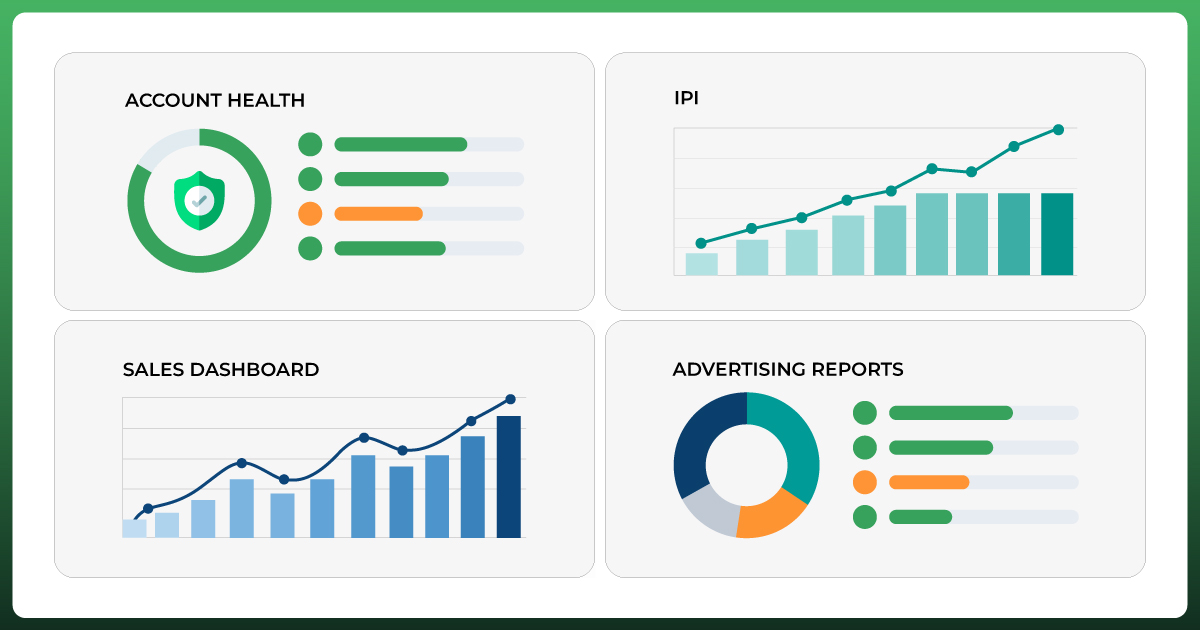
Running a successful Amazon FBA business isn't just about launching products. It's about constantly monitoring your performance to make smart, data-driven decisions. Seller Central gives you access to powerful analytics and metrics that show how your business is doing in real time.
Here's how to stay on top of your performance:
1. Account Health
Found under: Performance > Account Health
Tracks:
Order defect rate
Late shipment rate
Policy violations
2. Inventory Performance Index (IPI)
Found under: Inventory > Inventory Performance
Measures how efficiently you manage stock.
3. Sales Dashboard
Found under: Reports > Business Reports > Sales Dashboard
See your:
Daily/weekly/monthly sales
Units sold
Conversion rates
4. Advertising Reports
Found under: Advertising > Campaign Manager > Reports
Track:
Spend
ACOS / TACOS
ROI on PPC campaigns
Use this data to refine your ad targeting and improve profitability.
5. Customer Feedback & Reviews
Found under: Performance > Feedback
Monitor:
Product reviews
Seller feedback
Training & Learning Resources for Sellers
Success on Amazon requires more than just product research; it demands constant learning. Here are the top resources to level up:
Amazon Seller University: Free video tutorials from Amazon on FBA, shipping, listing, ads, and more. Great for beginners. Access via Seller Central.
Helium 10 Freedom Ticket: Advanced FBA course by Kevin King (free with Helium 10 plan). Covers research, sourcing, PPC, and scaling.
Jungle Scout Academy: Step-by-step lessons on FBA basics, listing, and launches. Ideal for Jungle Scout users.
YouTube & Podcasts: Top creators: Tatiana James, Serious Sellers Podcast, Kevin David. Learn strategies and real seller stories on the go.
Facebook Groups & Seller Communities: Join groups like "FBA High Rollers" for tips, updates, and support. Engage, ask questions, and learn from others.
Common Challenges and How to Overcome Them
Running an Amazon FBA business is rewarding, but not without obstacles. Here are the most common challenges sellers face, plus smart ways to handle them:
1. Inventory Stockouts or Overstocking
Problem: Running out of stock kills rankings. Overstocking leads to high storage fees.
Solution: Use tools like SoStocked or Helium 10 Inventory Manager for accurate forecasting and restock planning.
2. Amazon Policy Violations
Problem: Account suspensions or product deactivations due to minor rule breaks.
Solution: Monitor your Account Health regularly and stay updated via Seller Central notifications. Respond to warnings ASAP.
3. Unexpected FBA Fees
Problem: Surprise costs from the aged inventory surcharge, returns, or weight miscalculations.
Solution: Audit FBA reports monthly and use tools like Refund Sniper or Sellerboard to track and recover fees.
4. Low Sales or Poor Visibility
Problem: Great products stuck on page 10.
Solution: Optimize listings (titles, images, A+ content), run targeted PPC ads, and encourage legitimate reviews.
5. Managing Finances & Cash Flow
Problem: Profit looks good on paper, but cash is tight.
Solution: Use tools like A2X or QuickBooks to track real profit. Plan for inventory investments ahead.
Every seller faces bumps in the road. The key is to stay proactive, learn fast, and use the right tools to stay ahead.
Amazon FBA vs Dropshipping – Which is Better?
Both Amazon FBA and dropshipping are popular ecommerce models, but they work very differently, and choosing the right one depends on your goals, budget, and business style.
Here are the two-part comparisons to help you decide:
Amazon FBA (Fulfillment by Amazon)
How it works: You buy inventory upfront, ship it to Amazon's warehouse, and they handle storage, packing, shipping, and customer service.
Pros:
Prime badge = faster shipping & higher trust
Better profit margins
Amazon handles fulfillment & returns
Builds a real brand with private label options
Cons:
Requires upfront investment
Risk of unsold inventory
Amazon storage & FBA fees
Dropshipping
How it works: You list products online but only buy from a supplier after someone places an order. The supplier ships directly to the customer.
Pros:
No inventory cost
Low barrier to entry
Simple to start & test products
Cons:
Lower profit margins
Slower shipping (especially from overseas)
Less control over product quality & fulfillment
Harder to build a long-term brand
So, Which Is Better?
Choose FBA if you want to build a scalable, brand-focused business on Amazon with long-term growth.
Choose Dropshipping if you want to test ideas quickly, spend less upfront, or learn eCommerce basics. Check whether dropshipping is still profitable in 2026 before you commit.
How EcomGiantz Helps You Launch & Grow Your Amazon FBA Business
Launching an Amazon FBA business can feel overwhelming with product research, listing optimization, inventory management, advertising, and staying compliant with Amazon's rules. That's where EcomGiantz comes in.
We simplify the entire process so you can focus on growing a profitable, sustainable brand on Amazon.
Here's how we help at every stage:
1. Product Research & Market Validation
We use top tools like Helium 10, Jungle Scout, and real-time market data to help you:
Identify profitable, low-competition products
Validate product demand and seasonality
Avoid saturated or risky niches
2. Listing Creation & Optimization
Our team builds high-converting Amazon listings with:
SEO-optimized titles, bullet points, and descriptions
Professional product images and A+ Content
Back-end keyword research for organic ranking
3. FBA Prep & Launch Support
We guide you through or manage:
Supplier communication
FBA shipping prep and labeling
Shipment creation and Amazon compliance
Early review strategies and keyword-ranking tactics
4. PPC Management & Advertising Strategy
Our Amazon ad experts build and optimize campaigns that:
Maximize ROI on Sponsored Products and Brands
Lower ACOS and boost total sales (TACOS)
Use advanced targeting strategies and bid automation
5. Ongoing Growth, Analytics & Scaling
We don't stop at launch. Our team helps you:
Manage inventory and restock timing
Expand into international marketplaces
Use data to guide product expansion
Optimize your brand presence with Storefronts, A+ content, and more
Why Sellers Choose EcomGiantz
360° Amazon expertise, from launch to scale
Transparent reporting & real-time communication
Tools, tech & team aligned to grow your business
Trusted by startups, private label brands, and 6–7 figure sellers
Whether you're starting your first FBA business or scaling your existing store, EcomGiantz is here to help you succeed, step-by-step, strategy first.
Amazon FBA Frequently Asked Questions
Is Amazon FBA still profitable in 2026?
Yes, for sellers who run it like a real business. FBA fees rose by an average of $0.08 per unit in January 2026, plus a 3.5% fuel and logistics surcharge added in April, but margins still hold up when you price correctly, keep inventory moving, and stay ahead of the newer placement and low-inventory fees covered above.
How much does it cost to start an Amazon FBA ecommerce business?
Most new sellers start with somewhere between $2,500 and $5,000, covering your Professional Seller account ($39.99 a month), a small inventory order, samples, and initial PPC. Private label brands ordering larger batches upfront often budget closer to $10,000–$20,000.
Does it cost money to ship inventory to an Amazon warehouse?
Yes. Amazon charges based on your shipping method, box size, and weight, and as of April 2026 a 3.5% fuel and logistics surcharge applies on top of the base fulfillment fee. Small parcel (SPD) shipments typically cost far less per unit than LTL freight shipments of bulky or heavy products.
What’s the biggest mistake new Amazon FBA sellers make?
Picking a product before checking the numbers. A cheap-looking product idea can turn unprofitable once referral fees, fulfillment fees, storage, and PPC are factored in, so run every product through a profitability calculator before you order inventory.
Is Amazon FBA or dropshipping better for a first ecommerce business?
FBA suits sellers who want to build a real brand and can invest in inventory upfront, since Amazon handles storage and shipping and rewards Prime-eligible listings. Dropshipping needs far less capital to start but comes with thinner margins and less control over shipping speed and product quality. See the full comparison above for more detail.
Need Help Growing Your Amazon FBA Business?
From Product Listings To Store Management, Ecomgiantz Helps You Scale Your Amazon FBA Business Faster.
Ecomgiantz Team consists of our in-house experts who share their hands-on experience in ecommerce businesses, websites, marketplaces, etc. We also share the latest updates, insights, and market trends that can be helpful for your online business.