BFCM Checklist for Ecommerce: Prepare Your Store for Black Friday and Cyber Monday
Prepare your ecommerce store for BFCM 2026 with a practical checklist covering inventory, website performance, promotions, marketing, fulfillment, customer service, analytics, and post-sale strategies.
Black Friday can bring a sharp traffic surge to your store. But traffic only helps if shoppers can find the right product, the offer works at checkout, and your team can ship what it sells. A BFCM checklist for ecommerce should cover the entire order journey, from demand planning to the last delivery update.
For 2026, Black Friday falls on November 27 and Cyber Monday on November 30. Your work should start well before those dates. In NRF's 2025 survey, 42% of US holiday shoppers planned to begin browsing and buying for the holiday season before November. That figure covers holiday shopping generally, not BFCM purchases specifically. It is a reason to have products, pages, and early messages ready in October.
Today, we’re showing you a complete guide that can help you prepare and run both Black Friday and Cyber Monday events for your ecommerce business. We will also explain how you can optimize your budget and resources accordingly.
BFCM Checklist for Ecommerce: Before, During, and After
Use this BFCM preparation checklist as a final handoff. Put your assigned employee’s name and a completion date beside each task in your working copy. Use it as a Black Friday checklist for ecommerce, then revisit offers, stock, and messages as a Cyber Monday ecommerce checklist after the weekend.
Before BFCM
Confirm the demand forecast, supplier dates, available units by SKU, and stock sync across sales channels.
Approve the offer map: eligible products, margin floor, audiences, prices, start and end times, and a stockout replacement.
Check promoted product pages, sale collections, search results, filters, mobile layouts, and key page speed issues.
Place test orders across payment, shipping, tax, discount stacking, bundles, and low-stock scenarios.
Test campaign links, analytics events, confirmation messages, and abandoned checkout recovery.
Confirm support coverage, daily packing capacity, supplies, carrier pickups, and the threshold for changing delivery promises.
Assign on-call owners and response rules for site, payment, offer, inventory, fraud, and delivery problems.
During BFCM
Check traffic, conversion, orders, margin, payment errors, and the top promoted SKUs at planned intervals.
Pause or redirect campaigns when products sell out, checkout fails, or contribution margin misses its limit.
Review support queues, open orders, and carrier exceptions; update customers when a promise changes.
Recheck prices, stock, and campaign timing before switching to the Cyber Monday offer.
After BFCM
Reconcile orders, marketing spend, refunds, returns, and contribution margin by offer and channel.
Resolve open delivery issues and send useful order and care information to new buyers.
Compare first-time and returning buyers, repeat orders, customer feedback, and post-purchase message performance.
Decide how to move leftover promotional stock and record lessons for the next peak season.
Start Your BFCM Preparation Early
You don’t need a perfect forecast before you begin. You need a shared plan that tells your team what to check and when a decision is due. Start with last year's evidence, then adjust it for this year's catalog, prices, audience, and marketing budget.
Review Last Year's Performance and This Year's Demand
Pull daily results from last BFCM and the surrounding weeks. Which products sold before Friday? Which sizes or variants ran out? Where did visitors leave the purchase journey? You should know those answers thoroughly. Make sure to review sales, sessions, conversion rate, average order value (AOV), marketing costs, support tickets, returns, and delivery complaints together.
Do not let a bestseller's revenue hide its fulfillment problem. A product that sold quickly but shipped late might need a different stock or delivery plan. If you have no BFCM history, use recent product demand, supplier lead times, and a cautious range of traffic and conversion scenarios. Mark your assumptions so you can revise them.
Set Goals, Owners, and a Campaign Calendar
Set a revenue goal, but also define the orders and contribution margin you want to keep after discounts, product costs, payment fees, shipping subsidies, and marketing spend. Decide which customers you want to acquire and which existing customers you want to bring back. A revenue target alone can reward an offer that loses money.
Put one person in charge of each critical area: offers, stock, site and checkout, campaigns, customer support, and fulfillment. Set approval dates for creative and pricing, a deadline for test orders, and a final check before launch. If a discount fails at midnight, someone should already know who can fix it.
BFCM Preparation Timeline
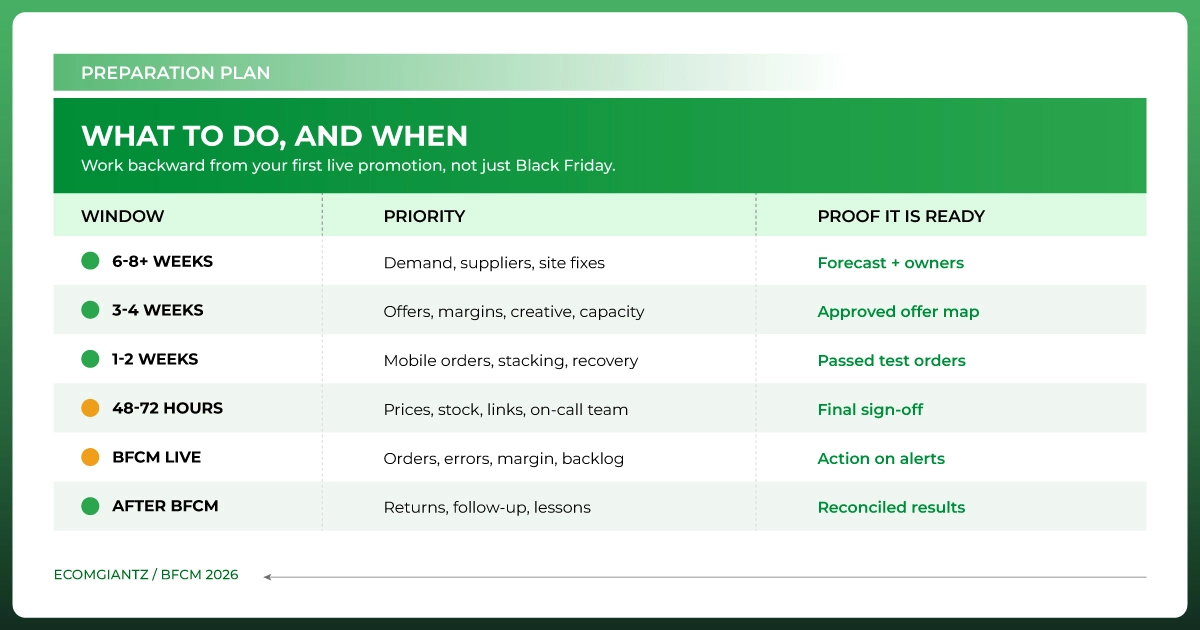
Work backward from your first promotion, which may launch before November 27. These are planning windows, not universal supplier deadlines. Move inventory and development work earlier when your lead times require it.
Six to eight weeks or more before: Review last year's results, forecast demand by SKU, confirm supplier lead times, and assign owners. Start site fixes that require development or outside approval.
Three to four weeks before: Approve the offer plan and margin limits. Confirm stock, landing pages, creative, email and SMS schedules, shipping capacity, and analytics setup.
One to two weeks before: Test mobile orders, payment methods, combined discounts, inventory sync, abandoned checkout recovery, and support channels. Brief the fulfillment team.
The final 48 to 72 hours: Recheck live prices, stock, links, tracking, shipping promises, and on-call contacts. Avoid optional changes that would require another full test.
During BFCM: Review sales, errors, margin, stock, support queues, and open orders at agreed intervals. Recheck Monday's offer after the weekend.
After BFCM: Reconcile costs, resolve delivery and return issues, follow up with customers, and document what to change next year.
Get Your Products and Inventory Ready
Plan your BFCM inventory around the products you intend to promote, not the hope that all sales will rise equally. A campaign that drives demand to the wrong variant can turn a promising day into cancellations and support tickets.
Forecast Demand and Confirm Available Stock
Start with last year's unit sales by SKU or variant, then adjust for current sales, new products, planned offers, and supplier capacity. Check what is physically available, what is incoming, and when it can actually be picked and packed. Set a reorder or substitution decision point for products at risk.
If the same item sells on your site and a marketplace, check how quickly stock updates between channels. Reserve units for committed orders and prevent an ad from promoting a product that has sold out. For a high-volume store, assign someone to review fast-moving SKUs during the sale and pause or redirect promotions when availability changes.
Update the Product Pages Shoppers Will See
Prioritize promoted items and likely bestsellers. Confirm that the images show the correct variant, sizes and specifications are clear, the price matches the promotion, and reviews and availability display properly. Add an accurate delivery estimate and a visible path to the returns policy where these details affect the decision.
Gift shoppers may know the recipient or budget but not your product names. Make useful categories, filters, and product details easy to scan. A well-placed size guide, compatibility note, or bundle explanation can answer the question that would otherwise send a buyer to support or a competing store.
Prepare Your Ecommerce Website for BFCM Traffic
BFCM website optimization is more than a speed score. Your store must work from the first ad click to the order confirmation, especially on a phone. Adobe found that mobile devices accounted for 57.5% of US online Cyber Monday sales in 2025 (Adobe Cyber Week 2025). Check your own device mix, but treat mobile purchasing as a primary path.
Test Speed, Mobile Usability, and Site Stability
Test the homepage, sale landing page, top collections, product pages, cart, and checkout on real phones and common browsers. Look for slow images, shifting banners, hard-to-tap controls, broken links, and apps that block the screen. Google's current Core Web Vitals guidance sets good-experience targets of 2.5 seconds for LCP, under 200 milliseconds for INP, and below 0.1 for CLS. Use those measures to find problems, then confirm the page feels usable to a shopper. (Google Search Central)
If your hosting and traffic profile warrant it, test how the site behaves under a plausible surge. Check payment, inventory, and promotion integrations too. Finish major theme or plugin changes before the final testing window. Keep a rollback plan and a technical contact ready for sale week.
Test Product Discovery and the Complete Checkout
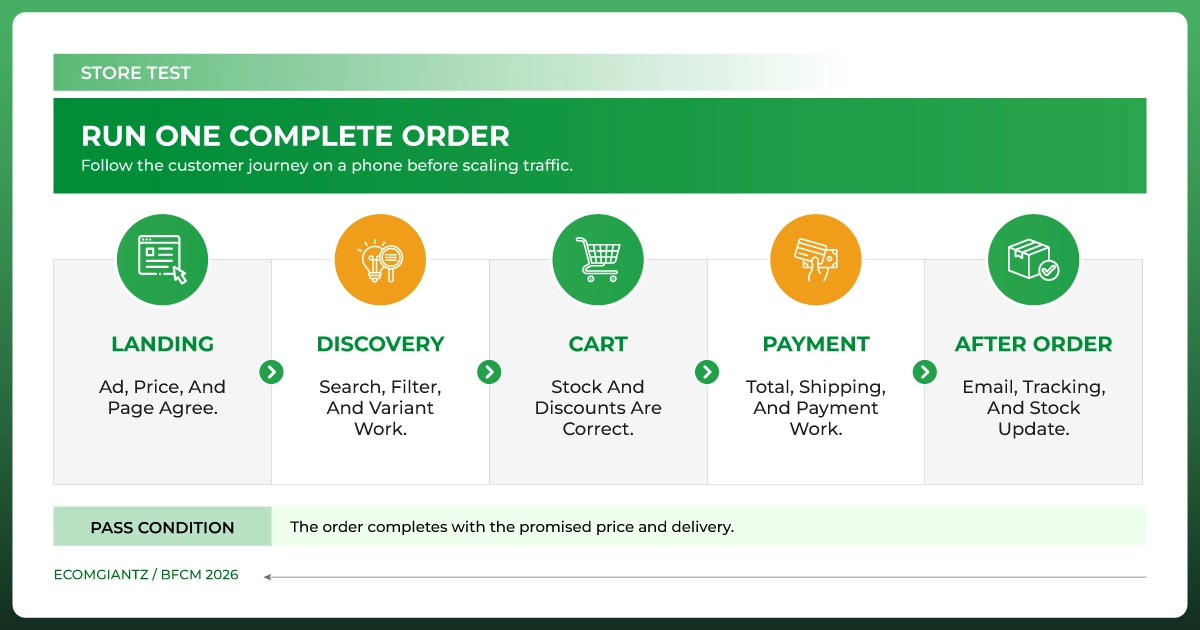
Search for the words a customer would use, including common gift terms and misspellings. Review searches that return no useful results, filters that hide in-stock items, and sale collections that display full-price products. Then place real test orders with a promoted item, a non-promoted item, a bundle, and a low-stock variant.
Try different devices, shipping destinations, discounts, and payment methods. Check the total before payment, the confirmation email, inventory deduction, and purchase tracking. In Baymard's surveyed breakdown that excludes the "just browsing" group, 40% cited high extra costs, 20% slow delivery, and 17% site errors or crashes. These are reasons reported by that group, not percentages of all abandoned checkouts or predictions for your store.
Create Your BFCM Offers and Promotions
The strongest BFCM promotions give a customer a clear reason to buy while leaving the business enough margin to fulfill the order well. Choose offers based on product economics, demand, and available stock. Avoid selecting a sitewide percentage simply because competitors advertise one.
Choose Deals That Fit Product Margins and Stock
Compare selective discounts, bundles, gifts with purchase, and free-shipping thresholds. A bundle can increase AOV if the components are available and the combined margin works. A shipping threshold should account for actual packing and carrier costs, not just the cart value you hope to achieve.
Write a one-page offer plan before building the campaign: which SKUs qualify, the price for each audience, whether loyal customers get early access, when Black Friday pricing starts and ends, and whether Cyber Monday changes the deal. Name the replacement offer or landing page if a promoted product sells out.
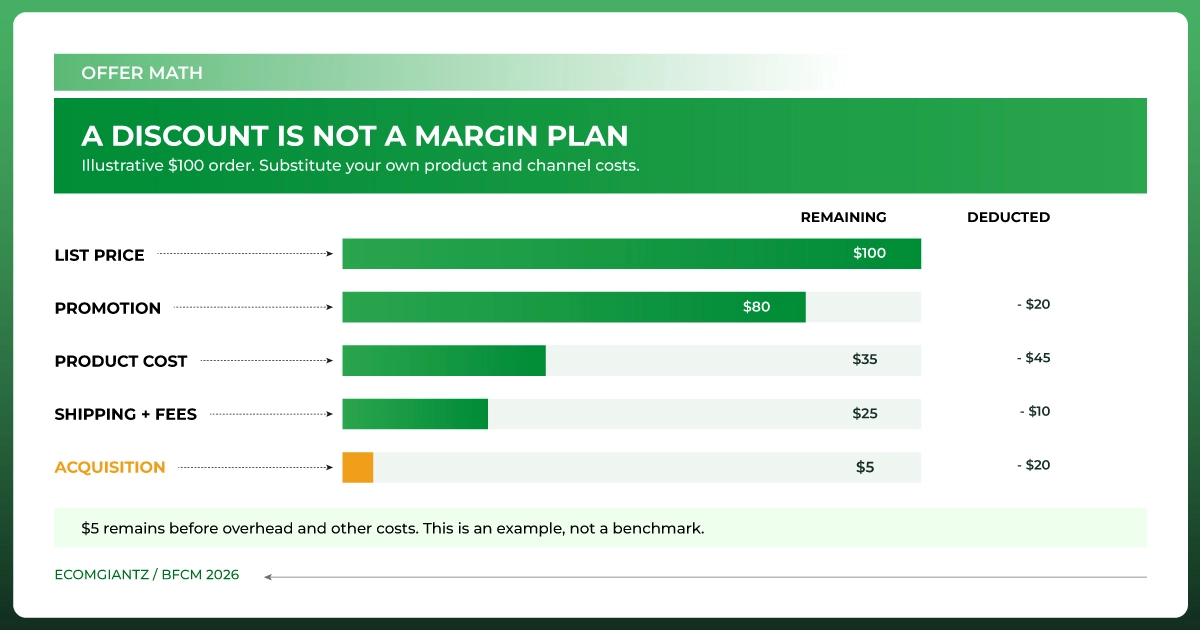
Here is an illustrative calculation, not a benchmark: if a product sells for $100, costs $45, and carries $10 in shipping and payment costs, a 20% discount leaves $25 before acquisition cost and overhead. If the ad costs $20 to win that order, only $5 remains at that stage. Run this calculation on your own high-volume products before approving the offer.
Make Every Offer Easy to Understand
State the price, eligibility, exclusions, start and end times, and whether codes combine with other discounts. Check the same terms in ads, email, sale banners, product pages, cart, and checkout. If the advertised saving disappears at payment, the problem is both a conversion loss and a customer service issue.
Place test orders with every applicable combination: automatic discount, coupon, bundle, gift, and free shipping. Check the final payable amount, including shipping and tax where relevant. Make sure a customer-specific offer neither stacks unexpectedly nor blocks a valid promotion.
Decide in advance what happens when a discounted item sells out. Remove the promotion, show an appropriate alternative, or update the message. Do not create urgency with a timer or stock claim that does not reflect the actual offer.
Plan Your BFCM Marketing Campaign
Good BFCM marketing sends the right shopper to an available product and an offer that works. Build the campaign around your stock and landing pages. Then check whether the traffic is producing profitable orders, not just clicks.
Prepare Email, SMS, and Promotional Content
Plan your email marketing around an early announcement, launch, relevant reminders, and a final-day message. Give loyal customers early access if you can deliver the promise. Separate engaged customers from people who have not opened or bought recently, and tailor the product selection where your data supports it. Send SMS only to people who have consented under the rules that apply to your market.
Before scheduling, test every link, code, subject line, image, and landing page. Check message timing against the offer's time zone. A customer who opens a Cyber Monday email should see the Cyber Monday offer, not a banner that ended Sunday.
Trigger a test abandoned checkout and confirm that the recovery message arrives, links to the correct cart, respects consent and send settings, and does not promise a different or expired discount. Check that purchasers do not continue receiving recovery messages for the completed order.
Coordinate Paid, Organic, and Marketplace Traffic
Match each ad or social post to the product and offer it describes. Review product feeds, search ads, remarketing audiences, and seasonal creative before budget increases. If you sell through marketplaces too, confirm that prices and stock can support campaigns on all active channels.
Choose simple pause rules. If a promoted SKU runs low, checkout errors rise, or the margin falls below your target, the campaign owner should know when to reduce spend or switch the destination. Keep SEO landing pages useful after the sale by updating seasonal information rather than deleting valuable pages each December.
Prepare Customer Service and Fulfillment
BFCM customer experience continues after payment. For BFCM fulfillment, agree on the daily number of orders your team and partners can process, and compare that capacity with the campaign forecast. Confirm packaging, pick-and-pack staffing, carrier collection, and what happens if a carrier misses a pickup.
Write down the number: orders your team can dispatch per day, people per shift, packaging available, and carrier pickup capacity. Set a backlog threshold that triggers extra shifts or a longer delivery estimate. Test that the promised delivery date can still be met when the order mix shifts toward bulky products or priority shipping.
Publish realistic delivery estimates, holiday cutoffs, returns, and exchange terms. Brief support staff on offers and exceptions, then prepare short answers for code problems, size questions, order status, stockouts, and delayed parcels. Make it easy for agents to see the current promotion and the order record before replying.
During the event, review open orders and support queues at set intervals. If a delivery promise changes, update the website and affected customers quickly. A customer can often accept a delay that is explained early; an unexplained delay after a confident delivery promise is harder to repair.
Track BFCM Performance and Respond to Problems
Before launch, confirm that your analytics records visits, add-to-cart events, checkout starts, purchases, refunds, and campaign links correctly. Agree on one reporting view for orders and revenue. Ad platforms can credit the same sale in different ways, so compare their reports with your store's actual orders and costs before moving budget.
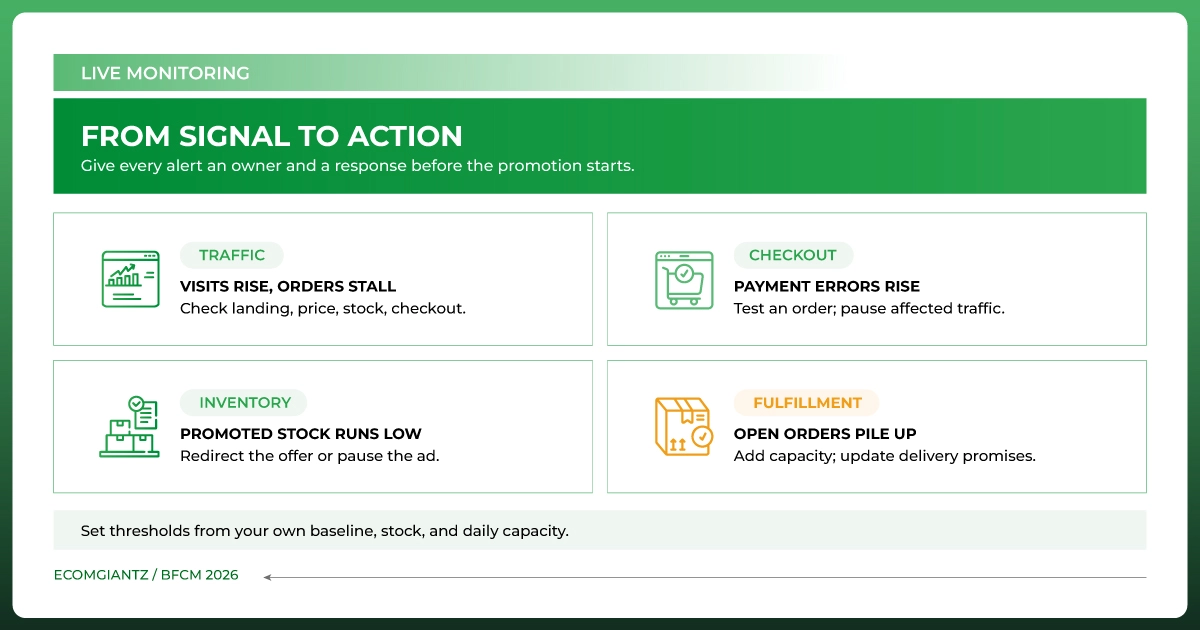
During BFCM, watch revenue, orders, conversion rate, AOV, traffic, cart and payment errors, ad spend, contribution margin, stockouts, and support volume. Compare each with a relevant baseline. Use traffic, conversion, operations, and profitability as the four lenses for a live check.
For live BFCM analytics, put decisions beside metrics: who checks the number, what change triggers investigation, and who can act. Agree on alert thresholds from your own baseline and capacity; a universal percentage change will not fit every store.
If visits climb while orders stall, check the offer, stock, and checkout before buying more traffic. If payments fail, test a real order and pause affected ads. When a promoted SKU nears its stock limit, redirect the offer. Rising backlogs call for more capacity and an updated delivery promise.
Keep an emergency contact and decision rule for site outages, failed payments or discounts, overselling, a hero-product stockout, fulfillment backlogs, carrier disruptions, and unusual fraud or chargeback signals. For each, record who investigates, who can pause traffic or change the offer, and how customers will be updated. A backup is only useful if someone can activate it during the sale.
After BFCM: Turn New Orders Into Repeat Customers
Do not treat every new BFCM buyer as ready for another promotion. First, deliver the order well and answer questions about use, care, or returns. Then send a relevant replenishment, accessory, or next-purchase suggestion when the product and timing make sense. Compare repeat purchase rates for first-time and returning BFCM customers over an appropriate period, not just the first week after the sale.
Common BFCM Ecommerce Mistakes to Avoid
Starting with the discount instead of the economics
An attractive price can still leave no room for acquisition or fulfillment costs. Check contribution margin before launch and as the mix of products and channels changes.
Skipping a complete mobile test order
A fast homepage does not prove that variants, codes, shipping, payment, and confirmation work together. Test the journey that a customer actually completes.
Promoting stock you cannot ship
Compare available units with committed orders across every channel. Have a pause or replacement plan for fast-moving products.
Hiding delivery details until checkout
Give shoppers a realistic cost and timeline early enough to decide. Review these details again if carrier capacity changes.
Watching sales without a response plan
Assign an owner and a trigger for checkout failures, stockouts, low margin, and rising support volume. This is where a checklist becomes useful during the event, not just before it.
Frequently Asked Questions
What Is a BFCM Checklist for Ecommerce?
A BFCM checklist for ecommerce is a set of checks for products, stock, website performance, offers, marketing, customer service, fulfillment, and measurement before and during Black Friday and Cyber Monday. It should name an owner for each critical task and include a plan for problems that arise during the sale.
When Should an Ecommerce Business Start Preparing for BFCM 2026?
Start as early as your buying, development, and campaign lead times require. If you are beginning in late September, focus first on stock, offers, site issues, and team ownership. Leave time to test complete orders and messages before November 27. A shorter runway calls for sharper priorities, not untested changes at launch.
How Do I Prepare My Ecommerce Website for Black Friday?
Test the pages that campaigns will send people to, especially on mobile. Check search and filters, product details, discounts, shipping costs, checkout, payment, confirmation, and analytics with actual test orders. Fix high-impact failures before cosmetic changes and keep a technical contact available during the sale.
How Should I Plan BFCM Inventory and Promotions?
Forecast demand by SKU or variant, confirm units and lead times, and decide what to do when a promoted product sells out. Calculate the margin after the proposed discount and variable order costs. Then match the offer and marketing budget to stock you can fulfill.
What Should I Monitor During Black Friday and Cyber Monday?
Watch actual orders and revenue alongside conversion, AOV, ad spend, margin, payment failures, stock, open orders, and customer inquiries. Compare changes with your baseline and give someone authority to fix the cause. Check Monday's offer and inventory separately after the weekend's sales.
Final Thoughts
The best BFCM ecommerce strategy is one your team can execute under pressure. Work through the store, stock, offer, and delivery checks before you scale traffic. Then use a small set of live measures to catch problems while there is still time to fix them.
If the largest gap is the ongoing coordination of listings, orders, inventory, and store updates, see how Ecomgiantz approaches store management. Give your team a clear owner for each task, and the checklist can become a working plan instead of another document saved for later.
Ready Your Store for BFCM?
Prepare Your Ecommerce Store for Black Friday and Cyber Monday.
Ecomgiantz Team consists of our in-house experts who share their hands-on experience in ecommerce businesses, websites, marketplaces, etc. We also share the latest updates, insights, and market trends that can be helpful for your online business.