8 Best Ecommerce Platforms for Small and Growing Businesses in 2026
Discover the 8 best ecommerce platforms for 2026. Compare Shopify, WooCommerce, BigCommerce, Wix, Adobe Commerce, and more based on pricing, features, SEO, scalability, and business needs to choose confidently.
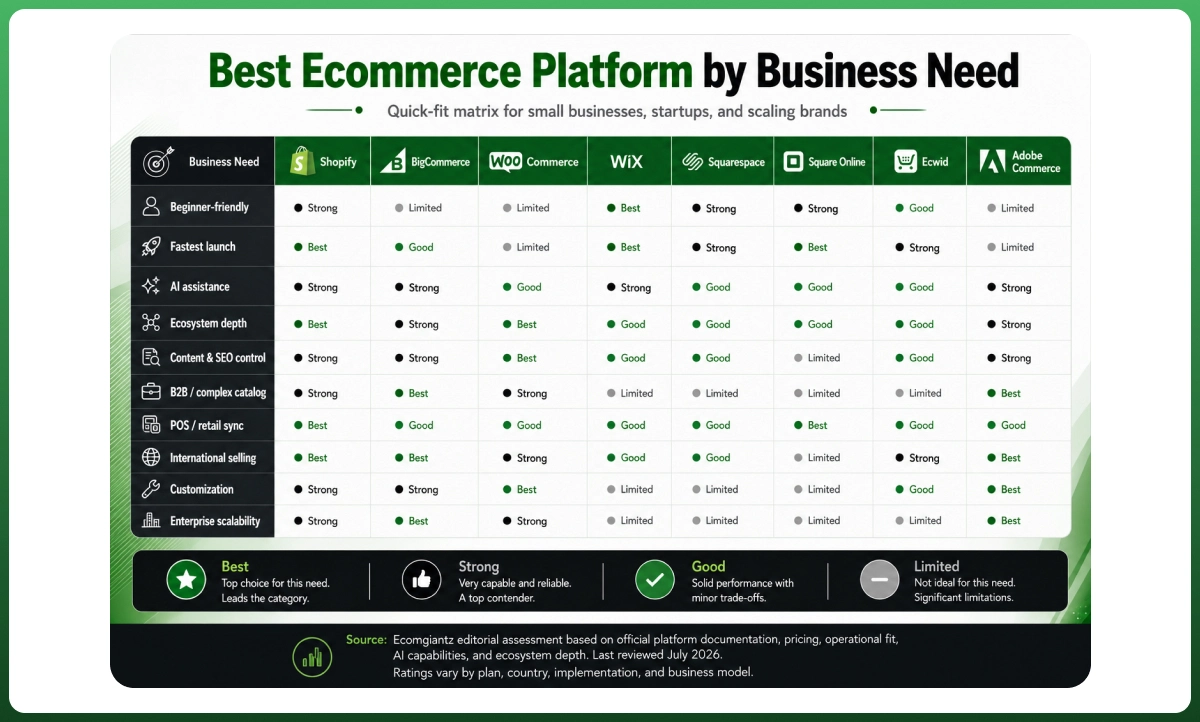
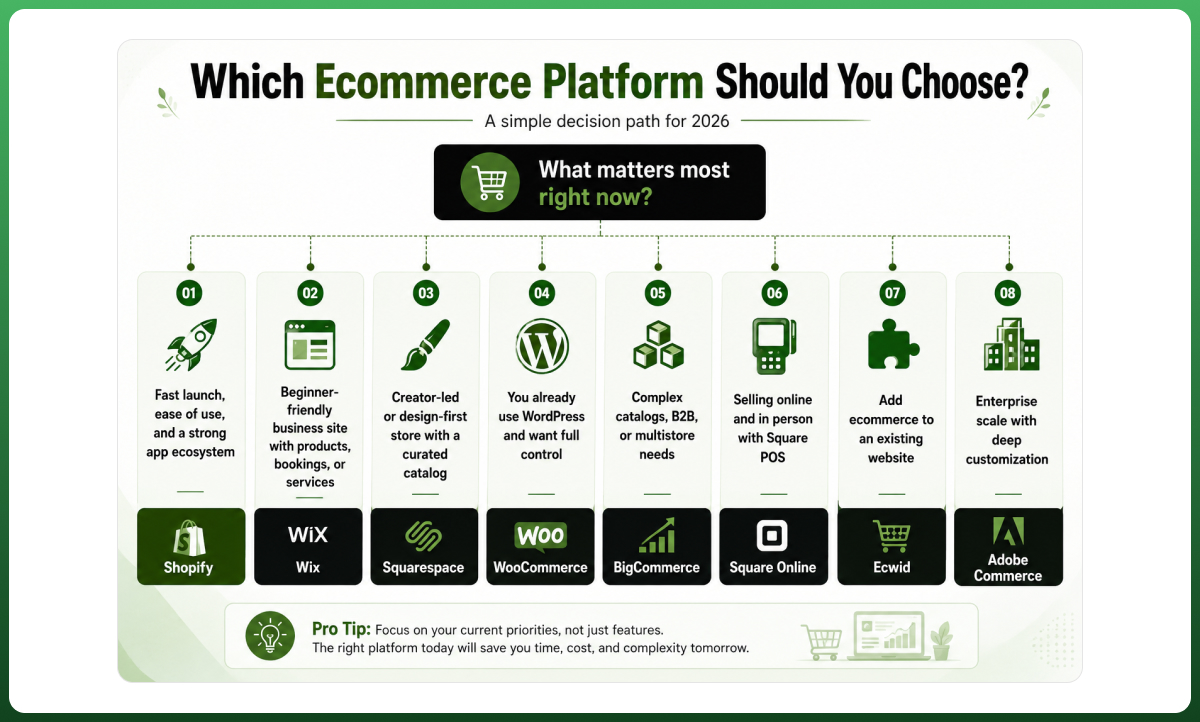
The best ecommerce platforms in 2026 are Shopify for balanced growth, BigCommerce for complex catalogs and B2B, WooCommerce for WordPress-led control, and Wix for beginners who want to launch without coding. Square Online suits POS-led retailers, while Adobe Commerce is built for enterprise complexity rather than a first store.
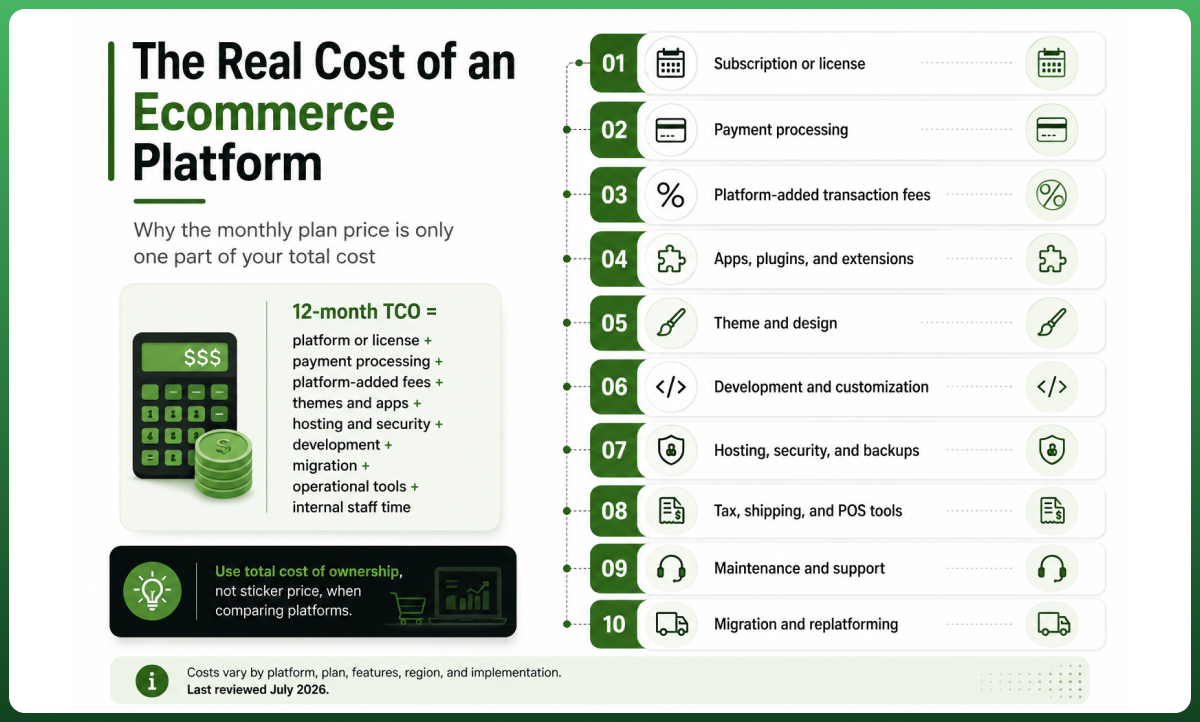
A low monthly price can become expensive after processing fees, apps, development, and migration. Choose the platform that fits your next three years, not the one that produces the fastest demo today.
This guide compares eight platforms using current pricing, ecosystem depth, AI assistance, payment gateways, inventory management, SEO control, and total cost of ownership. It also shows where each option becomes a poor fit, so you can remove unsuitable platforms before investing in a theme, custom domain, or product migration.
Choose the architecture before you design the storefront A platform can look impressive and still create expensive limits around checkout, integrations, and growth. Explore Ecomgiantz’s ecommerce web design and development services
Best Ecommerce Platforms Compared
Start with this shortlist. The prices below are entry points, not complete operating budgets. Annual billing terms, regional payment rates, sales volume, premium themes, and essential apps can materially change the amount a site owner pays during the first year.
Platform
Best for
Model
Published entry point
Decision advantage
Main watch-out
Shopify
Most small and growing ecommerce brands
Hosted SaaS
$29/month billed annually
Strong checkout, apps, AI, multichannel reach
App cost and third-party payment fee
BigCommerce
B2B, large catalogs, multistore operations
Hosted SaaS
$29/month billed annually
Native commerce depth and APIs
GMV caps and open-provider fees
WooCommerce
WordPress and content-led stores
Open source
Free core; hosting extra
Data, checkout, hosting, and code control
Maintenance and extension complexity
Wix
Beginners, service brands, smaller catalogs
Hosted SaaS
$29/month billed annually
Fast no-code setup and visual editing
Less suitable for complex operations
Squarespace
Creators and design-led product ranges
Hosted SaaS
From $19/month
Strong presentation and simple commerce
Basic plan adds 2% commerce fee
Square Online
Retailers already using Square POS
Hosted SaaS
Free plan available
POS and online inventory sync
Narrower regional and design flexibility
Ecwid
Adding a store to an existing website
Hosted SaaS
Starter from $5/month
Embeddable hosted shopping cart
Advanced features require higher plans
Adobe Commerce
Enterprise and multi-brand commerce
SaaS or PaaS
Custom quote
Deep customization, B2B, large catalogs
High implementation and ownership cost
Pricing sources: Shopify, BigCommerce, WooCommerce, Wix, Squarespace, Square Online, Ecwid, and Adobe Commerce. Prices were checked July 27, 2026, and may vary by location or billing term.
How I Evaluated Each Platform
I used a decision framework rather than a feature-count contest. Feature lists often reward the platform with the longest marketing page, even when the missing capability can be solved through a reliable app. The more important question is whether the complete stack supports your business model without unacceptable cost, risk, or operational friction.
Total cost: subscription, payment processing, added transaction fees, themes, apps, hosting servers, development, and maintenance.
Technical fit: API access, webhooks, third-party integrations, custom checkout flows, migration support, and performance at scale.
Trust and discovery: PCI compliance, SSL encryption, security patches, security and compliance controls, SEO enhancements, structured product data, and Page load speed.
2026 readiness: native AI, partner ecosystem, developer tools, composable commerce options, and governance for enterprise businesses.
Different Business Models require different priorities. A Fashion multi-brand e-commerce platform with thousands of variants should not be judged like a ten-product subscription startup or a local retailer using POS software.
1. Shopify: Best Overall for Balanced Growth
Shopify is my default recommendation for owners who want to launch quickly, operate without a full-time developer, and add complexity later. It is an ecommerce-first SaaS ecommerce platform with hosting, SSL Certificates, checkout, inventory, analytics, and an extensive App Store managed through one admin.
The official US pricing page lists Basic at $29 per month when billed annually. In the US, online card rates start at 2.9% plus $0.30 on Basic, while using a third-party payment provider can add a separate 2% platform transaction fee. That distinction matters when Shopify Payments is unavailable or unsuitable for a business.
Shopify performs well for direct-to-consumer brands, dropshipping integration and broader dropshipping capabilities, print-on-demand, social commerce, and marketplace expansion. The ecosystem includes themes, agencies, developers, logistics tools, analytics platforms, and thousands of apps. It also supports more advanced headless setups through APIs when a standard theme eventually becomes restrictive.
Why choose Shopify
Choose Shopify when launch speed, checkout reliability, multichannel reach, and a broad support ecosystem matter more than low-level infrastructure control. Its native operations are accessible to general users, and Shopify Sidekick can work with store data, write ShopifyQL queries, and take permitted actions inside the admin.
Where Shopify falls short
The main risk is the gradual accumulation of costs. A growing store may add separate apps for subscriptions, advanced search, returns, bundles, loyalty, or custom reporting. Those monthly fees, script weight, and overlapping data can reduce profit margin and complicate support. Checkout and backend freedom also remain more controlled than in open source.
Shopify verdict Pick Shopify for the strongest all-round growth path. Avoid it when payment freedom or complete backend control is non-negotiable.
For a store that needs custom theme architecture, app integrations, or performance work without losing Shopify’s operational simplicity, review Ecomgiantz’s Shopify development services.
2. BigCommerce: Best for B2B, Complex Catalogs, and Multiple Storefronts
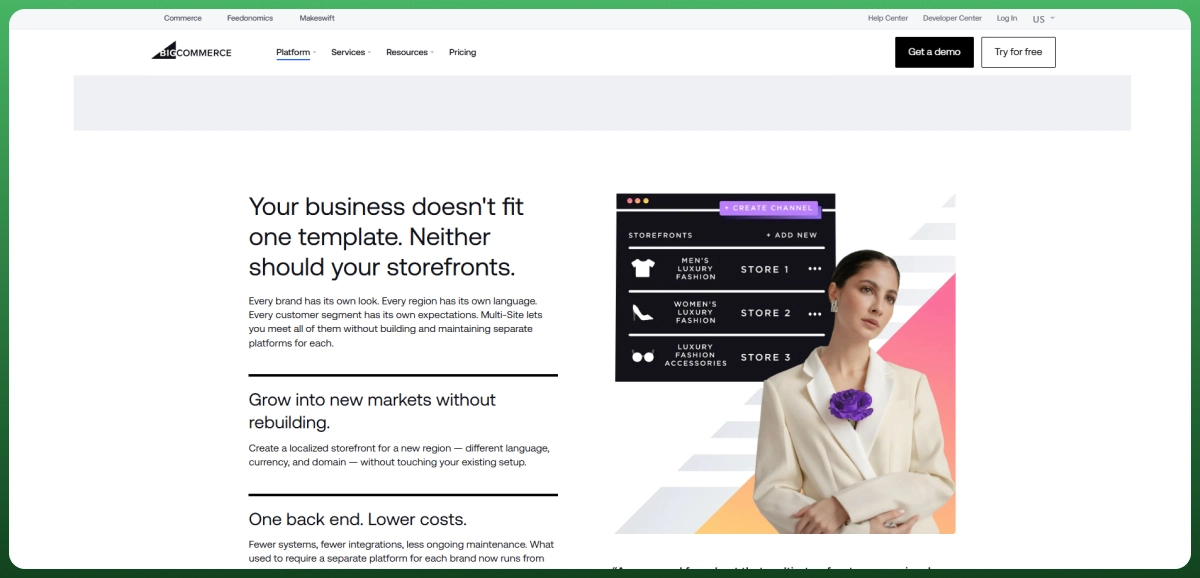
BigCommerce deserves a serious place on the shortlist when native product, B2B ecommerce, and storefront capabilities can reduce reliance on third-party apps. It is particularly relevant for companies with multiple brands, customer-specific pricing, large catalogs, and connections to enterprise systems such as ERP, PIM, or 3PL software.
Its 2026 pricing requires careful reading. BigCommerce lists Core at $39 monthly or $29 with annual billing, but that plan carries a $30,000 trailing-twelve-month GMV cap and a 2% open payment provider fee on eligible order GMV. Growth reduces that fee to 1%, while Scale uses a $33,333 monthly GMV allowance plus a 0.9% overage above it.
Why choose BigCommerce
Choose it when your requirement list is operationally complex from day one. BigCommerce offers robust APIs, B2B tools, multistore support, and a strong catalog model. Its official AI suite, BigAI, is being positioned around recommendations, analytics, B2B quoting, and extensible AI services rather than only product-copy generation.
Where BigCommerce falls short
The platform is less intuitive for a simple first store, and the new GMV-linked structure can change the TCO calculation as revenue rises. The ecosystem is meaningful but smaller than Shopify’s. Owners should model the approved payment provider, expected GMV, support level, and essential integrations before treating the annual subscription as the true price.
BigCommerce verdict Pick BigCommerce when B2B, catalogs, or multistore needs replace several apps. Skip it when those capabilities add no measurable value.
3. WooCommerce: Best for WordPress, Content, and Full Control
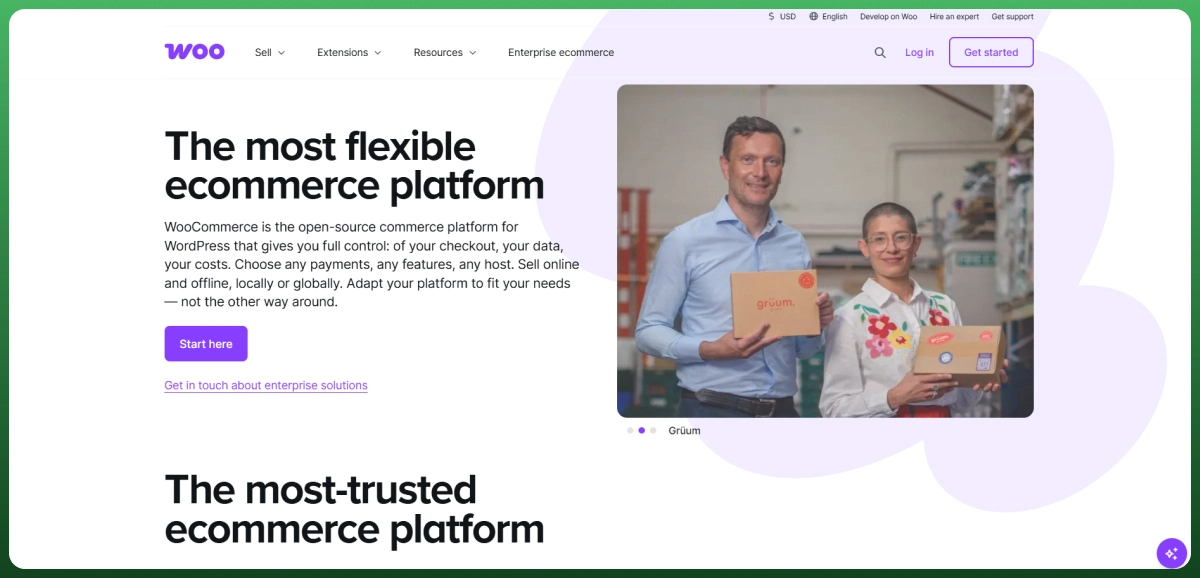
WooCommerce is the strongest open-source ecommerce choice when WordPress is central to acquisition, and the team can manage hosting, updates, security, and extensions. The core software has no platform fee or revenue share, but a free core is not a free production store.
WooCommerce’s official cost guide says hosting runs from about $25 to $350 per month for most stores, while extensions commonly cost $29 to $299 per year each. You may also need a premium theme, backups, security monitoring, staging, performance tuning, and developer support. Costs are flexible, but responsibility shifts to the owner.
Why choose WooCommerce
Among Content Management Systems, WordPress gives WooCommerce a strong content management system (CMS) advantage, flexible URLs, deep checkout control, broad payment gateways, and ownership of the hosting environment. It is also useful when custom product types, editorial content, or direct database and code access matter to the customer experience.
Where WooCommerce falls short
Plugin conflicts, security patches, hosting quality, and extension renewals can create maintenance risk. Customer support is distributed among the host, theme vendor, gateway, and plugin developers. A poorly governed build can become slower and harder to upgrade than a managed platform, even when the initial setup looked inexpensive.
WooCommerce verdict Pick WooCommerce when WordPress control is strategic and technical ownership is clear. Avoid it without accountable maintenance.
4. Wix: Best Ecommerce Platform for Beginners
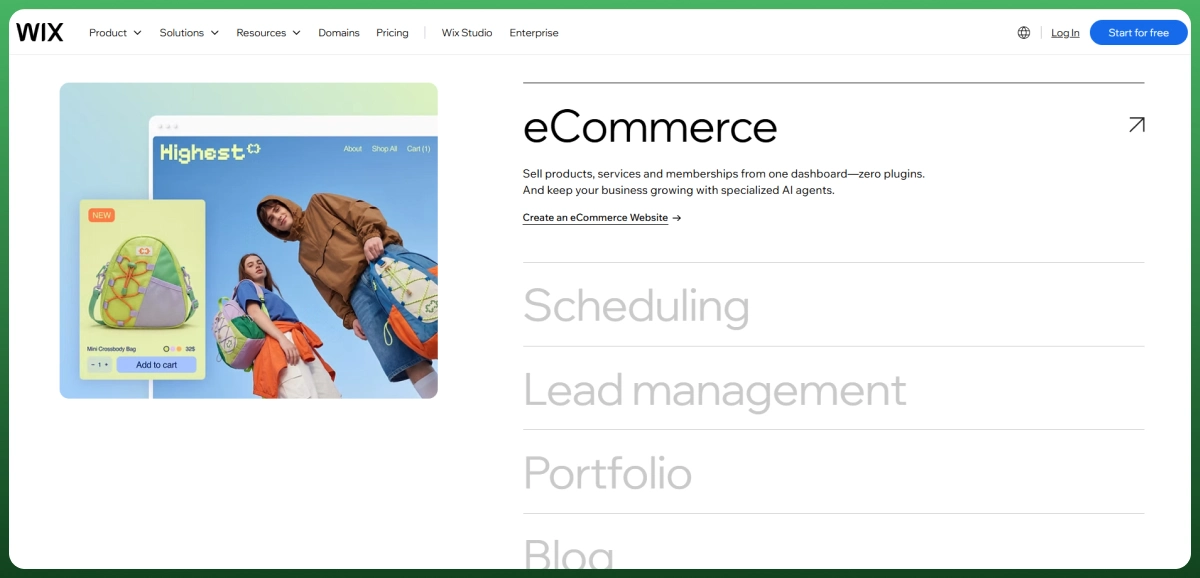
Wix is the most approachable option for many first-time store owners because the editor, design templates, hosting, domain tools, business apps, and AI-assisted creation sit in one environment. The Core plan is listed at $29 per month with annual billing in the US and includes payment acceptance and basic ecommerce capabilities.
Its AI website builder can generate a functioning site from a conversation, while built-in tools assist with content, images, SEO, and business tasks. Wix also offers hundreds of integrations and more than 100 payment providers across supported countries, although the available Payment Methods differ by location.
Why choose Wix
Choose Wix when the owner values visual freedom, a quick learning curve, product galleries, appointments, content, and a manageable catalog. It works particularly well for service businesses that sell a smaller number of products alongside bookings, memberships, or lead generation.
Where Wix falls short
As operational complexity rises, the convenience advantage can narrow. Large product catalogs, advanced B2B logic, demanding warehouse workflows, or highly custom integrations may fit a more ecommerce-specialized platform. Free-form design can also create inconsistent mobile layouts or slower pages when the site becomes overloaded with visual elements.
Wix verdict Pick Wix for an easy, design-led launch. Choose a commerce-specialized platform when inventory and fulfillment become dominant.
5. Squarespace: Best for Creators and Design-Led Product Ranges
Squarespace is a strong decision for photographers, designers, creators, coaches, and small product brands where visual presentation and content are central to conversion. All current website plans can sell products, but the commercial economics differ substantially by plan, especially for physical and digital goods.
The Basic plan carries a 2% commerce transaction fee in addition to payment processing. Core removes that platform commerce fee, while Plus and Advanced reduce Squarespace Payments rates for standard US cards. The same platform can therefore be inexpensive for a low-volume site and inefficient for a store with growing order value.
Why choose Squarespace
Choose Squarespace when branded storytelling, portfolios, memberships, subscriptions, blogs, and a curated catalog are more important than complex inventory. Its templates and structured editing make it easier to maintain a consistent visual system than a completely free-form builder.
Where Squarespace falls short
The ecosystem and advanced commerce flexibility are narrower than Shopify or WooCommerce. B2B, multistore operations, marketplace feeds, and highly specific fulfillment rules can require workarounds. The Basic plan’s 2% platform fee is also hard to justify once order volume becomes meaningful.
Squarespace verdict Pick Squarespace when content and presentation lead the sale. Avoid it for sophisticated inventory, wholesale, or multistore workflows.
6. Square Online: Best for Retailers Already Using Square POS
Square Online is less about winning a website-builder contest and more about reducing operational duplication. A retailer already using Square can synchronize items, stock, orders, and customer activity between the physical location and online store, which is often more valuable than having the largest app marketplace.
Square’s 2026 online plans include a Free option with no monthly subscription, Plus at $49 per location, and Premium at $149 per location. Online processing on Free is listed at 3.3% plus $0.30, while Plus and Premium list 2.9% plus $0.30. That makes transaction volume central to the plan decision.
Why choose Square Online
Choose Square Online when Square already handles in-person payments and the team wants one inventory and reporting workflow. It is useful for local retailers, restaurants, service businesses, pickup operations, and hybrid sellers that value payout and POS continuity over deep storefront customization.
Where Square Online falls short
Square has narrower international availability than several global platforms, and advanced design or integration requirements may outgrow its website tools. Before committing, verify country support, payment eligibility, shipping needs, and any third-party integrations that are essential to the business.
Square Online verdict Pick Square Online when Square already runs the physical store. Look elsewhere for global scale or advanced storefront control.
7. Ecwid: Best for Adding Ecommerce to an Existing Website
Ecwid is a practical hosted shopping cart for businesses that already have a functioning website and do not want to rebuild it. The storefront can be added to an existing site, and Ecwid states that it charges no platform transaction fees across its plans, although the selected payment processor still charges its own fees.
The Starter plan supports up to ten products. Venture expands to 100 products, social selling, analytics, custom checkout, and App Market access. Business adds larger catalogs, marketplaces, subscriptions, abandoned cart recovery, multilingual selling, and custom URL slugs, while Unlimited removes the product cap and adds POS options.
Why choose Ecwid
Choose Ecwid when the existing site, domain authority, design, or content must remain intact. It can also be a sensible validation route for a small catalog because the business adds commerce without committing to a complete CMS migration.
Where Ecwid falls short
As ecommerce becomes the core of the business, the embedded model can feel fragmented. Advanced features are concentrated in higher plans, and the surrounding site still controls much of the broader content and SEO experience. Complex operational needs may eventually justify a purpose-built storefront.
Ecwid verdict Pick Ecwid when adding a store is safer than rebuilding. Avoid it when commerce must become the site’s central architecture.
8. Adobe Commerce: Best for Enterprise Customization and Multi-Brand Scale
Adobe Commerce is for enterprise businesses with complex catalogs, multiple brands, B2B requirements, international operations, and experienced implementation partners. Adobe offers custom-priced SaaS and PaaS approaches rather than a self-serve entry plan, so the licensing quote is only one layer of the total investment.
The platform supports deep customization, enterprise integrations, AI-powered merchandising, large product catalogs, and extensive governance. Adobe also promotes a Commerce MCP server that can provide AI agents with controlled access to real-time catalog, cart, pricing, inventory, and order information, which signals where agent-ready commerce is moving.
Why choose Adobe Commerce
Choose Adobe Commerce when standard platform limits would directly constrain business rules, regional stores, B2B accounts, or integration architecture. It can support deep customization and sophisticated customer experiences when the organization has developers, solution architects, QA processes, and a long-term roadmap.
Where Adobe Commerce falls short
Implementation cost, maintenance, release management, and technical governance make it unsuitable for most small businesses and early startups. A highly flexible platform can also produce technical debt when each regional team requests unique behavior without shared standards.
Adobe Commerce verdict Pick Adobe Commerce only when enterprise complexity creates measurable value and the organization can fund continuous ownership.
Other Platforms You May Encounter
Salesforce Commerce Cloud, now positioned as Agentforce Commerce, is another enterprise option for connected B2C, B2B, POS, order management, and agentic shopping experiences. It belongs beside Adobe in an enterprise evaluation, not in a beginner shortlist. Nexcess StoreBuilder takes a different path by packaging WordPress, WooCommerce, managed hosting, and guided store setup for owners who want open-source flexibility with more infrastructure support.
The Fastest Way to Shortlist a Platform
If your priority is a reliable launch with room to grow, begin with Shopify. If your catalog, B2B pricing, or storefront structure is unusually complex, compare BigCommerce. Choose WooCommerce when WordPress content and technical control are strategic assets, not simply because the core software is free.
Wix is the easiest starting point for many nontechnical owners. Squarespace is stronger when the brand story, product galleries, services, and content matter more than advanced inventory workflows. Square Online is the practical choice when Square POS software already manages the physical store. Ecwid works when rebuilding the existing site would create more disruption than value.
My decision rule Shortlist no more than three platforms, then test the same products, payments, shipping, tax, and integrations in each.
What Platform Usage Data Really Shows
Popularity alone does not identify the best ecommerce platforms for your business. It does show where merchants, developers, agencies, and integration vendors have already created momentum. A large ecosystem usually makes it easier to find themes, specialists, documentation, and third-party integrations, although it can also increase app dependency.
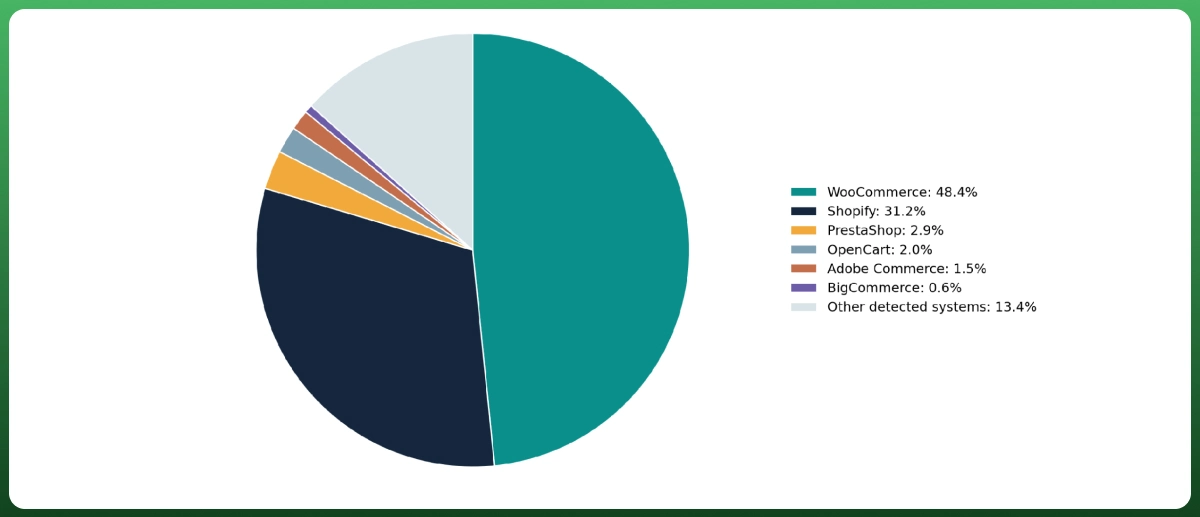
Figure 1. Global share of ecommerce systems detected by W3Techs
W3Techs reports WooCommerce at 48.4% and Shopify at 31.2% of the ecommerce systems it detects. The chart is not a revenue ranking and does not measure gross merchandise value. It is a technology-detection snapshot, so it should inform ecosystem confidence rather than decide your platform on its own.
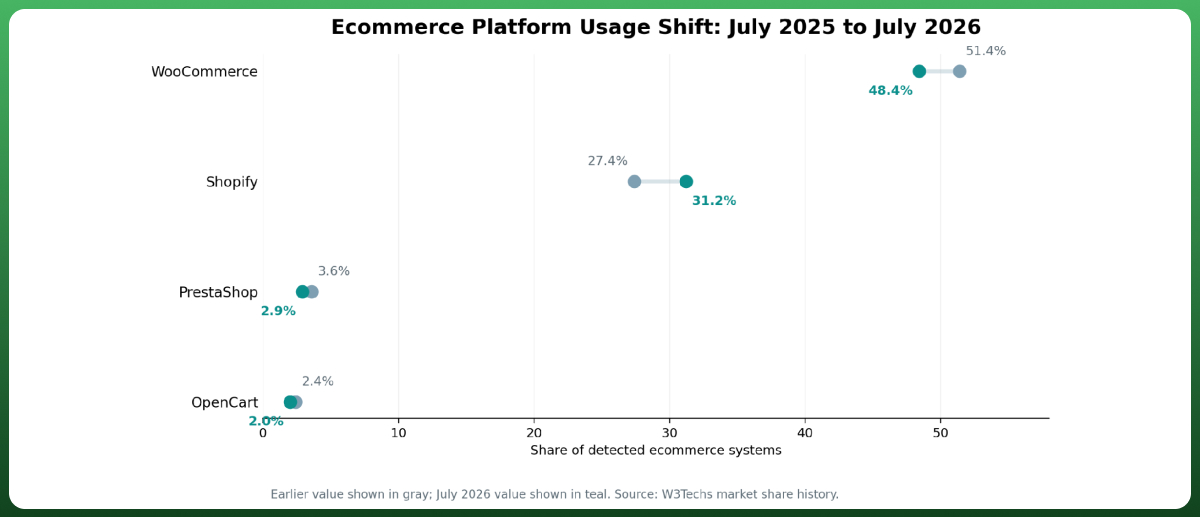
Figure 2. Selected platform share movement from July 2025 to July 2026
Use the scenario table to narrow the shortlist before comparing themes or minor features. The right platform is the one that removes your largest operating constraint without creating a more expensive one elsewhere.
Business situation
Recommended shortlist
Why
First online store, limited technical skill
Wix or Shopify
Wix is easier for a broader business site. Shopify is stronger when ecommerce is the main business.
Small DTC brand expecting steady growth
Shopify
Strong checkout, apps, marketing integrations, and multichannel options with low operational friction.
Content-led WordPress brand
WooCommerce
Keeps editorial control, flexible URLs, and direct ownership of the stack.
B2B, wholesale, or complex catalog
BigCommerce
Native catalog and B2B capabilities may replace several apps or custom modules.
Physical retailer using Square
Square Online
Unifies POS, inventory, orders, and customer data.
Creator with a small visual catalog
Squarespace
Combines content, design, subscriptions, and simple commerce.
Existing site needs a store widget
Ecwid
Adds ecommerce without a complete site migration.
Multi-brand enterprise with custom workflows
Adobe Commerce
Fits complex governance, integration, and regional requirements.
Best Ecommerce Platform for Small Business
For most small businesses, Shopify is the safer long-term choice when online selling is the core operation. Wix may be better when ecommerce supports a service-led site, and Square Online may win when a physical shop already uses Square. WooCommerce becomes attractive when WordPress expertise is available in-house.
Best Ecommerce Platform for Startups
Startups should optimize for speed of learning, not maximum theoretical flexibility. Shopify is the strongest default for product-led startups, while WooCommerce suits content-led teams with technical capacity. Avoid enterprise software until custom workflows, integrations, or transaction scale are proven requirements rather than projections.
Best Ecommerce Platform for Beginners
Wix offers the gentlest learning curve for a general business website with commerce. Shopify is the better beginner choice when the store will manage serious inventory, promotions, fulfillment, and multichannel sales. The best beginner platform is not the easiest editor alone; it is the one the owner can operate accurately after launch.
Selling through an online marketplace can complement a branded store, but it is not a replacement for platform ownership. Marketplaces provide built-in demand and rules, while your own store gives you stronger control over customer data, merchandising, margins, and long-term brand equity.
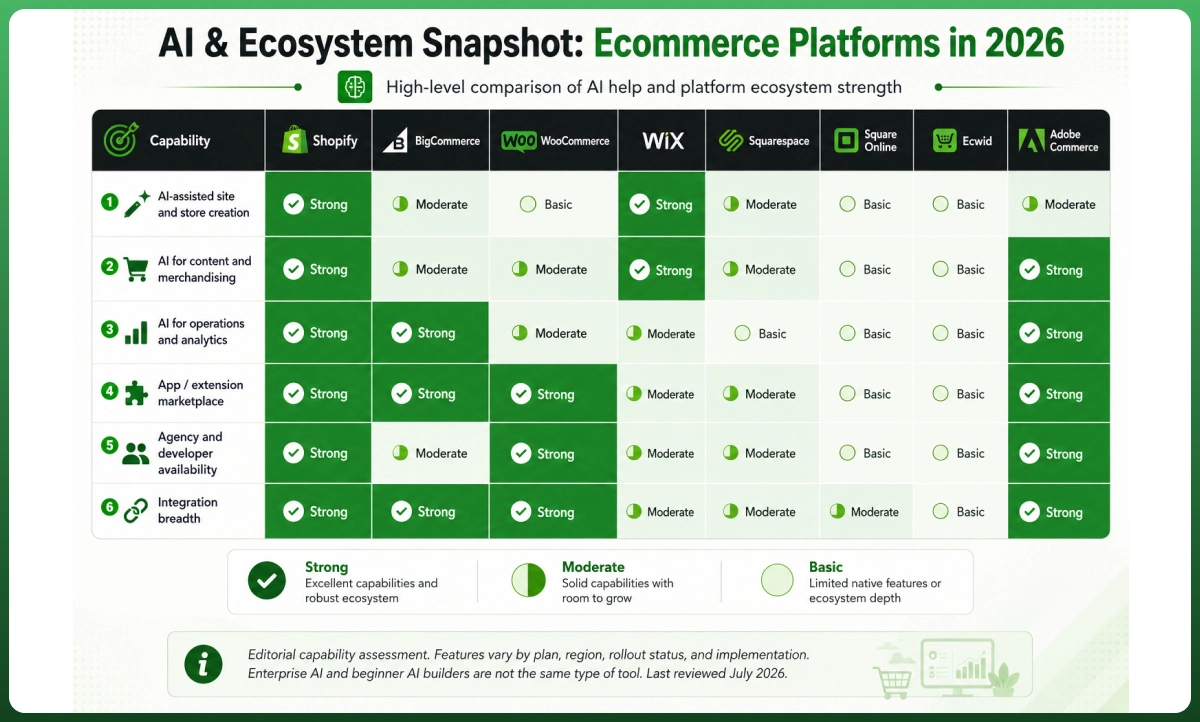
AI and Ecosystem Comparison for 2026
AI is now a meaningful platform factor, but the label covers very different capabilities. Product-description generation is useful, yet it does not justify a platform change. The stronger advantage comes from AI that can understand store data, recommend actions, automate repetitive admin work, support developers, and operate within defined permissions.
Strong for owners who want AI inside daily operations
BigCommerce
BigAI
Recommendations, analytics, B2B quoting, extensible AI services
Strong integrations and agency ecosystem, smaller than Shopify
Promising for B2B and complex commerce workflows
WooCommerce
Extension-led
AI search, copy, automation, support, and custom integrations vary by plugin
Very large WordPress developer and plugin ecosystem
Maximum choice, but governance and quality vary
Wix
AI website builder and built-in AI tools
Site generation, content, images, SEO, analytics, and business tasks
Hundreds of apps plus Wix and Wix Studio professionals
Best for guided creation and nontechnical owners
Squarespace
Built-in AI assistance
Content and site creation support with simpler commerce workflows
Smaller, curated extension environment
Useful for creators, less central to advanced operations
Square Online
Square ecosystem tools
Commerce insights and operational assistance across Square products
Strongest around payments and POS
Value comes from unified retail data more than site generation
Ecwid
App and integration-led
Varies by plan and connected services
Useful embeddable-store ecosystem
Adequate for small stores, not an AI leader
Adobe Commerce
Adobe Sensei, GenAI, and Commerce MCP
Merchandising, content, search, enterprise data and agent access
Deep enterprise partner and Adobe Experience Cloud ecosystem
Strongest when governance and integration capacity exist
An ecosystem is more than an app count. Verify customer reviews, API stability, pricing, migration tools, support, and storefront scripts. Unmanaged app choice can damage reliability and Page load speed.
AI should also support customer engagement after launch. Reliable product data, email segmentation, abandoned cart recovery, and automated service workflows usually create more commercial value than generating another homepage.
Ecomgiantz’s ecommerce email marketing service can connect those retention workflows to the platform rather than treating email as an isolated channel.
Total Cost of Ownership: What the Monthly Price Leaves Out
The subscription is only the visible layer of cost. A realistic first-year model should include the platform plan, payment processing fees, any added platform transaction fees, apps, design, integrations, migration, maintenance, and staff time. The cheapest plan can become the most expensive option when it forces manual work or an early rebuild.
TCO formula 12-month TCO = platform or license + payment processing + platform-added fees + themes and apps + hosting and security + development and migration + operational tools + internal staff time.
Cost layer
How it is charged
What to verify
Platform subscription
Fixed monthly or annual plan
Annual discount may require upfront payment; plan features can vary by country.
Payment processing fees
Percentage plus a fixed amount per transaction
Rates vary by card type, country, currency, and payment provider.
Platform transaction fees
Extra percentage charged by the platform
Shopify may add this with a third-party provider; BigCommerce now publishes open-provider fees.
Apps and extensions
Monthly, annual, usage-based, or revenue-based
Subscriptions, search, reviews, returns, and automation commonly add recurring costs.
Hosting and infrastructure
Included in SaaS; separate for open source
Traffic, storage, backups, staging, CDN, and monitoring change the requirements.
Design and development
One-time project plus ongoing improvements
Custom themes, integrations, checkout logic, and accessibility work can be substantial.
Operations and support
Staff time, retainers, or support plans
Manual order work and fragmented tools are costs even when no invoice is generated.
Migration risk
One-time project with possible revenue disruption
Data mapping, redirects, feeds, tracking, and retraining should be budgeted before replatforming.
Three Realistic Buying Scenarios
Scenario
Likely shortlist
Main cost drivers
Decision warning
New ten-product brand
Wix Core, Shopify Basic, or Ecwid Starter/Venture
Theme, payment rate, basic email, shipping, domain, and owner time
Avoid paying for enterprise APIs before demand is proven.
Growing multichannel store
Shopify, BigCommerce, or WooCommerce
Marketplace sync, inventory, returns, email, analytics, and support
Model app fees and the cost of keeping stock accurate across channels.
Complex B2B or international brand
BigCommerce, Adobe Commerce, or a governed headless stack
Custom catalogs, currencies, tax, ERP/PIM, account pricing, QA, and maintenance
Implementation and governance usually outweigh the public plan price.
When omnichannel selling is central, weak synchronization creates overselling, cancellations, and support work. Sound Omnichannel strategies need a clear data owner. A dedicated multichannel software management service can be more valuable than another unmanaged connector.
SaaS, Open Source, or Headless Commerce?
Architecture should follow the business constraint. A SaaS ecommerce platform provides hosting, platform updates, security infrastructure, and a managed admin for a subscription. Open source provides control over code and hosting but shifts maintenance responsibility to the owner. Headless Commerce separates the storefront from the commerce backend through APIs.
Architecture
Examples
Main advantage
Main responsibility
Best fit
Hosted SaaS
Shopify, BigCommerce, Wix
Fast launch, predictable platform operations, vendor support
Platform rules, subscription tiers, and app dependency
Most small and growth-stage brands
Open source
WooCommerce, Adobe Commerce PaaS
Code, hosting, data, and checkout control
Security, updates, hosting, QA, and technical ownership
Higher build cost, integration burden, and operational complexity
Enterprise or experience-led businesses with proven need
Cloud-native SaaS and other SaaS ecommerce solutions reduce infrastructure work. Composable commerce and MACH architecture offer more modular control, but only when the team can own contracts, APIs, monitoring, and failure recovery across vendors.
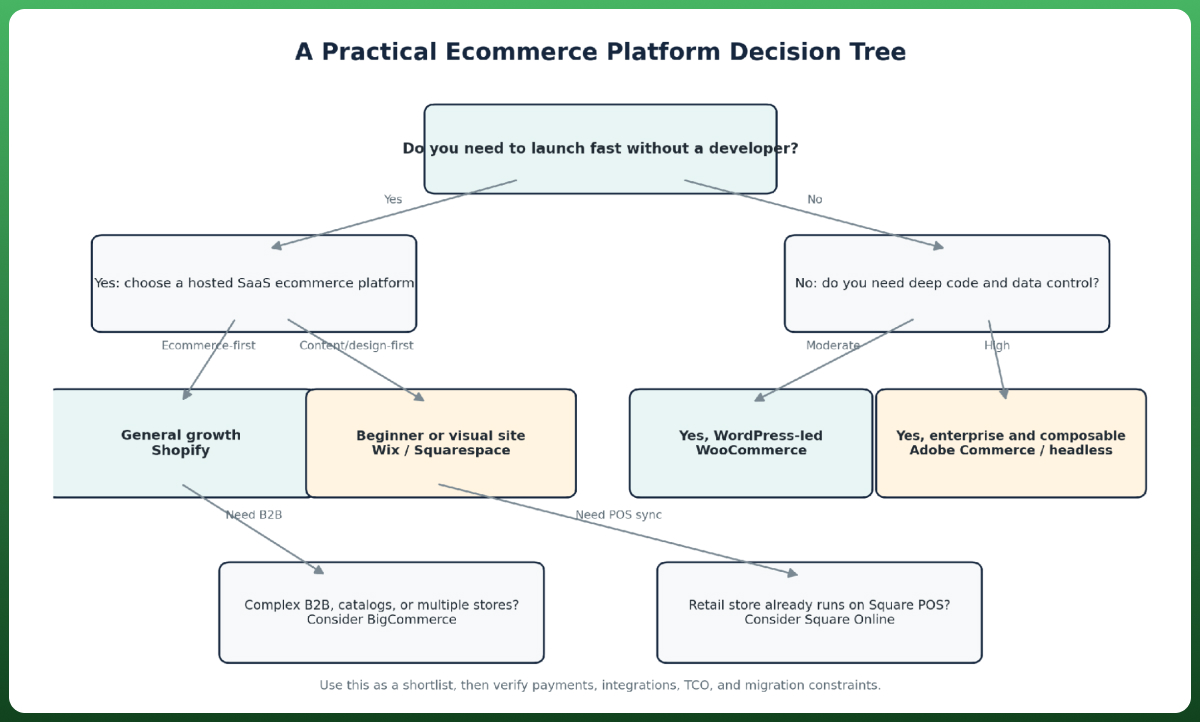
Figure 3. Decision tree for choosing an ecommerce platform architecture
Headless ecommerce is not automatically faster or more SEO Friendly. A custom frontend can improve performance and multichannel experiences, but only when the build handles rendering, structured data, navigation, analytics, redirects, and caching correctly. For a typical small store, a well-built theme is usually more efficient than a custom headless architecture.
Payments and Regional Fit
Never choose a platform before confirming payment eligibility in every target country. Payment gateways, payout speed, local methods, currency conversion, dispute fees, and business-document requirements vary. A platform may support a country while its preferred gateway, POS hardware, or specific payment method does not.
Market
Platform picture
What to verify before signing
USA
Broad support across all shortlisted platforms
Domestic card rate, sales-tax tools, ACH, POS, and marketplace feeds
UK
Strong Shopify, Wix, WooCommerce, Squarespace, and Square support
VAT workflows, local card rates, GBP settlement, and POS availability
Canada
Broad SaaS and gateway coverage
CAD settlement, provincial tax setup, bilingual requirements where applicable
Australia
Strong Shopify, Wix, WooCommerce, Squarespace, and Square support
GST, AUD settlement, local card rates, shipping integrations
UAE
Shopify Payments support is available but may have eligibility conditions; other gateways vary
AED settlement, business verification, local methods, cross-border fees, and provider onboarding
Shopify’s official list includes the USA, UK, Canada, and Australia for Shopify Payments, while Wix maintains a country-by-country directory of more than 100 payment providers. That does not guarantee approval. The merchant must still meet local business, product, banking, and verification requirements.
Also separate payment processing fees from platform transaction fees. The processor charges for moving money. The platform may add another fee based on the plan or gateway. BigCommerce’s 2026 open-provider fee and Shopify’s third-party provider fee show why this distinction belongs in every TCO model.
SEO, Performance, and Migration Risk
Most modern ecommerce website builders let ecommerce websites edit titles, descriptions, alt text, and basic URLs. Meaningful differences appear in variants, canonicals, redirects, faceted navigation, structured data, multilingual URLs, and how much app code reaches the storefront.
Choose SEO control that matches the catalog
A small catalog can perform well on Shopify, Wix, Squarespace, or Square when the content and technical setup are clean. WooCommerce offers deeper structural freedom, while BigCommerce and Adobe Commerce suit more complex product relationships. The platform does not create organic visibility alone; the implementation and merchandising model matter more.
Treat Core Web Vitals as an implementation metric
Google’s current Core Web Vitals guidance defines good performance as Largest Contentful Paint within 2.5 seconds, Interaction to Next Paint under 200 milliseconds, and Cumulative Layout Shift below 0.1 at the 75th percentile. Themes, images, scripts, and apps can move any platform outside those targets.
Plan migration before you need it
Google’s site-move guidance recommends mapping old URLs to relevant new URLs, using permanent redirects, updating internal links and sitemaps, and monitoring the move. Products, customers, orders, subscriptions, reviews, analytics, feeds, and custom functions may require separate migration processes.
Do not redirect every retired product or category to the homepage. Preserve valuable URLs when possible, map equivalent content, and document what will be removed. After launch, crawl the site, test checkout, validate structured data, confirm analytics, and monitor ranking, feed, and conversion rate changes.
Platform selection and organic growth should be planned together. Ecomgiantz’s digital marketing services can connect technical setup, product data, content, paid acquisition, and retention instead of optimizing each channel in isolation.
What to Consider to Find the Best Ecommerce Platforms
Use this process to narrow the best ecommerce platforms before requesting proposals or buying a theme. It keeps the discussion focused on measurable business requirements rather than a vendor’s latest feature announcement.
Define what you sell. Record product types, variant depth, subscriptions, digital goods, services, B2B rules, and expected catalog growth.
Confirm where you sell. List countries, currencies, payment methods, marketplaces, social channels, retail locations, and fulfillment partners.
Separate day-one needs from year-three needs. Do not buy enterprise complexity for a hypothetical future, but do not ignore requirements already on the roadmap.
Calculate a 12-month and 36-month TCO. Include processing, platform fees, apps, development, maintenance, migration, and staff time.
Build the same test catalog in no more than three platforms. Include variants, discounts, taxes, shipping, refunds, and a real integration.
Test the failure points. Export products, remove an app, process a refund, change a URL, create a redirect, and ask support a difficult question.
Document the exit path. Confirm data ownership, export formats, URL flexibility, subscription migration, and how analytics history will be preserved.
Decision checkpoint Choose the platform that creates the lowest combined operational risk and ownership cost for your actual business. Do not choose it because a competitor uses it, an influencer recommends it, or its AI created the prettiest first draft.
Final Verdict
For most growing stores, Shopify offers the strongest balance of usability, ecosystem depth, AI assistance, multichannel support, and scalability. BigCommerce is the better comparison for complex B2B and catalog requirements. WooCommerce wins when WordPress, data control, and custom development are strategic. Wix is the easiest route for a broader small-business site with commerce.
Squarespace suits visual, creator-led businesses. Square Online is the practical extension of a Square-based retail operation. Ecwid is the least disruptive way to add commerce to an existing site. Adobe Commerce belongs on the shortlist only when enterprise complexity, budget, and technical governance are already present.
The best ecommerce platforms do not remove every constraint. They place the right constraints around your team, budget, and growth model. Make the final decision after testing payment eligibility, operational workflows, integrations, and the three-year TCO, not after comparing homepage templates.
Need a platform recommendation grounded in your store? Share your catalog, markets, integrations, and growth plan with Ecomgiantz. The team can help you compare architecture, migration risk, and ownership cost before development begins. Discuss your ecommerce project
Frequently Asked Questions
Which platform is best for a small business?
Shopify is usually the best fit when ecommerce is the business. Wix is better when a broader service or content website also needs a manageable store. Square Online suits retailers already using Square POS, while WooCommerce is compelling when the team already operates WordPress and has technical support.
Is Shopify better than Wix?
Shopify is better for inventory, fulfillment, apps, and long-term ecommerce operations. Wix is easier for a general business website that combines services, content, bookings, and a smaller product catalog. Choose based on the dominant workflow, not the editor you find easier during the first hour.
Is WooCommerce cheaper than Shopify?
WooCommerce has no platform fee, but the store still pays for hosting, extensions, maintenance, and development. Shopify has a clearer subscription structure but can accumulate app and transaction costs. WooCommerce is cheaper only when the chosen infrastructure and support model produce a lower complete TCO for the required features.
Which ecommerce platforms charge transaction fees?
Shopify may add a fee when a merchant uses a third-party payment provider, and the rate depends on the plan. BigCommerce now publishes open payment provider fees on Core, Growth, and Scale. Squarespace Basic adds a 2% commerce fee. Payment processing fees remain separate on all platforms.
Can I migrate platforms without losing SEO rankings?
A migration can preserve most organic equity when URLs, redirects, content, structured data, internal links, sitemaps, and analytics are handled carefully. Temporary volatility is still possible. The greatest risk comes from changing high-value URLs without mapping them or launching before the new site has been crawled and tested.
Is Etsy an ecommerce platform or an online marketplace?
Etsy is primarily an online marketplace where sellers operate within Etsy’s audience, rules, fees, and storefront structure. Shopify, WooCommerce, Wix, and similar products let a business build its own ecommerce website. Many brands use both, but the marketplace should not be confused with owning the customer journey.
Need Help Choosing The Best Ecommerce Platform?
Get Expert Guidance And Ecommerce Development Services From Ecomgiantz.
The Ecomgiantz Team is a group of eCommerce specialists, developers, designers, SEO strategists, and content editors dedicated to publishing accurate, practical, and research-backed resources for online businesses.
Every article undergoes a structured editorial review to ensure technical accuracy, clarity, and relevance. The team combines hands-on industry experience with extensive research to create content that helps entrepreneurs, brands, and enterprises build, optimize, and scale successful eCommerce businesses.
The Team regularly covers topics including eCommerce development, online store optimization, AI-powered solutions, digital marketing, marketplace strategies, and emerging technologies. Their goal is to deliver actionable insights that help readers make informed business decisions in an evolving digital landscape.