What Is Shopify and How Does It Work? Features, Pricing, Pros & Cons
Learn what Shopify is, how it works, its key features, pricing, advantages, disadvantages, and why millions of businesses use it to build, manage, and grow successful online stores.
Shopify is a cloud-based e-commerce platform. It lets you build an online store, list products, accept payments, and manage orders from a single dashboard. You don’t need deep coding skills or a developer to get started. It handles hosting, security, and checkout out of the box, which is exactly why millions of merchants across 175+ countries run their businesses on it today.
Think of Shopify as your complete business infrastructure. Whether you sell handmade candles, digital courses, or clothing through dropshipping, the platform gives you all the tools to run that operation without different software subscriptions. That one-stop nature is what sets it apart from a standard website builder like Wix or a marketplace like Etsy.
If you’re wondering what Shopify is used for or whether Shopify is the right choice for your business, don’t worry; you’ll get all the answers here. We’ll walk through the basics of this platform and its most important advantages and limitations to help you make the right decision.
So, let’s begin.
What Is Shopify?
Shopify was launched in 2006 by Tobias Lütke and his business partners. At first, the group owned a snowboard shop. In search of the best e-commerce tool for their business, they created Shopify. What started as a personal tool soon became the leading commerce platform.
According to recent reports, this platform now powers more than $292 billion in annual GMV. Other reports show that the cumulative sales have crossed $1 trillion. (Shopify FY2024 results).
In short, Shopify is a SaaS (software as a service) product. Users pay a monthly fee to gain a completely hosted store online. It doesn’t require any server management, patching, or uptime monitoring. The system handles most of the tasks. This is a major reason reasy why entry-level sellers choose Shopify over self-hosted options like WooCommerce.
The platform covers storefront design, product catalog management, payment processing, shipping, taxes, and post-purchase analysis. You can easily run your store from your browser or mobile app just by logging into your account.
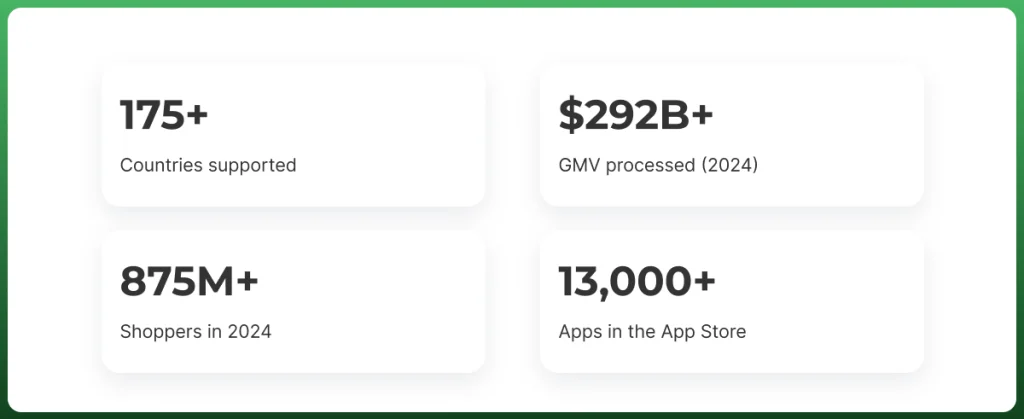
175+Countries supported
$292B+GMV processed (2024)
875M+Shoppers in 2024
13,000+Apps in the App Store
What Is Shopify Used For?
The platform is flexible enough to power different types of businesses. People use it for everything from single-product launches to multi-million-dollar fashion brands.
Selling Physical Products
This is the most common use of Shopify. You upload product photos, write descriptions, and set prices. Shopify will handle the shopping cart, checkout, payment processing, and emails.
It syncs with major shipping carriers like UPS, USPS, and DHL. So you can print labels directly from your dashboard. Small business owners who sell handmade goods, clothing, home decor, or food products find built-in shipping tools especially practical.
Need An Enterprise Shopify Store?
Get Professional Shopify Store Design & Development Services From Ecomgiantz.
Here, you can list products from a supplier without holding inventory. And when a customer orders, the supplier ships directly to them. Shopify connects with platforms like DSers and Zendrop to automate the entire process. This done-for-you dropshipping store setup can get you launched faster.
Selling Digital Products
Shopify supports digital downloads with the right apps installed. Creators who sell eBooks, design templates, music files, or online courses use the platform to deliver files automatically after purchase. The Digital Downloads app from Shopify is free and handles file delivery, which removes the need for a separate file-hosting service.
Print-On-Demand Stores
Print-on-demand works similarly to dropshipping but specifically for customized products, like t-shirts, mugs, phone cases, and posters. Services like Printful and Printify integrate directly with Shopify. So when someone orders a custom hoodie from your store, the print partner fulfills and ships it. You never hold print-demand-products, and your upfront cost is near zero.
Subscription Businesses
Shopify allows subscription selling through apps like Recharge and Bold Subscriptions. This lets you charge customers weekly, monthly, or annually. Coffee brands, beauty boxes, and pet supply companies commonly use this setup to build predictable monthly income instead of relying solely on one-time purchases.
Retail Stores With POS
Shopify’s Point of Sale (POS) system bridges your physical and online store into one operation. Retailers who sell both in-person and online can use the Shopify POS app with compatible hardware to accept card payments at a counter, pop-up market, or trade show. Inventory updates automatically across both channels.
International Ecommerce
You’ll get features like multi-currency pricing, localized checkout experiences, automatic duty calculations, and translation tools. With Shopify Markets, you can manage international storefronts from a single dashboard.
You can pair that with multichannel software management, and sellers in the US, UK, and Canada can reach customers globally without building three separate sites.
B2B and Wholesale Selling
Shopify Plus merchants get access to a dedicated B2B portal where wholesale buyers log in, see custom pricing tiers, and place bulk orders without calling a sales rep.
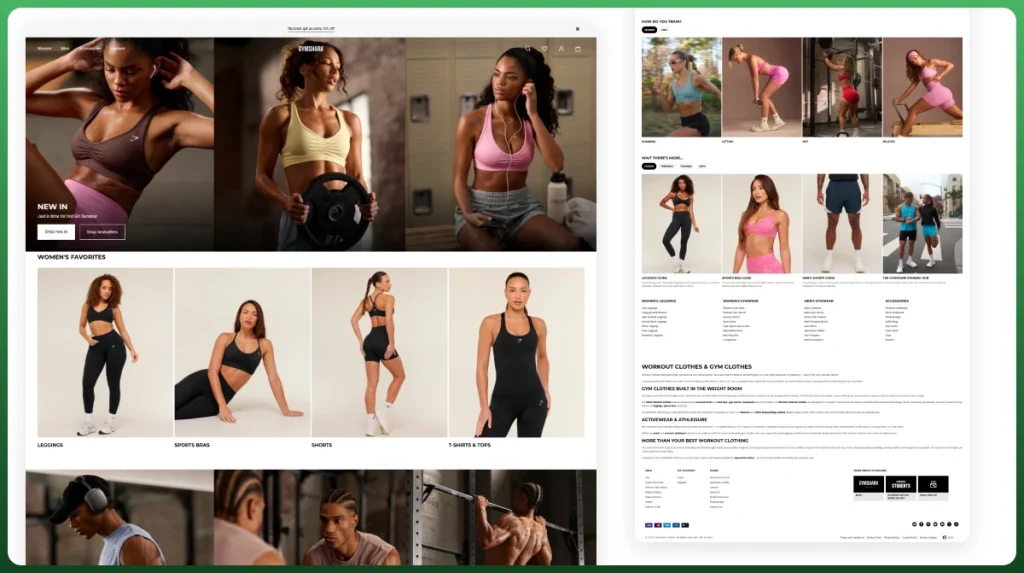
This feature closes the gap between traditional wholesale operations and modern ecommerce expectations. Brands like Gymshark and Heinz have used Shopify’s infrastructure to handle this complexity at scale without running a separate ERP or B2B platform in parallel.
Social Commerce
Instagram, TikTok, and Facebook have all become legitimate sales channels. Shopify integrates natively with all three, letting you tag products in posts and run a shop tab directly on your social profiles. Meta has reported that more than half of Instagram users rely on the app to discover new products. And Shopify makes it straightforward to convert that discovery into a completed sale without redirecting buyers away.
Getting a Shopify store live is a sequential process, and the order you do things in actually matters.
1. Create a Shopify Account
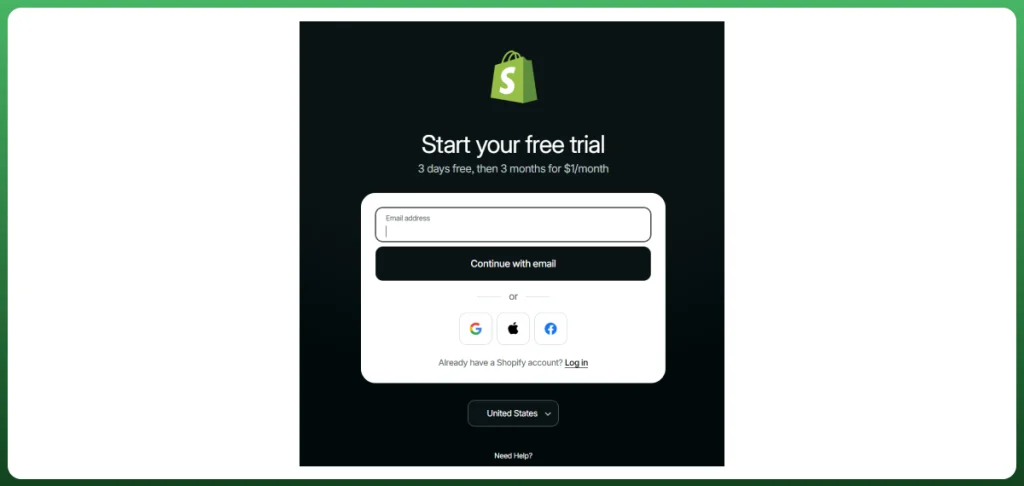
Go to Shopify.com and start a free trial. No credit card is required for the first three days. You’ll enter your email, create a password, answer a few questions about your business stage, and your admin dashboard is ready within minutes. The onboarding wizard gives you a checklist of setup steps to follow, which is genuinely useful if this is your first store.
2. Choose a Theme With the Shopify Store Builder
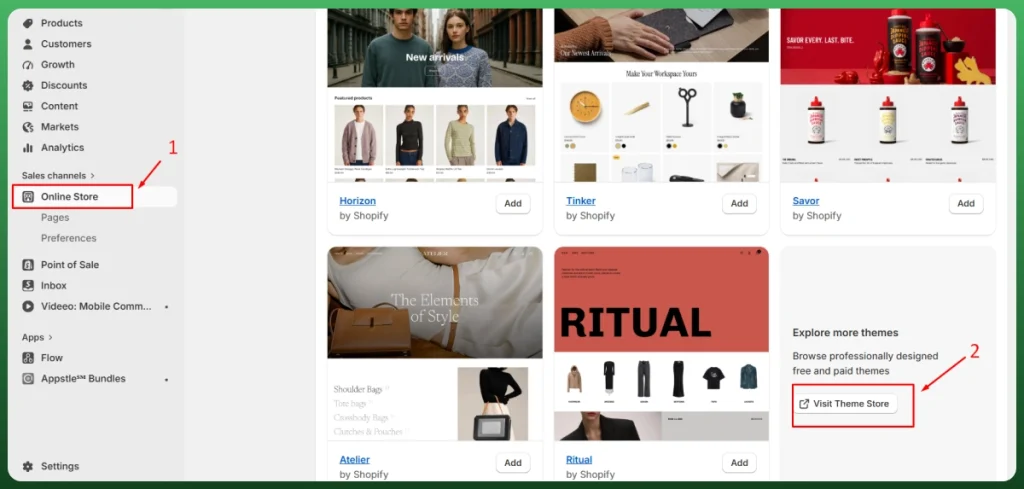
Shopify’s Theme Store offers 200+ free and paid themes. Each one is mobile-responsive by default. Free themes like Dawn are solid starting points for most new sellers. Paid themes typically range from $150 to $400 and offer more built-in customization without requiring code changes.
In 2025, Shopify introduced the Horizon theme foundation. Horizon is now the default for new stores. It makes design even more accessible for sellers who have never touched a website editor before.
3. Use Shopify’s AI Tools
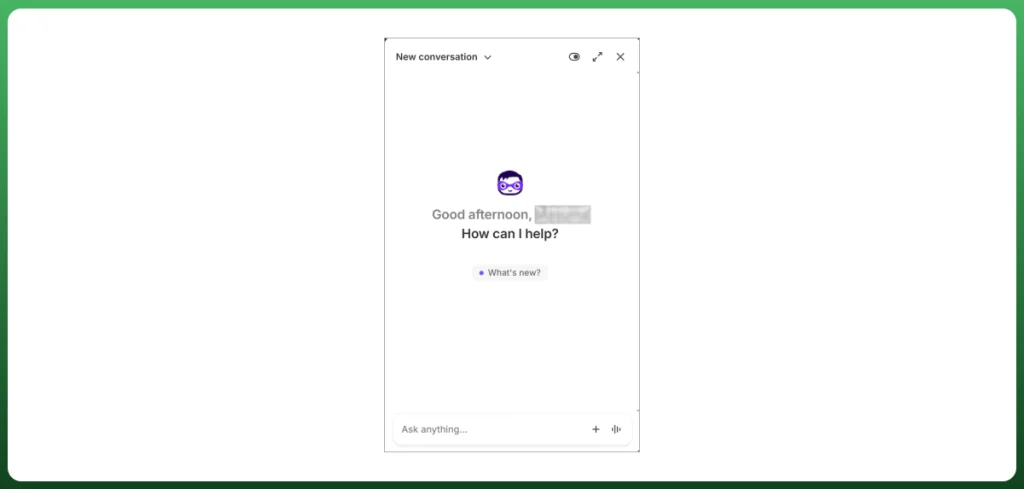
Two AI tools are built directly into Shopify: Shopify Magic and Sidekick.
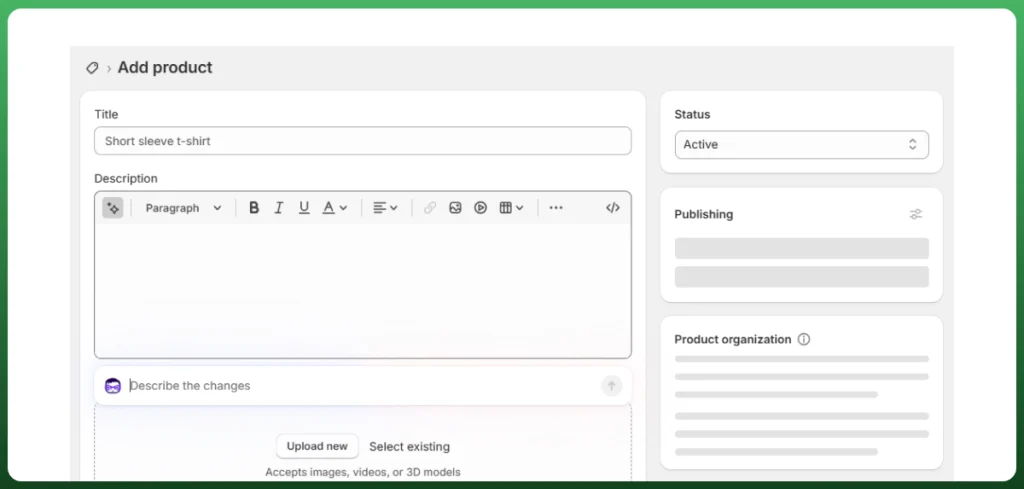
Shopify Magic generates product descriptions, email subject lines, and blog content from a short prompt. Sidekick functions more like a commerce-focused assistant. Ask it questions about your store performance, and it answers with context pulled from your actual sales and analytics data.
4. Add Products
Go to the Products section of your admin and click “Add product.” Fill in your product title, description, price, and SKU.
Upload images following Shopify’s recommended 2048×2048 px dimension for the best display quality. You can organize products into collections to make browsing easier for customers and help search engines understand your catalog structure.
Tip: Shopify supports both manual and automated collections. Automated ones pull in products based on tags or other conditions you set.
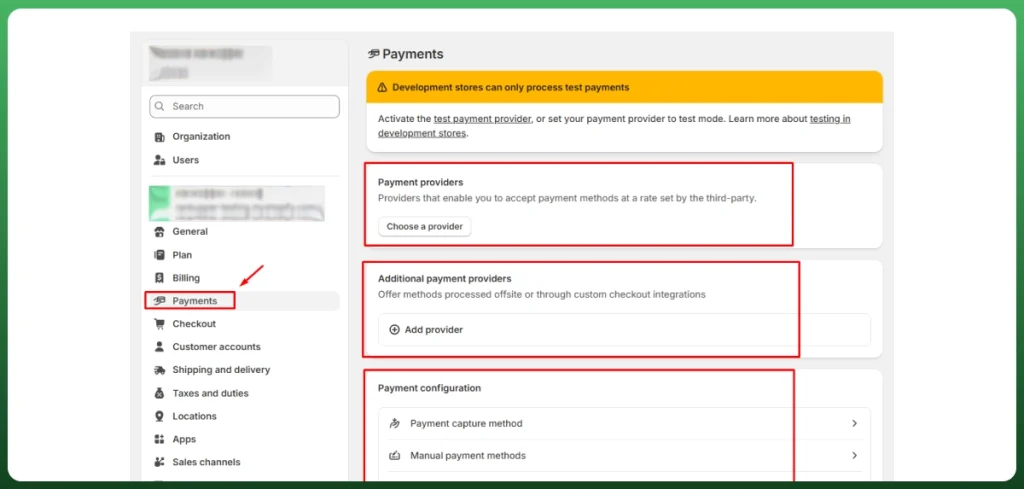
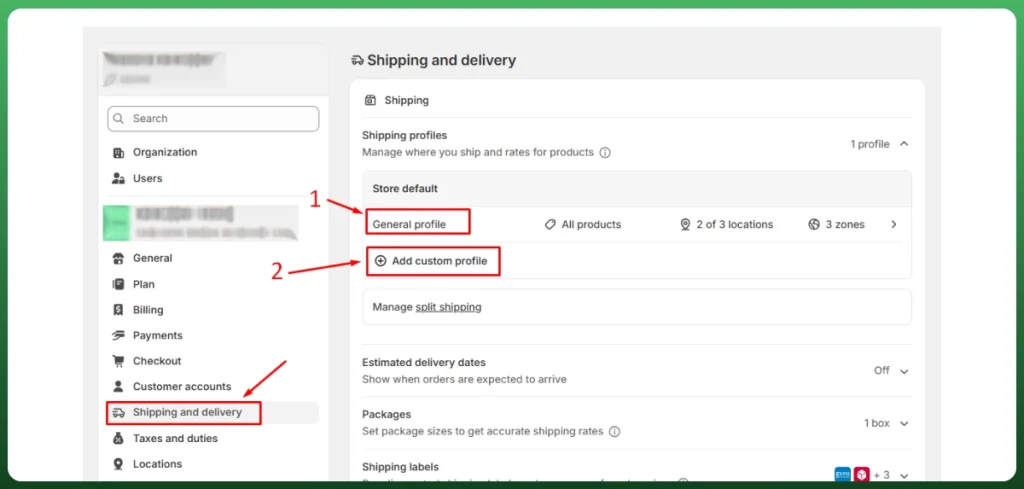
5. Set Up Payments and Shipping
Shopify has its own payment processor, Shopify Payments, available in 20+ countries. Enabling it means you pay zero third-party transaction fees.
If you prefer a different processor like PayPal, Stripe, or Square, you can use those as well. Though Shopify adds a 0.5% to 2% transaction fee depending on your plan tier.
For shipping, use Shopify Shipping to access pre-negotiated discounted rates with USPS, UPS, DHL, and Canada Post. US merchants get up to 88% off standard USPS rates.
6. Launch Your Online Store
Before going live, connect a custom domain. You can buy one directly through Shopify starting around $11–$15/year. Or you can use an existing domain from GoDaddy, Namecheap, or another registrar.
Once connected, run a test checkout using Shopify’s bogus gateway to confirm the purchase flow works end-to-end. Then remove password protection under Online Store → Preferences, and you’re open for business.
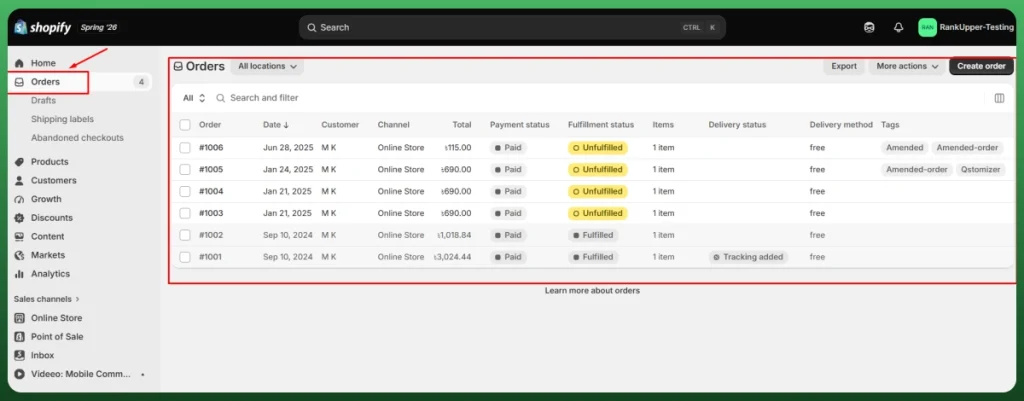
7. Receive and Manage Orders
Every order appears on your Orders page with full customer details, product info, payment status, and shipping requirements.
You can fulfill orders manually by printing labels and entering tracking numbers, or connect a fulfillment service like Amazon MCF or ShipBob to automate the process. Shopify also supports partial fulfillment if you’re shipping items from an order separately.
Key Shopify Features
What makes Shopify worth the subscription is its depth of built-in tools that help you sell, manage, and grow without constantly bolting on third-party software. Here’s what matters most for a new or growing seller.
Website and Store Builder
Shopify’s drag-and-drop editor requires zero coding to use effectively. You can move sections, swap images, adjust fonts, and rearrange your homepage layout visually. If you want more control, Shopify’s theme language, known as Liquid, lets developers make deeper customizations at the code level.
Product and Inventory Management
The inventory system handles variants, bundles, and multiple warehouse locations. You can track stock levels across physical locations, set low-inventory alerts, and receive automatic purchase order suggestions when stock runs low.
For stores with hundreds of SKUs, the bulk editor lets you update pricing, tags, or descriptions across many products at once. Shopify also generates an inventory report or business analytics showing your best and worst sellers by revenue, units sold, and margin.
Shopify is PCI DSS Level 1 compliant. This is the highest level of payment security certification for ecommerce platforms. Every store gets an SSL certificate automatically, and checkout pages are hosted on Shopify’s secure servers.
Buyers can pay with credit cards, Shop Pay, Apple Pay, Google Pay, and PayPal with no extra configuration for most of these options. Shopify’s 2025 Horizon update brought roughly 2 seconds faster load speeds. High-intent shoppers can easily make expensive purchases with secured gateways.
Marketing and SEO Tools
Every product and collection page has editable meta titles and meta descriptions. URLs are clean and customizable. The platform auto-generates a sitemap.xml and handles canonical tags to prevent duplicate-content issues.
For marketing, Shopify Email lets you send branded campaigns to your subscriber list directly from your admin. And automated flows like abandoned-cart recovery and post-purchase upsells are available without a separate platform.
Once your list grows, dedicated ecommerce email marketing (think Klaviyo with advanced segmentation) starts to pay for itself.
Boost your Shopify store’s brand visibility with Ecomgiantz’s Shopify SEO services.
Analytics and Reporting
The built-in analytics dashboard shows total sales, sessions, conversion rate, average order value (AOV), and top-selling products at a glance. Higher plan tiers unlock more detailed reports. Such as customer cohort analysis, profit reports by product, inventory forecasting, and marketing attribution.
Multi-Channel Selling
Shopify works as a central hub for selling across multiple platforms at once. You can easily connect your store to Amazon, eBay, Instagram Shop, TikTok Shop, Facebook Marketplace, and Google Shopping. Hands-on marketplace management makes this even smoother on high-volume channels.
Note: This multichannel integration is one of the clearest advantages Shopify holds over platforms like Squarespace or Wix. Most CMS treat ecommerce as a secondary feature.
Security and Hosting
Shopify hosts every store on globally distributed servers with 99.99% uptime. You’ll never deal with server configurations, software patches, or DDoS protection. This is the fundamental difference from self-hosted platforms like WooCommerce. In WooCommerce and other platforms, managing server performance falls on you or your hosting provider.
Shopify App Store
With more than 21,000 apps available, Shopify App Store covers almost every business need you can think of. You'll find most of the required tools from the app recommendations list. Many apps offer free tiers or trial periods, and Shopify vets apps before listing them, which keeps quality reasonably high.
Who Should Use Shopify
Shopify works well across a wide range of seller types. But it’s not equally ideal for everyone. Here’s an honest breakdown of who gets the most value.
Beginners and First-Time Sellers
If you’ve never built an online store before, Shopify’s guided setup, pre-built themes, and AI-assisted content tools remove most of the technical friction. The platform is genuinely beginner-friendly in a way that WooCommerce or Adobe Commerce is not.
That said, beginners should go in with a realistic budget. The $29/month Basic plan is just the starting point. Apps, premium custom themes, and domain costs can add another $50–$150/month depending on what the store needs.
Small Businesses Ready to Scale
A small business that outgrew Etsy, Wix, or a basic website is Shopify’s sweet spot. You get proper inventory management, multi-channel selling, real analytics, etc. All these are enough to build a genuine brand identity. The admin experiences allows non-tech persons easily manage all the features.
Many Etsy sellers make the switch when they want full control over their customer relationships and aren’t willing to share a platform with thousands of competitors anymore. Shopify has import tools for Etsy and other platforms.
Growing Brands and DTC Companies
Direct-to-consumer (DTC) brands that want to own their customer data and build relationships outside of third-party marketplaces find Shopify’s CRM features, email tools, and analytics particularly useful. Brands like Allbirds, Gymshark, and Ridge built significant businesses on Shopify before moving to Shopify Plus as they scaled into tens of millions in annual revenue. The platform grows with you rather than requiring a full migration when your needs change.
Dropshippers and Digital Creators
For dropshippers, Shopify’s supplier integrations (DSers, AutoDS, Spocket) make product sourcing and order automation simpler than building the same setup on WooCommerce.
Digital creators also use Shopify effectively when they want a branded storefront rather than listing products on platforms like Gumroad or Teachable, where they have limited control over the customer experience and no way to build their own email list directly.
Enterprise Companies (Shopify Plus)
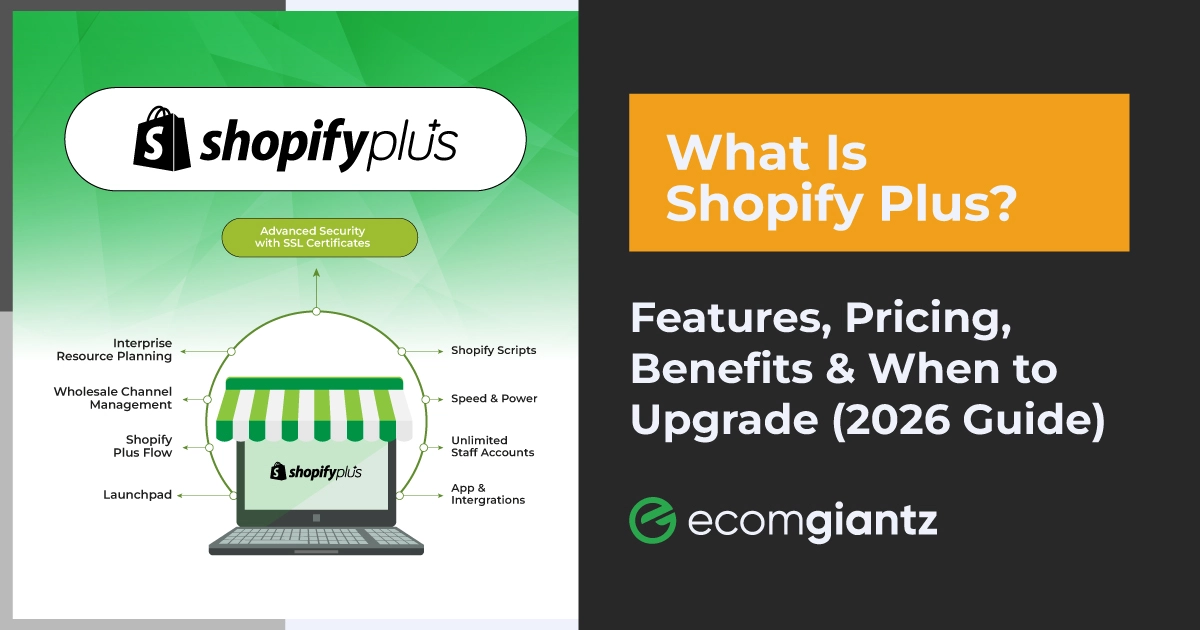
Shopify Plus is the enterprise tier. The price starts at around $2,300/month. It handles high-volume transaction loads, offers custom checkout scripting, and includes a dedicated merchant success manager. Brands like Red Bull, Staples, and Heinz operate on Shopify Plus for exactly these reasons.
Global Businesses That Use Shopify
The majority of Shopify’s merchant base is small businesses with fewer than 10 employees: people who hand-make products, source from local suppliers, or build niche stores around a specific passion. For them, Shopify replaces a hired developer and a stack of separate tools.
On the larger end, Gymshark built its brand almost entirely on Shopify before reaching a $1.3 billion valuation in 2020, and Allbirds went from a Kickstarter project to a publicly traded company on the platform.
Beauty names like ILIA, Kylie Cosmetics, and Victoria Beckham Beauty run high-volume product launches that would crash lesser-built systems, because Shopify autoscales during traffic spikes without manual intervention.
And it isn’t limited to fashion and beauty: Heinz launched a direct-to-consumer grocery service on Shopify during the pandemic, while Red Bull and Staples Canada have all operated on Shopify Plus.
Shopify Plans and Pricing
The listed plan price is only part of the total cost — transaction fees, apps, and theme purchases all factor into what you actually pay each month. Here’s a clear breakdown of what each tier offers and what it costs (annual-billing rates shown).
Plan
Monthly (annual billing)
Online card rate
3rd-party transaction fee
Basic
$29/month
2.9% + 30¢
2%
Shopify
$79/month
2.6% + 30¢
1%
Advanced
$299/month
2.4% + 30¢
0.5%
Shopify Plus
From $2,300/month
Custom rate
0.15–0.25%
There’s also a lightweight Shopify Starter plan (around $5/month) for selling through social, messaging, and links without a full online store.
Third-party transaction fees only apply when you use a payment processor other than Shopify Payments.
Beyond the plan cost, budget for these common additions: a premium theme ($150–$400, one-time), apps for reviews, email marketing, subscriptions, or upsells ($20–$80 per app per month), and a custom domain ($11–$15 per year).
So, a realistic monthly cost for a properly equipped Basic store often lands between $80–$150 all-in.
However, Shopify currently offers a 3-day free trial with no credit card required, followed by a $1/month promotional rate for the first three months.
Advantages and Disadvantages of Shopify
No platform delivers everything perfectly. After working with Shopify across different business stages and sizes, here’s an honest assessment of where it genuinely delivers and where it creates frustration.
The Strengths Worth Noting
All-in-One Solution
The biggest advantage is that everything works together. Your store, payments, shipping, analytics, and marketing tools all live on the same platform and share the same data. You don’t spend hours troubleshooting integrations between three separate tools because your order management software doesn’t talk to your email platform.
Speed
Speed is another genuine strength. Shopify stores load fast by default because Shopify’s CDN caches your store’s assets on servers close to your customers. In CyberNews’ 2025 platform testing, Shopify ranked among the fastest ecommerce builders evaluated.
Support
Support access is also worth mentioning. Shopify offers 24/7 support on all paid plans, which not every ecommerce platform provides at the entry-level tier.
Where Shopify Falls Short
Customization Ceiling Without Code
Liquid is powerful for developers, but non-technical sellers hit a ceiling quickly. Moving a section outside its default placement, building a custom product page, or adding conditional logic to your checkout all require either hiring a developer or buying a specific third-party app.
Expense
The cost structure is the most frequent complaint from long-time merchants. At face value, $29/month sounds manageable. But the moment you need subscription billing, advanced reviews, a custom size chart, or better reporting, you’re stacking paid apps on top of that fee.
Blog and Content Marketing Limitations
Shopify’s built-in blogging tool is functional but basic compared to WordPress. You can publish posts and add images, but you don’t get traditional category structures, advanced scheduling, or the same depth of SEO control WordPress provides for content-heavy sites.
Shopify Alternatives
Shopify earns its market-leading position, but it’s not always the right fit. Here are the main alternatives and what each does better in specific situations.
WooCommerce
Free WordPress plugin with more structural control and lower long-term cost, but you manage your own hosting and technical setup. Best for content-heavy stores where blogging drives traffic.
BigCommerce
More built-in features than Shopify without paying for extra apps. Better for high-volume sellers who want lower transaction costs and native multi-currency support.
Wix
Better design freedom and a lower price point Wix works well for small stores where ecommerce is secondary to a service or portfolio site, and design control matters more than scaling.
Squarespace
Superior visual templates and more creative layout control. A strong fit for design-forward brands with smaller catalogs that prioritize aesthetics over operational features.
Etsy
A marketplace rather than a standalone store. No monthly fee but high seller commissions and no ownership of the customer relationship is required here. It is a common starting point before switching to Shopify. You need to manage your seller account properly.
Adobe Commerce (formerly Magento)
Fully open-source and deeply customizable, but requires developer expertise and significant server infrastructure. A realistic option for large enterprises only.
Note: The choice usually comes down to three factors; your technical comfort level, your monthly budget, and how central content marketing is to your growth. If you want ease of use and real scalability without heavy technical involvement, Shopify remains the strongest option available today for most ecommerce sellers.
Frequently Asked Questions
Is Shopify good for beginners?
Yes. Shopify’s guided setup, drag-and-drop editor, and built-in AI tools make it accessible for first-time sellers without technical backgrounds. Most stores go live within a few days of signing up.
Can I use Shopify without holding inventory?
Absolutely. Shopify supports dropshipping, print-on-demand, and digital product delivery all models where you sell without stocking physical goods yourself.
Does Shopify charge transaction fees?
Only when you use a third-party payment processor. Enable Shopify Payments and those extra fees disappear, leaving only standard credit card processing rates per transaction.
Does Shopify include hosting?
Yes. All plans include fully managed cloud hosting with SSL, automatic backups, and 99.99% uptime. You never need to purchase or configure separate hosting.
What are Shopify Magic and Sidekick?
Shopify Magic generates product descriptions and marketing copy from a short prompt. Sidekick is an AI assistant that answers store-specific questions using your own sales and analytics data.
Final Thoughts
Shopify is one of the most complete ecommerce platforms available today. It removes the technical barriers that stop new sellers from ever launching, packages hosting, payments, and marketing under one subscription, and grows with you from your first sale to your ten-thousandth.
Go in with realistic expectations on cost. Between your plan, a few essential apps, and payment processing, you’ll spend more than the listed price each month. For sellers generating consistent revenue, that full cost is easy to justify.
And if you’re switching from Etsy, Wix, or a custom-built site that’s become a headache to manage, Shopify is almost certainly the upgrade you’ve been looking for.
At Ecomgiantz, we’ve built, migrated, and managed hundreds of Shopify stores, so if you’d rather skip the trial-and-error, book a free consultation and we’ll map the fastest path from “store is live” to “store is growing” for your specific situation.
Ecomgiantz Team consists of our in-house experts who share their hands-on experience in ecommerce businesses, websites, marketplaces, etc. We also share the latest updates, insights, and market trends that can be helpful for your online business.