How to Add Keywords to Shopify Website (Complete SEO Guide)
You must add keywords in the page title, meta description, URL, image alt texts, and content body to let search engines easily find your Shopify website pages. Using keywords properly…

You must add keywords in the page title, meta description, URL, image alt texts, and content body to let search engines easily find your Shopify website pages. Using keywords properly…
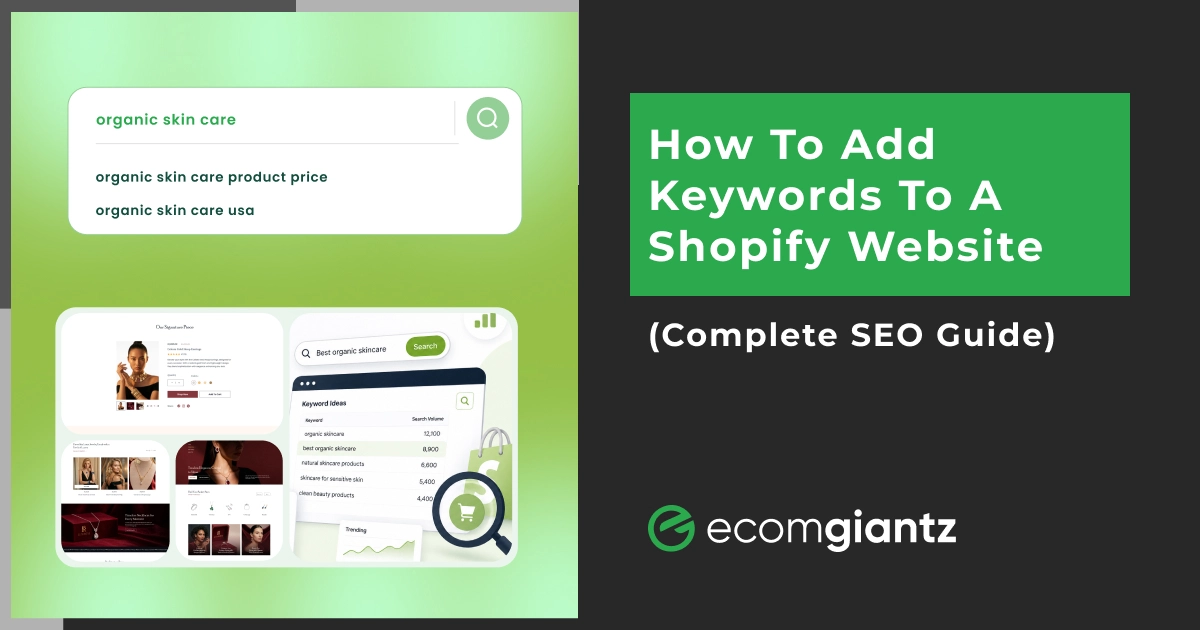


You must add keywords in the page title, meta description, URL, image alt texts, and content body to let search engines easily find your Shopify website pages. Using keywords properly also improves internal access to a specific product or collection page on your site through the search option.
Adding good products with high-quality images and descriptions doesn’t end your job. You need to make sure your buyers are easily able to find them. Using keywords the right way is the first rule to gain organic traffic in Shopify.
From years of experience in Shopify SEO, we’ve noticed that most new sellers don’t consider keyword optimization at all. Keywords are signals that Google and AI models read to understand what your page is about. When you don’t place keywords in locations that search and AI bots try to read first before digging in, you’re losing the big game.
So, here’s the solution. Let’s explain how to add keywords to a Shopify website page even if you’re new to SEO.
In the ecommerce SEO industry, keywords are mostly the terms and phrases buyers type into the search engine or AI model when they want to make a purchase or arrive at a decision.
Think “blue running shoes” or “organic dog treats.” They tell search engines what your page is about. On Shopify, these terms go into your titles, descriptions, and other fields. Used well, they connect your products to real buyer intent. Used badly, they read like spam and quietly hurt your rankings.
So why bother adding keywords at all? Because they do real work behind the scenes. Here’s what the right keywords actually deliver for your store.
Google has to register what each page is about before it can rank it. Keywords are the signal it reads. Without them, it guesses what you sell, and it usually guesses wrong.
A shopper searching for “waterproof hiking boots” wants exactly that. When your page uses the same words, you connect with someone already reaching for their wallet, not a random browser who bounces.
Ranking for the right terms pulls organic traffic that costs nothing per click, unlike ads. Targeted keywords filter out the wrong visitors, so the people who land on your store are the ones likely to buy.
Shopify’s on-site search reads your page titles and descriptions to match what shoppers type. Descriptive keywords help customers find products faster once they’re already on your site, which lifts conversions.
Put simply, keywords turn search visibility into sales. They’re the bridge between what people search for and the products you’re trying to sell them.
Want to rank your Shopify store #1? Check our Digital Marketing service.
Shopify doesn’t have one box where you dump keywords. Instead, you place them naturally across a few key fields. Here are the spots that carry the most weight for keyword placement.
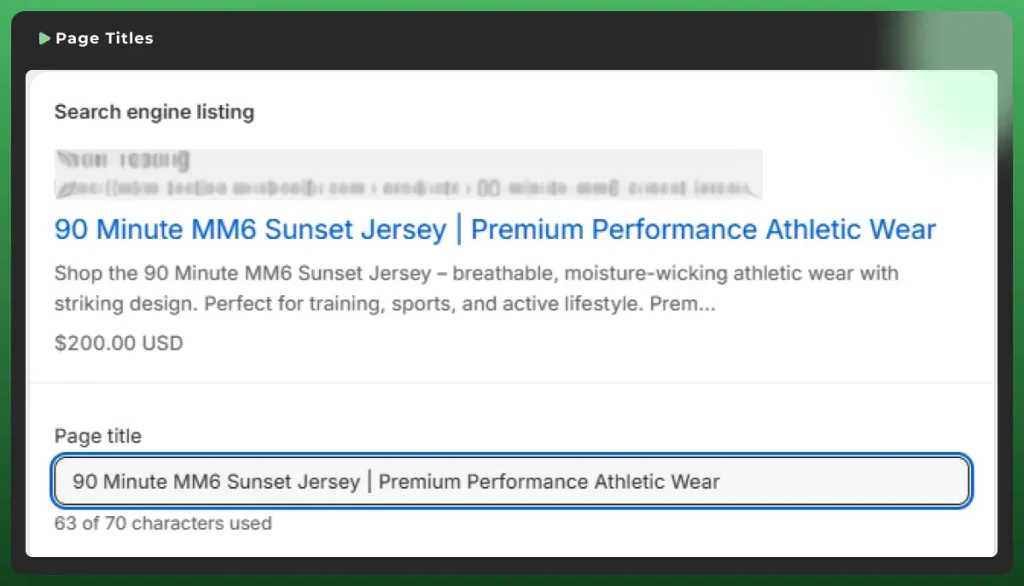
The meta title is the clickable headline in search results. Put your main keyword near the front and keep it under 60 characters so Google doesn’t cut it off. However, Shopify allows up to 70 characters, but shorter is safer.
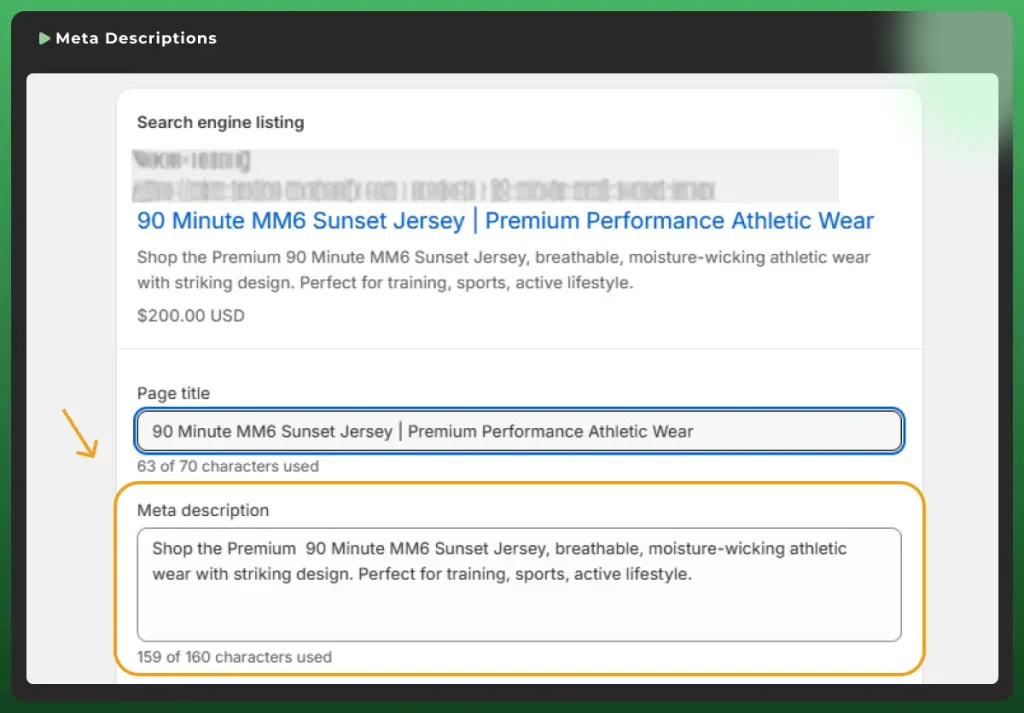
This is the short summary under your title in Google search results. It doesn’t directly boost rankings, but it drives clicks. Include your primary keyword, highlight one benefit, and keep it around 150 to 160 characters.
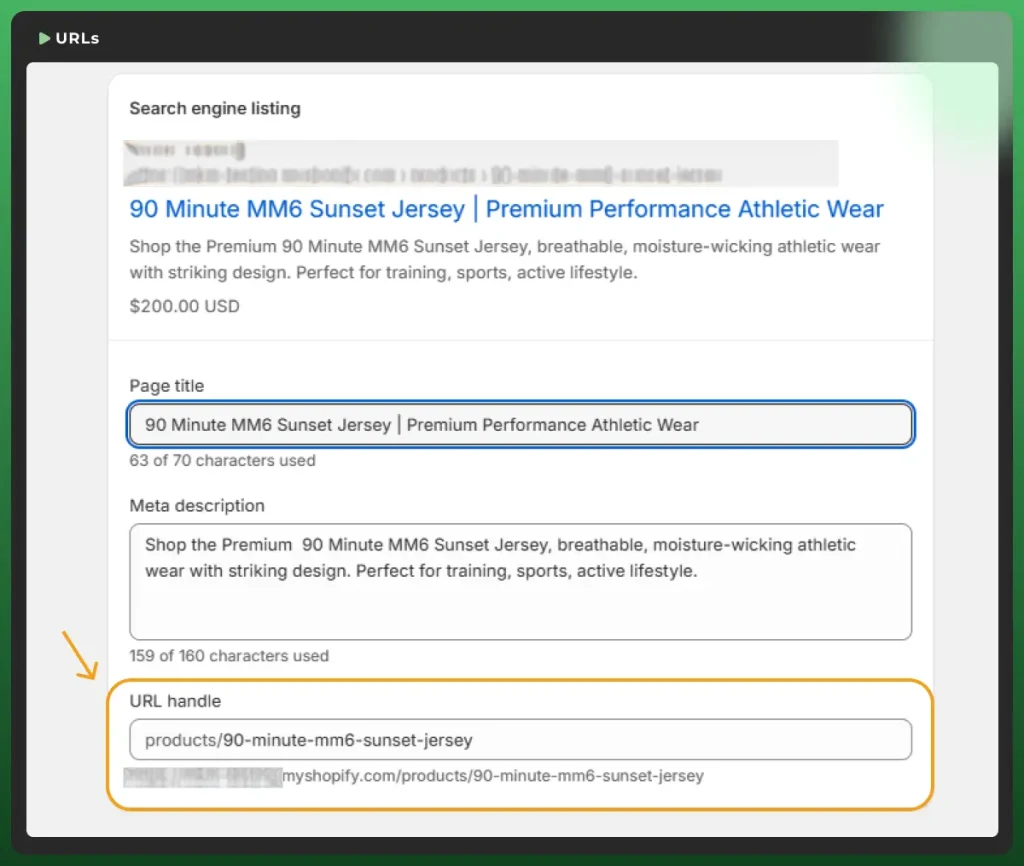
Your URL handle should be short, hyphenated, and contain the main keyword. Use “mens-leather-boots” instead of “product12345.” Once a page is live, avoid changing the URL or set up a redirect to prevent broken links.
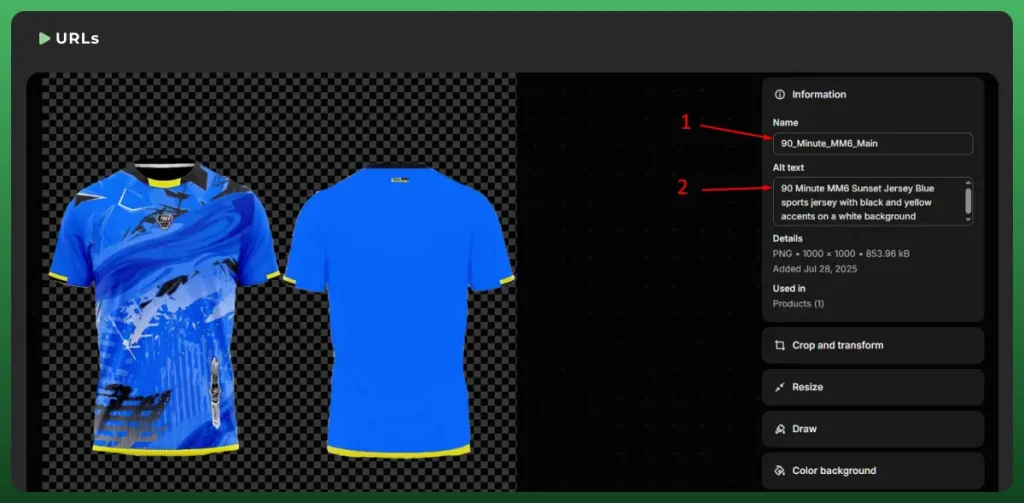
Search engines can’t see images, so alt text describes them. Write a clear description with your keyword, kept under 125 characters. It helps image search and supports accessibility for screen readers too. Before uploading, name the file descriptively as well, like “leather-ankle-boots.jpg” instead of “IMG_1234.jpg,” so it carries your keyword too.
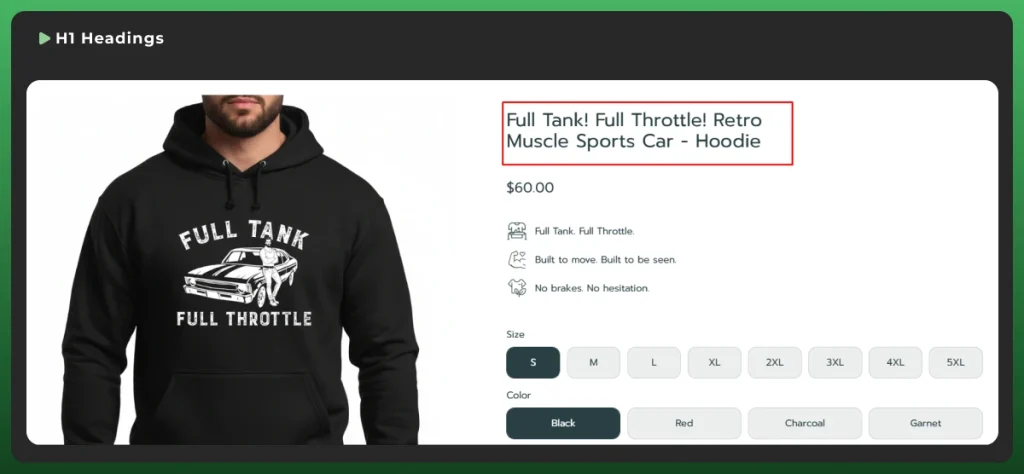
The H1 is the main heading on a page. Shopify usually pulls it from your title field, so include your keyword there. Stick to one H1 per page and keep it aligned with the page topic.
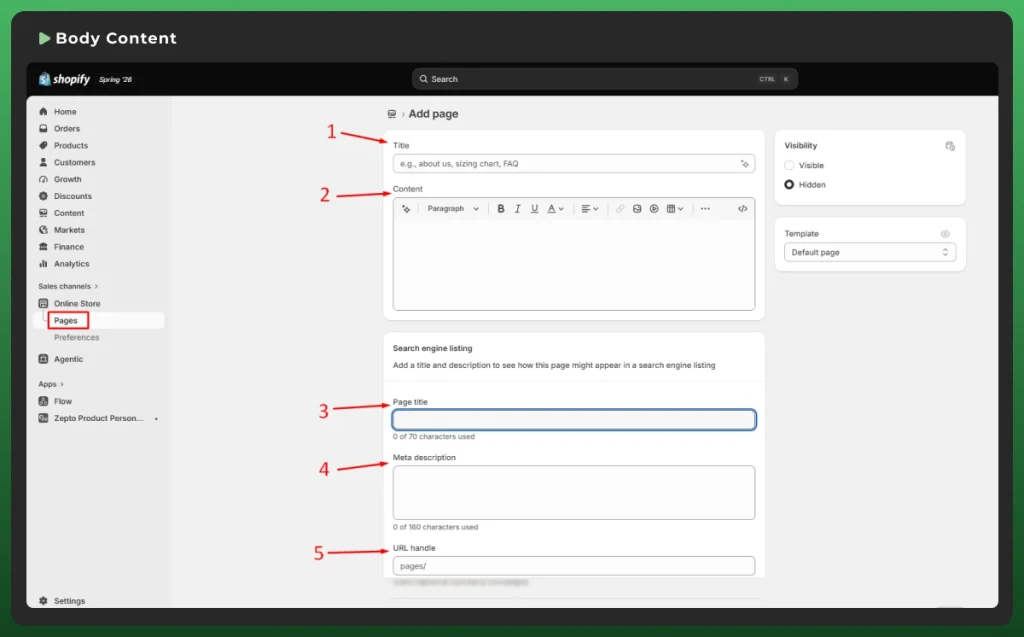
Work keywords naturally into your page copy. Shopify store recommends at least 250 words on product and collection pages, and 500+ on blog posts. Write for humans first, sprinkle keywords second.
The actual process is simple once you know the fields. Most keyword spots live in the same “Search engine listing” section, which you’ll get familiar with fast.
Never guess your keywords. Shopify keyword research shows you what people actually search for, so you spend effort on terms that bring buyers. Here’s how to do it without overcomplicating things.
Start typing your product into Google and watch the suggestions drop down. These are real, popular searches. Free, fast, and a goldmine for long-tail keywords your competitors often miss.
Search the term you want to rank for, then study the top pages. Look at their titles, H1s, and product descriptions. See where they place the main keyword, then plan how to cover the topic better.
Tools like Google Keyword Planner, Semrush, or Ahrefs show search intent, search volume, and keyword difficulty. You can make a solid keyword strategy for your website with premium versions of these tools. Balance high-volume terms with lower-difficulty ones. A keyword with traffic you can’t rank for is just a wish.
Match the keyword to what the shopper wants. Product pages need transactional terms like “buy” or “best.” Blog posts target informational queries. Get this wrong, and you’ll rank for words that never sell.
Product pages are where buyers convert, so intent matters. Your product titles should describe the item clearly, like “Men’s Breathable Cotton Crew-Neck T-Shirt,” which names the type, material, and benefit in a few words.
In the description, lead with your primary keyword in the first sentence or two. Then cover fit, material, size, and use. Break it into short paragraphs and bullets. Never copy the manufacturer’s text, since duplicate copy weakens your SEO.
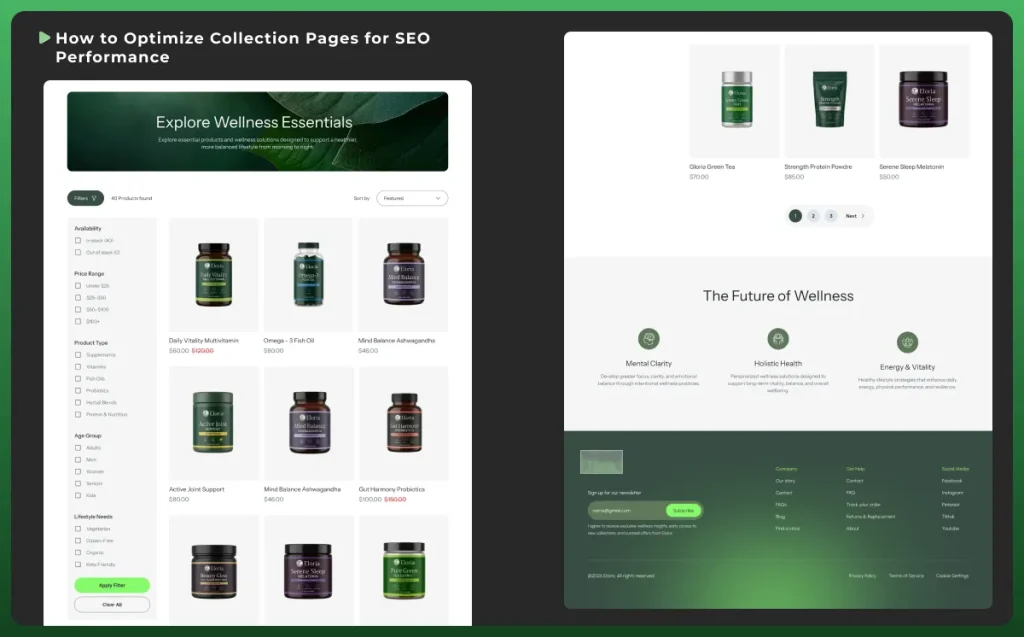
Collection pages group related products, so they target broader keywords. A page for “running shoes” should use that term in the title, H1, and intro text. These pages often rank well because they match category-level searches. If you sell across channels, our Shopify store development team can help structure collections for both search and conversions.
Your SEO strategy should be like this: add a short block of intro copy above the product grid. A couple of sentences with your collection keyword give Google context that an image grid alone can’t provide. Keep it useful, not stuffed.
Search isn’t just Google anymore. Shoppers now ask ChatGPT, Gemini, and AI Overviews for product picks. Answer Engine Optimization (AEO) and Generative Engine Optimization (GEO) are about getting cited in those answers.
The good news: the fundamentals overlap. Clear, keyword-focused content that directly answers questions helps AI understand and surface your store. Use natural language, cover topics fully, and structure pages so the meaning is obvious. Unique copy signals topical relevance that AI rewards.
Be honest with yourself here. SEO is a long game. Most stores see meaningful movement in three to six months, depending on competition, domain age, and how consistently you publish.
Adding keywords isn’t a one-time switch. Google needs to crawl and reindex your changes, which can take days to weeks. Keep optimizing, track results, and improve based on what the data shows.
The biggest one is keyword stuffing. Repeating a term unnaturally reads as spam and can hurt rankings. As Google’s John Mueller puts it, the number of times you use a keyword doesn’t really matter when you write naturally.
Another common slip: treating product tags as SEO. They’re not. Tags organize products for your store’s internal search and navigation. Google can’t see them, so they won’t move your rankings.
Other traps include chasing high-volume terms you can’t rank for, ignoring search intent, and copying manufacturer descriptions word for word. Each one quietly drags your SEO down.
Shopify search engine optimization works in three stages:
Keywords are how you signal relevance at the indexing stage. But they're not the whole story. Google also weighs site speed, mobile-friendliness, secure hosting, and overall user experience. Shopify handles much of the technical groundwork out of the box, so your job is the on-page part: keywords, content, and structure, which you fully control.
Keyword optimization takes time, and doing it across a full catalog is a grind. If you’d rather focus on running your business, our Shopify design and development team can build and optimize your store for search from the ground up.
From adding keywords to Shopify websites to clean site structure, we help your store get found and convert. Reach out for a quick consultation and let’s map out your Shopify SEO.