What Is Headless Shopify? A Practical Guide for Growing Ecommerce Brands
Learn what headless Shopify is, how it works, its benefits, costs, SEO challenges, and limitations. Discover real-world examples and determine whether headless commerce suits your growing ecommerce business.
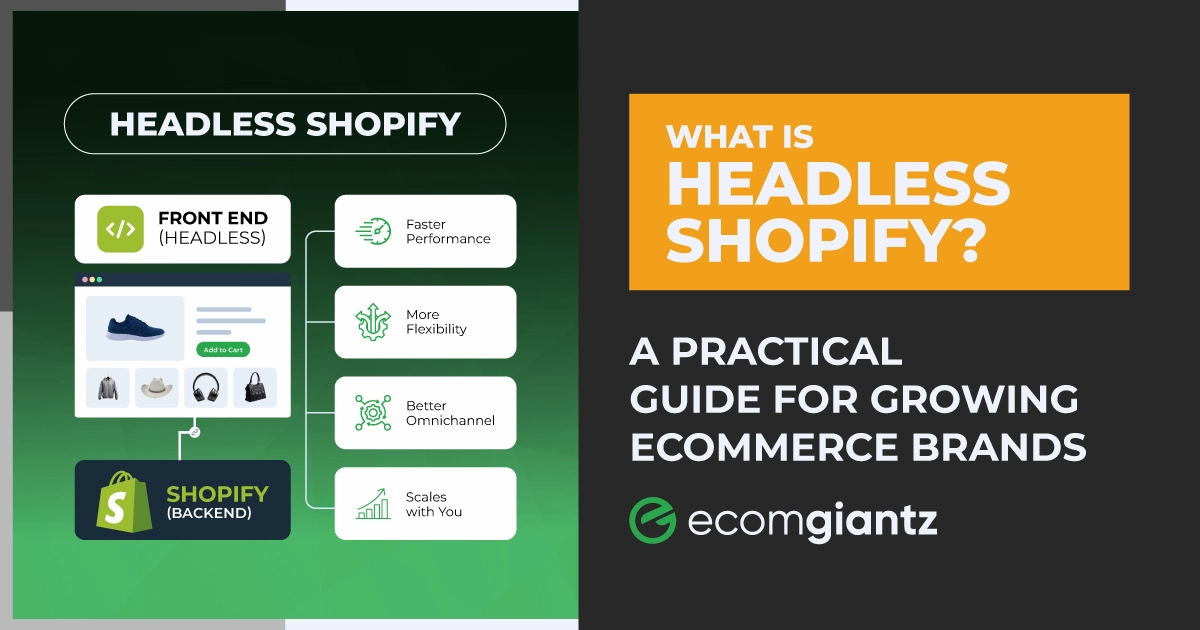
Headless Shopify is a setup where your storefront, the part customers see and click, is separated from Shopify's back end, where products, orders, and checkout live. The two halves communicate via APIs rather than a Liquid theme.
That split lets you build almost any front-end experience you want while Shopify keeps running the commerce engine underneath. It sounds impressive in a pitch deck. It also quietly wrecks budgets when brands adopt it too early.
Our team has spent years building and scaling Shopify stores, and “should we go headless?” is one of the questions I hear most. So this guide is the honest version, the conversation I would have with a friend who cannot decide whether to make the jump.
If you have been Googling what headless Shopify is and stalling on the decision, this is built to get you unstuck. By the end, you will know how a headless build works, what it costs, where it helps, and whether your store is one of the few that truly needs it.
What Is Headless Shopify?
Headless Shopify is an ecommerce architecture that separates your Shopify frontend from your Shopify backend, connecting them through APIs rather than a theme. “Headless” simply means you have removed the “head,” the front-end presentation layer, from the “body” that handles back-end operations.
In plain terms, that is what headless Shopify is at its core: Shopify's commerce engine continues to manage products, inventory, and payments, while a custom storefront built with your own tools controls exactly how everything looks and feels.
Understanding Headless Commerce
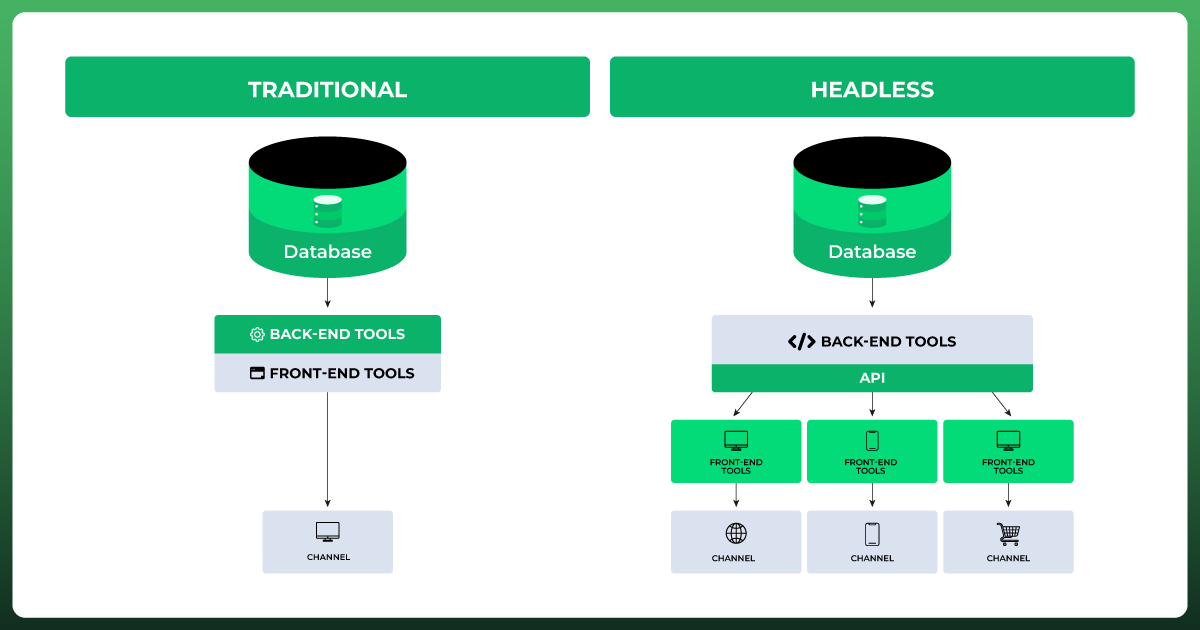
Traditional platforms are monolithic. The front end and back end are welded together, so a change to one can ripple into the other. Headless commerce breaks that bond, and it is the broader eCommerce model behind every headless build, on Shopify or any other platform.
This decoupled, API-first approach is closely tied to Jamstack thinking and composable commerce, where you assemble best-of-breed pieces instead of accepting one vendor's full stack. Shopify just happens to be the strongest ecommerce platform to build that model around.
What Makes a Shopify Store “Headless”
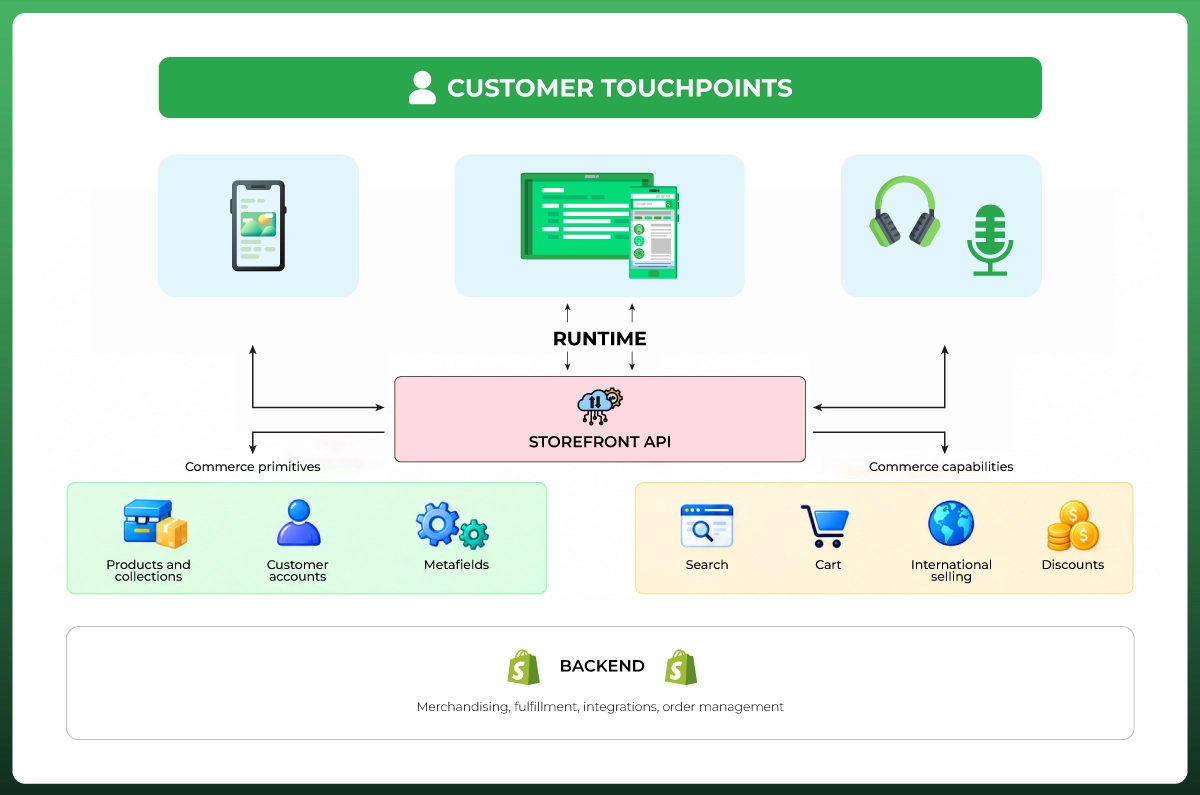
In a standard store, a Liquid theme renders every page. Going headless, you retire those Liquid templates and build a custom front-end storefront with a framework like React, Vue, or Next.js. It pulls live data through the Storefront API.
So the visible difference is the Shopify frontend. Everything a shopper touches is now yours to design. The Shopify backend, the ecommerce engine that runs orders and money, barely changes at all. That balance is the heart of Shopify headless commerce.
Headless Shopify at a Glance
Before the deep dive, here is the quick comparison most people are after. It lines up a headless build against a traditional theme-based store on the factors that actually shape the decision.
Factor
Headless Shopify
Traditional Shopify
Best for
High-growth, omnichannel, heavy customization
Most SMBs and mid-market stores
Difficulty
High, needs developers
Low, editor and themes
Typical cost
Tens of thousands to millions
Theme plus apps, far cheaper
Site performance
Very high ceiling, if built well
Fast out of the box
Design flexibility
Effectively unlimited
Limited to themes and apps
SEO
Powerful, but you own the risk
Handled by the platform
App ecosystem
Many apps need custom work
One-click App Store installs
Developer required
Yes, ongoing
Not usually
How Headless Shopify Works
A headless Shopify setup has three moving parts. Once you see how they connect, the whole model stops feeling mysterious and starts looking like plumbing you can actually plan around.
The 3 Core Pieces
Back-end commerce engine: Shopify Admin runs product catalog management, inventory tracking, orders, draft orders, payments, and checkout. Your team still works here daily.
Front-end storefront: a custom front end built with your chosen tech stack, whether that is a React ecommerce build, a Next.js Shopify project, or another framework.
API layer: the Storefront API, Admin API, and Customer Account API act as the bridge. This API management layer is where the two halves stay in sync.
To switch it on, you install the Headless channel (or the Hydrogen channel) inside Shopify. That generates the public and private tokens you use for API authentication, so your storefront can query Shopify securely through the GraphQL Storefront API. Every call to the Shopify API flows through this layer.
What You Keep from Shopify, and What You Replace
This is the part most guides skip, and it is exactly where people get nervous. Going headless does not mean abandoning Shopify. It means redrawing the line between what Shopify owns and what you own.
You keep the Shopify Admin for product listings, inventory management, customers, and staff permissions control. You keep secure checkout, usually by sending shoppers to Shopify's hosted checkout URL. You keep payments, PCI compliance, Shopify Functions, and your reliable back-end commerce engine.
You replace the theme layer and anything welded to it. Liquid themes go, and so do theme-dependent apps like pop-ups and review widgets that inject code into Liquid. You also take on hosting, your day-to-day Shopify store management, performance tuning, and front-end security.
The Customer Journey, Start to Finish
Here is the data flow in practice. A shopper opens your custom storefront, which requests product data from the Storefront API. They add an item, the cart updates through the API layer, and checkout hands off to Shopify's secure flow.
The order then lands back in Shopify Admin like any normal sale, and your connected tools, from a CRM to Klaviyo, fire on schedule. Nothing about the back-end operations feels foreign to your team, because it is still Shopify running the show.
The Shopify Tech Behind a Headless Build
Shopify gives you a real toolkit for going headless, so you are not stitching everything together from scratch. Knowing these pieces helps you scope a project and avoid paying for work Shopify already handles.
Storefront API and Admin API
The GraphQL Storefront API is the foundation. It serves buyer-facing data: products, collections, search, and cart. The Admin API covers back-office tasks, and the Customer Account API handles login and accounts. Shopify has been steadily shifting from its older RESTful API toward GraphQL APIs.
Shopify Hydrogen
Shopify Hydrogen is Shopify's own React framework for custom storefronts. It launched on the React-based Remix framework, and today Hydrogen projects are structured as React Router apps, with a stable release in the 2026 line and calendar-based versioning.
The Hydrogen framework ships with commerce-ready components, hooks, and developer tooling wired to Shopify's APIs. A June 2026 developer preview even reimagines it as a framework-agnostic toolkit, so its commerce primitives can pair with Next.js, Astro, and more.
Shopify Oxygen
Shopify Oxygen is the global edge hosting built for Hydrogen. It handles server-side rendering and worldwide delivery, and Oxygen hosting is included free on every paid Shopify plan except Starter. If you build outside Hydrogen, a Next.js Shopify store can deploy to Vercel or Netlify instead.
Metaobjects, Shopify Functions, and CMS Options
Metaobjects let you model custom content inside Shopify, while Shopify Functions add custom back-end logic like tailored discounts. For richer content management, many brands add a Shopify headless CMS. Popular picks include Contentful CMS, Sanity, Strapi v5, and Builder.io. You can also wire in a Product Information Management or Customer Relationship Management system through API integrations.
The Benefits of Headless Shopify
When headless fits, the payoff is real. These are the advantages I actually see move the needle for brands, rather than the vague promises that fill most sales pages.
Complete Design Freedom
Your storefront is no longer boxed in by theme limits. You can build any layout, animation, or interaction the web allows, which is a genuine unlock for brands that treat their storefront and customer experience as part of the product. This is the real ceiling lift on Shopify customization.
Faster Site Performance, If You Build it Right
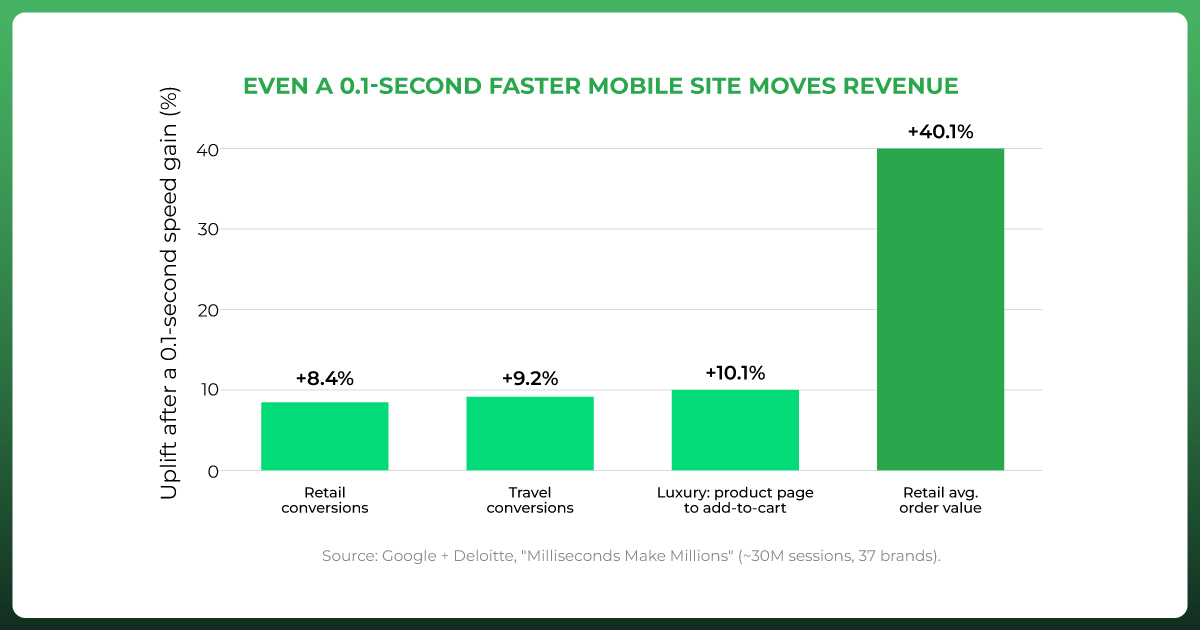
Decoupling lets you tune Shopify performance hard, and speed pays. Google and Deloitte found that a 0.1-second mobile speed gain lifted retail conversions and average order value, with speed-sensitive categories seeing even larger jumps.
The honest caveat: themed Shopify stores are already fast, and a sloppy headless build can be slower. Amazon famously found every 100ms of latency costs about 1% in sales (GigaSpaces). Headless raises the ceiling on page load times; it does not guarantee you reach it.
A Stronger Mobile Experience
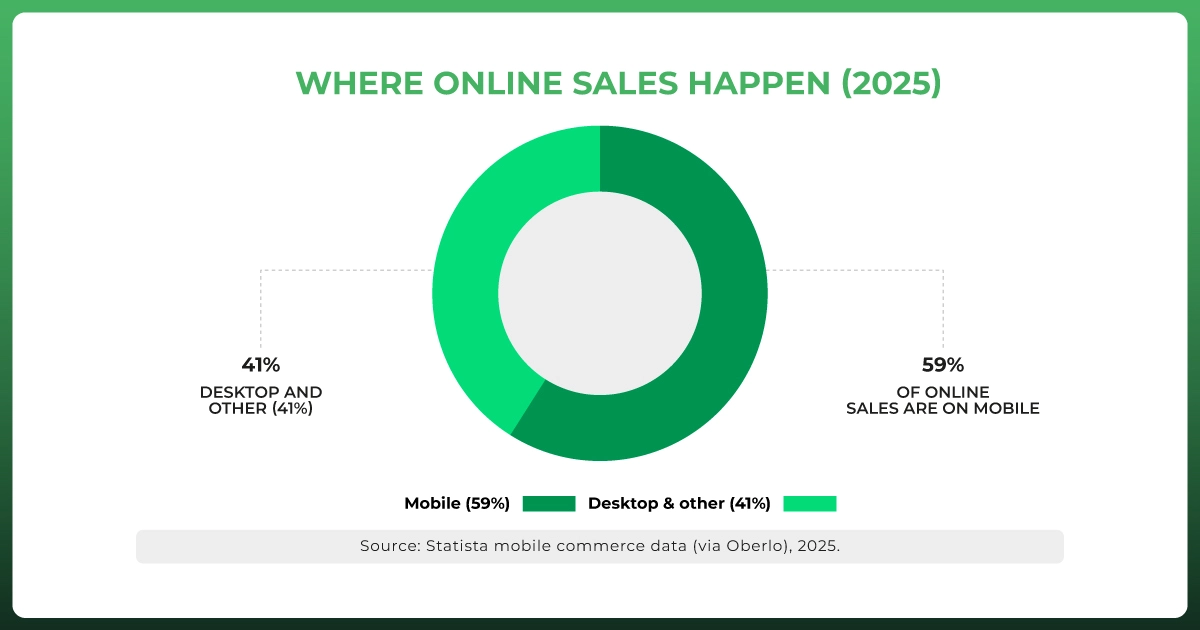
Mobile now drives most online sales, so the mobile experience is where headless earns its keep. You can design mobile-first, ship a Progressive Web Application, and cut the friction that makes shoppers bounce, all in service of a smoother user experience.
It matters because Google reports that 53% of mobile visits are abandoned when a page takes longer than three seconds to load. On mobile, speed is not a nice-to-have; it is the difference between a sale and a bounce.
True Omnichannel Commerce
One back end can power many front ends. That is the promise of omnichannel commerce: your online store, mobile apps, Point of Sale systems, kiosks, voice assistants, IoT devices, even vending machines all pull from the same source. It also makes it easier to manage product listings across multiple sales channels without duplicating work.
Easier Integrations with Your Tech Stack
Because everything runs through an API layer, connecting third-party tools gets cleaner. You can plug in best-of-breed services for everything from customer service to fulfillment, lean into composable commerce and a microservices architecture, and swap any piece later without rebuilding the whole store.
Enterprise-Level Scalability
A decoupled front end handles traffic spikes and large catalogs gracefully, since you can scale the storefront independently of the back end. For brands eyeing new markets, that enterprise-level scalability removes a lot of the re-platforming pain later.
A Future-Proof Ecommerce Architecture
Technology keeps shifting, and a headless ecommerce architecture lets you adapt without starting over. New channels, new frameworks, and AI-driven experiences slot into an API-first commerce foundation far more easily than into a fixed theme.
Do You Need Shopify Plus to Go Headless?
No. This myth trips up more merchants than almost any other. The Hydrogen framework is open source, and Oxygen is free on all paid plans except Starter, so you can launch a headless Shopify store on a Basic plan if you want to.
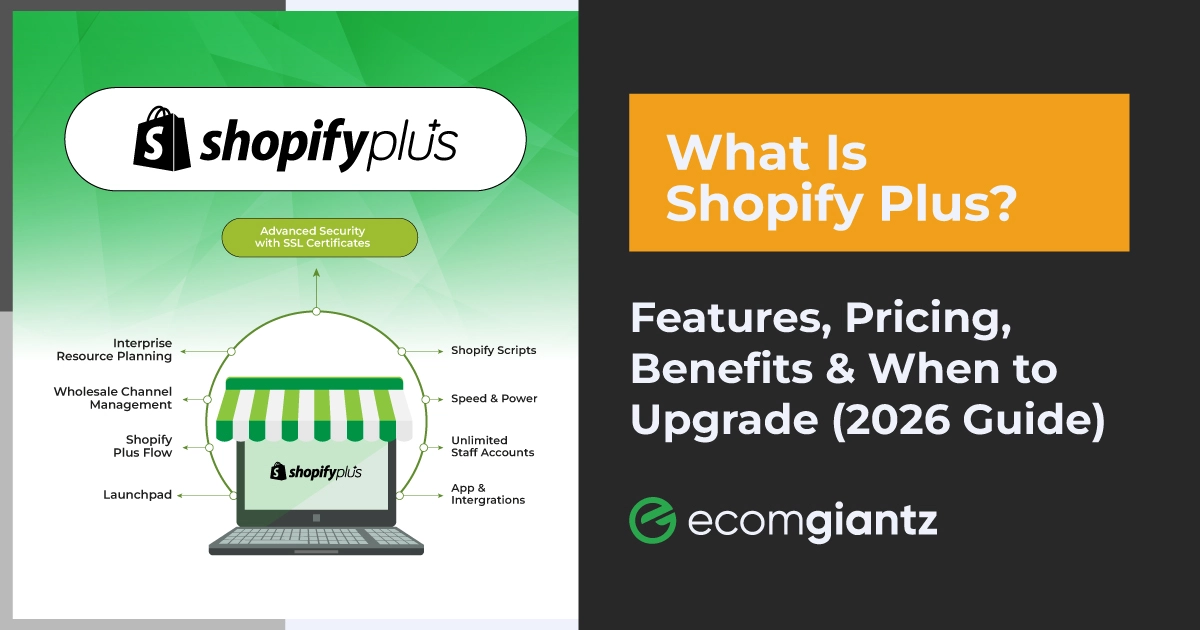
That said, most serious headless builds do run on Shopify Plus, because Plus brings higher API rate limits, checkout customization, and stronger automation. Those things make a large headless setup smoother, but Shopify Plus is a practical choice, not a hard requirement.
The Drawbacks and Limits of Headless Shopify
Now, the other side, because this is where honesty separates a useful guide from a sales pitch. These trade-offs are exactly why most stores should not rush into a headless build.
Higher Upfront and Ongoing Costs
A headless build is a bigger investment than a theme, and it keeps costing after launch. What you solve with a click in standard Shopify often becomes a development task here, which raises your total cost of ownership over the store's life.
It Needs Real Technical Expertise
You are running two environments now, a Shopify backend and a custom front end, and keeping them aligned takes skilled developers. Without solid API management and version control, updates drift out of sync and small changes turn into fire drills.
Longer Builds and Slower Changes
Time is the hidden cost. Headless projects take longer to launch, and everyday updates that a marketer once made in the theme editor now wait on development and QA. That can slow campaigns unless you plan the workflow carefully.
App Compatibility Gaps
Many Shopify apps assume a Liquid theme, so they will not just work in a headless setup. Instead of one-click installs, you rebuild that functionality through Third-party integrations or custom code, which adds both time and budget.
More Maintenance and Security on You
In a themed store, Shopify quietly handles caching, image optimization, and front-end security. Go headless and much of that becomes your responsibility, from your hosting setup to protecting the front-end storefront you now own.
Trickier Analytics and Order Attribution
Custom front ends can complicate tracking. Analytics scripts, consent handling, and order attribution across channels all need deliberate setup, or you risk blind spots in the exact data you rely on to grow customer engagement and revenue.
Headless Shopify and SEO: Help or Hurt?
As someone who lives in on-page SEO, I will not pretend headless is automatically good for rankings. It can be excellent or damaging, and the outcome depends entirely on how the build handles rendering and migration.
The upside is speed. Faster pages improve Core Web Vitals, and Google factors page experience into results, so a well-built headless store can lift both rankings and conversion rate at once. That is the genuine SEO case for going headless.
The risk is rendering. If your storefront renders only in the browser, crawlers may see empty pages, so server-side rendering is non-negotiable. You also have to preserve meta tags, canonical tags, and structured data, and map 301 redirects carefully during migration. Pairing the build with proper Shopify SEO and digital marketing support keeps hard-won rankings intact.
Headless vs Traditional Shopify
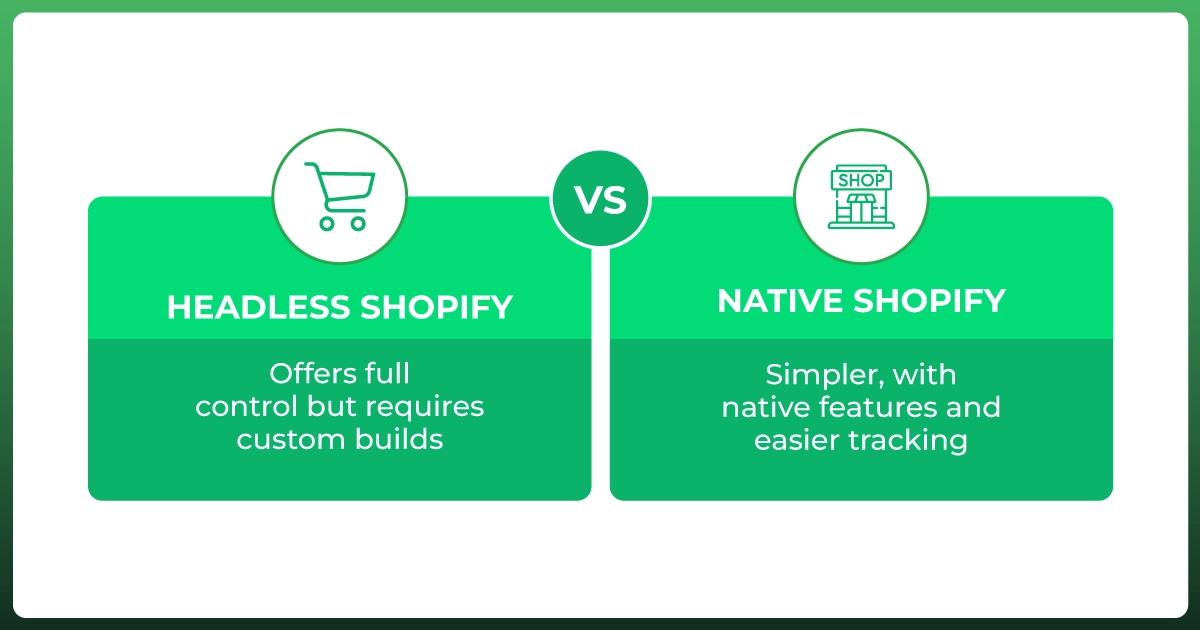
Put simply, traditional Shopify optimizes for speed of setup and ease, while headless optimizes for control and ceiling. A themed store gets you live quickly, stays cheap to run, and needs little to no development to maintain.
Headless flips those priorities. You trade simplicity for near-total control over design, Shopify performance, and integrations, and you accept higher cost and complexity in return. Neither is “better.” The right pick depends on whether your current setup is holding growth back.
If themes and apps already deliver the experience you want, stay traditional and invest the savings elsewhere. If you keep hitting walls that only custom technologies can break through, that friction is your signal to consider headless commerce Shopify setups.
Headless Shopify vs Shopify Online Store 2.0
Here is the comparison I wish more merchants ran before booking a headless project. Online Store 2.0 is Shopify's modern theme system, and it quietly closed much of the flexibility gap that used to push brands toward headless in the first place.
With sections on every page, app blocks, and metafield support, Online Store 2.0 lets you customize far more than the old Liquid themes ever allowed, and mostly without touching code. For plenty of stores, it delivers most of what they wanted from headless at a fraction of the cost.
Feature
Online Store 2.0
Headless Shopify
Theme editor
Yes, drag-and-drop
No, you build the front end
Apps
Excellent, one-click and app blocks
Mixed, many need custom work
Design flexibility
High, within the theme
Effectively unlimited
Site speed
Good out of the box
Excellent, if built well
Time to launch
Fast
Slower
Maintenance
Mostly handled by Shopify
On you
Cost
Low
High
Developer needed
Rarely
Yes, ongoing
So the honest rule of thumb: reach for Online Store 2.0 when your goals fit inside a flexible theme, and you want speed, low cost, and easy upkeep. Reach for headless only when a real business problem sits outside what even a modern theme can do.
If you have not pushed Online Store 2.0 to its limits yet, do that first. It is the cheapest experiment you can run, and it often removes the reason you were considering headless at all.
When Headless Shopify Makes Sense for Your Store (and When It Doesn't)
The decision usually comes down to a handful of clear signals. Read these two lists honestly, and the answer for your store tends to reveal itself pretty fast.
Signs You are Ready
You need advanced customization or a proprietary experience that themes simply cannot support.
Performance is a revenue KPI, and you have squeezed all the speed a themed store can give.
You sell across many touchpoints and want unified omnichannel commerce from one back end.
You have in-house developers or a committed agency partner to build and maintain it.
You are scaling into new markets and want to avoid a costly re-platform down the road.
Signs You Should Wait
You are early-stage, and speed to market matters more than a custom front end.
Your budget is tight, and a theme still meets your customers' needs well.
You have no reliable development resource to own the build long-term.
Standard Shopify, or a strong Online Store 2.0 theme, already does what you need.
How Much Does a Headless Shopify Build Cost?
There is no single price, because “headless” covers everything from a lean custom storefront to a full composable rebuild. It helps to think in three tiers, then add the running costs on top.
Lean build: a Storefront API front end on Next.js, hosted on Vercel, for a focused store. The most budget-friendly route into a headless build.
Mid-market Hydrogen build: a custom Hydrogen storefront on Oxygen hosting, with a headless CMS and several integrations.
Enterprise composable build: Shopify reports these projects often run from hundreds of thousands to several million dollars, depending on scope.
On top of the build, budget for a headless CMS subscription, hosting if you are not on Oxygen, and ongoing developer maintenance. Weigh it as total cost of ownership, not just launch price (Shopify).
A useful rule of thumb from agencies in this space: headless tends to pay off for brands around 8-figure revenue or with very specific customization needs. Below that, the complexity usually costs more than it returns.
Real Brands Running Headless Shopify
Skip the invented case studies you see elsewhere. Here are real, named brands and verifiable numbers, which is what EEAT and your buyers actually respect.
ATTITUDE built on Hydrogen and Oxygen and reported a 40% improvement in page load time, a 9% rise in new customers, 15% higher revenue per user, and a 10% higher average order value (Shopify).
Allbirds runs Hydrogen across 35 countries and integrates with around 50 retail locations, and brands like SKIMS, Gymshark, and Good American are live on Hydrogen too. Ruggable also credited its headless launch with speed and SEO gains (Shopify).
We have walked plenty of brands through this same call, headless or not. You can see how that plays out in our ecommerce case studies.
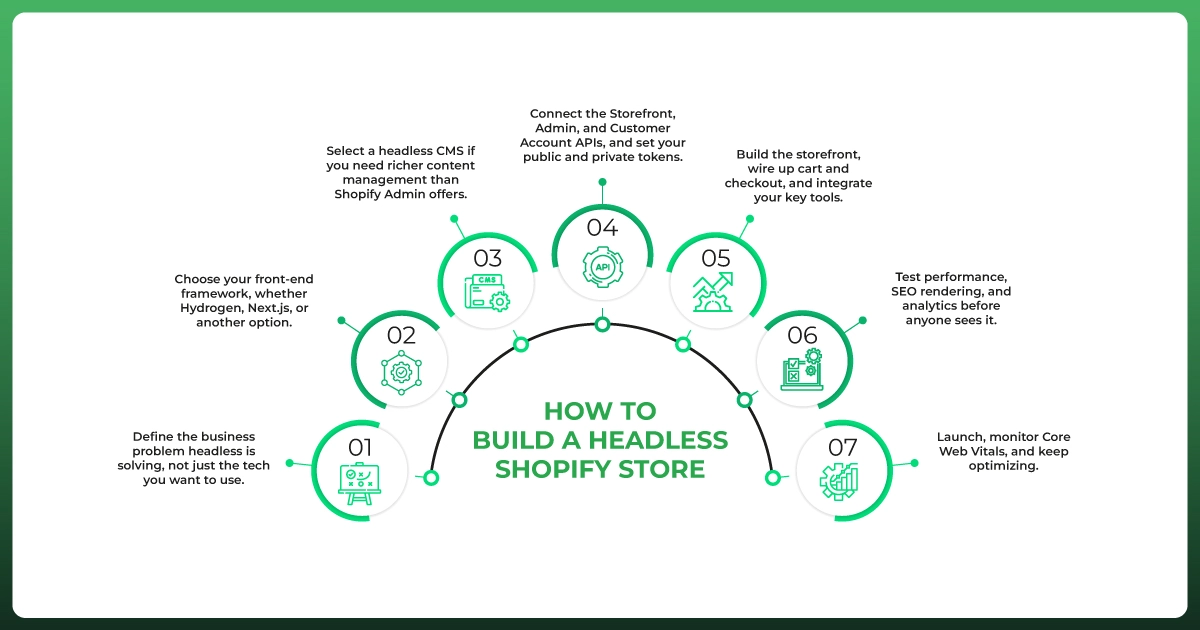
How to Build a Headless Shopify Store
If you decide to go for it, here is the high-level path. Each step deserves its own deep dive, but this is the shape of a sensible headless Shopify setup from plan to launch.
Define the business problem headless is solving, not just the tech you want to use.
Choose your front-end framework, whether Hydrogen, Next.js, or another option.
Select a headless CMS if you need richer content management than Shopify Admin offers.
Connect the Storefront, Admin, and Customer Account APIs, and set your public and private tokens.
Build the storefront, wire up cart and checkout, and integrate your key tools.
Test performance, SEO rendering, and analytics before anyone sees it.
Launch, monitor Core Web Vitals, and keep optimizing.
Common Mistakes to Avoid
Going headless too early, before your store has a problem that only headless can fix.
Ignoring SEO during the build, then wondering why traffic dropped after launch.
Underestimating maintenance, and budgeting only for the build, not the years after it.
Choosing the wrong tech stack, one your team cannot realistically support.
Hiring the wrong team, without proven headless and API-first commerce experience.
Need Help with Your Shopify Build?
Whether headless is right for you or a well-built theme will serve you better, the safest move is to decide with people who have shipped both. We handle full Shopify builds, white-label Shopify development for agencies, migrations, performance work, and ongoing growth.
Not sure which path fits your brand?Book a free consultation with our team, and we will map the smartest, most cost-effective route for your store, no pressure to over-build.
Frequently Asked Questions
Is headless Shopify good for SEO?
It can be, if built correctly. Server-side rendering, preserved meta and structured data, and clean redirects protect rankings, while faster pages and better Core Web Vitals can lift them. A careless build, though, can seriously hurt SEO.
Can I migrate my existing store to headless later?
Yes. Many brands launch on a traditional theme, then move to headless once they scale. The switch takes planning, especially for SEO and app integrations, but Shopify's APIs and Hydrogen make the path smoother than re-platforming entirely.
Do I need a developer for headless Shopify?
Effectively, yes. A headless build is not a no-code project. You need developers comfortable with APIs and modern frameworks to build it and to keep it maintained after launch. This is the single biggest practical requirement.
Does headless Shopify support Shopify apps?
Some, but not all. Apps that run server-side often still work, while theme-dependent apps that inject into Liquid usually do not. Those need to be rebuilt through APIs or replaced, which is a real planning consideration.
Is headless Shopify good for international ecommerce?
It can be a strong fit. One back-end commerce engine can power localized storefronts across markets, which suits brands expanding internationally. Many also pair it with Shopify Markets to handle currencies and regions without separate custom builds.
Can headless Shopify handle high-traffic stores?
Yes. A decoupled front end scales independently of the back end, and edge hosting like Oxygen is built for traffic spikes. That enterprise-level scalability is one of the main reasons large brands choose a headless architecture.
What should I check before migrating to headless?
Confirm you have a clear business reason, a development team, budget for maintenance, an SEO migration plan, and a list of apps that need rebuilding. If any of those is missing, fix it before you start, not after.
Final Word: Is Headless Shopify Right for Your Business?
Headless is a technology choice, not a strategy on its own. The real question is whether a custom storefront supports outcomes your current store cannot reach. When the answer is yes, headless can be a serious competitive edge.
So when someone asks me what headless Shopify really is for, my honest answer is this: a powerful option for the right store, and an expensive detour for the wrong one. A well-built traditional store serves most brands better, at a fraction of the cost and hassle.
Be honest about which camp you are in, and you have already made the smartest decision in this whole guide.
Ready To Upgrade Your Shopify Store?
Get Expert Headless Shopify Development Services From Ecomgiantz.
Ecomgiantz Team consists of our in-house experts who share their hands-on experience in ecommerce businesses, websites, marketplaces, etc. We also share the latest updates, insights, and market trends that can be helpful for your online business.