How to Make a Shopify Website in 2026: A Step-by-Step Guide for Beginners
Shopify is an online platform where you can build your online store with pre-built elements and themes. Making a Shopify website in 2026 is easier than ever with AI features.…

Shopify is an online platform where you can build your online store with pre-built elements and themes. Making a Shopify website in 2026 is easier than ever with AI features.…
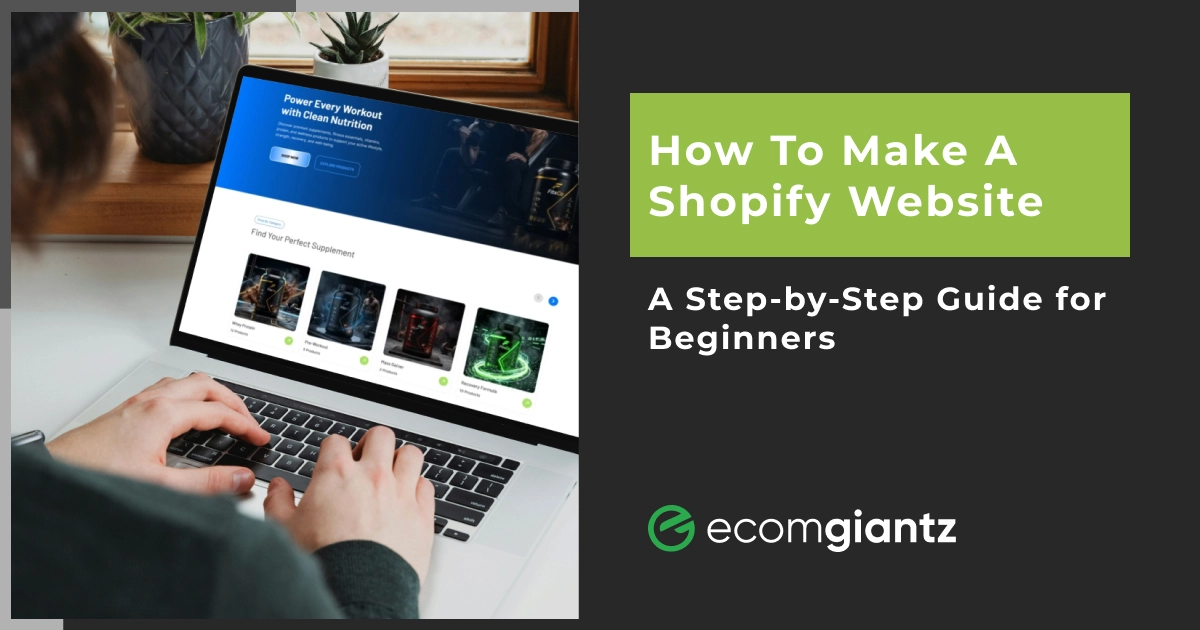


Shopify is an online platform where you can build your online store with pre-built elements and themes. Making a Shopify website in 2026 is easier than ever with AI features. You need to sign up for Shopify, pick a theme, upload products, set up payments and shipping, connect the business domain, and click launch. You can create your online storefront without writing a single line of code. The whole process will take less than a day.
At Ecomgiantz, we’ve built and moved stores on Shopify for more than a decade. We built hundreds of Shopify stores in various niches. So, we understand what new business owners want to know. Therefore, we’ve prepared a simple guide on how to make a Shopify website by yourself.
We will show you each step, the real cost factors, and tips that will help your store grow. So, without further ado, let’s start.
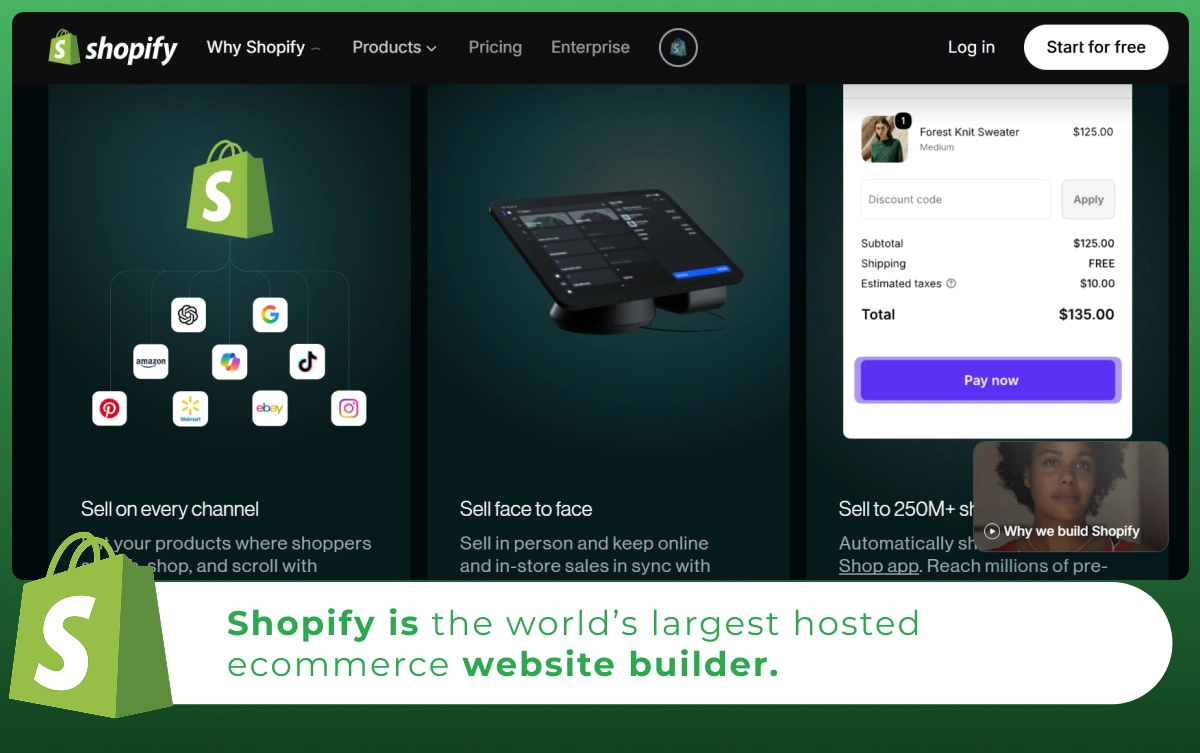
Shopify is the world’s largest hosted ecommerce website builder. It lets you create and manage online stores to sell both physical and digital products. Most of the Shopify plans don’t require coding to build websites. The platform handles hosting, security, and the checkout. Till this year, Shopify has served merchants in more than 175 countries.
You can consider it as an all-in-one platform. Your storefront, payment processing, inventory, and marketing tools sit in one dashboard called the Shopify admin. That is why it suits beginners and growing brands alike.
Shopify is a dedicated platform for ecommerce businesses ranging from small to large. They have separate pricing plans for each type of store. So, you can keep growing with Shopify without any help from other platforms or tools.
| Want to redesign your Shopify store? Talk to our expert Shopify web designers & developers today! |
Shopify is popular because merchants won’t have to face technical work. It is built mainly for selling. Its checkout converts up to 15% better than other platforms on average. A higher conversion rate matters a lot when you already have traffic and want to grow further.
Besides, hosting, SSL certificates, and security tools are also included here. Nonetheless, you get to access thousands of apps from the Shopify app store. No matter how big or small your business is, this platform has everything to help you grow.
For owners considering moving their shops from other platforms, Shopify can be a great choice. The ecommerce-first ecosystem will keep your store more secure and user-friendly for customers.
If you are weighing your options, here is how the main ecommerce website builders compare at a glance.
| Factor | Shopify | WooCommerce | Wix | Squarespace |
|---|---|---|---|---|
| Best for | Scaling online stores | WordPress users wanting control | Simple all-in-one sites | Design-led brands |
| Coding needed | None (only required for customization) | Some | None | None |
| Hosting | Included | You manage it | Included | Included |
| Built-in checkout | Yes, strong | Via plugins | Yes | Yes |
| App ecosystem | 21,000+ apps | Largest (open source) | Moderate | Limited |
| Scales to high volume | Excellent | Good | Limited | Limited |
| Upkeep | Low | High | Low | Low |
Prices and plan names change often, so confirm details on each platform before you decide.
Before you begin your Shopify store setup, get these ready so the process runs smoothly:
Here is the full process to create a Shopify website, from sign-up to launch. Follow it in order, and you will not miss anything important.
Step 1: Create Your Shopify Account
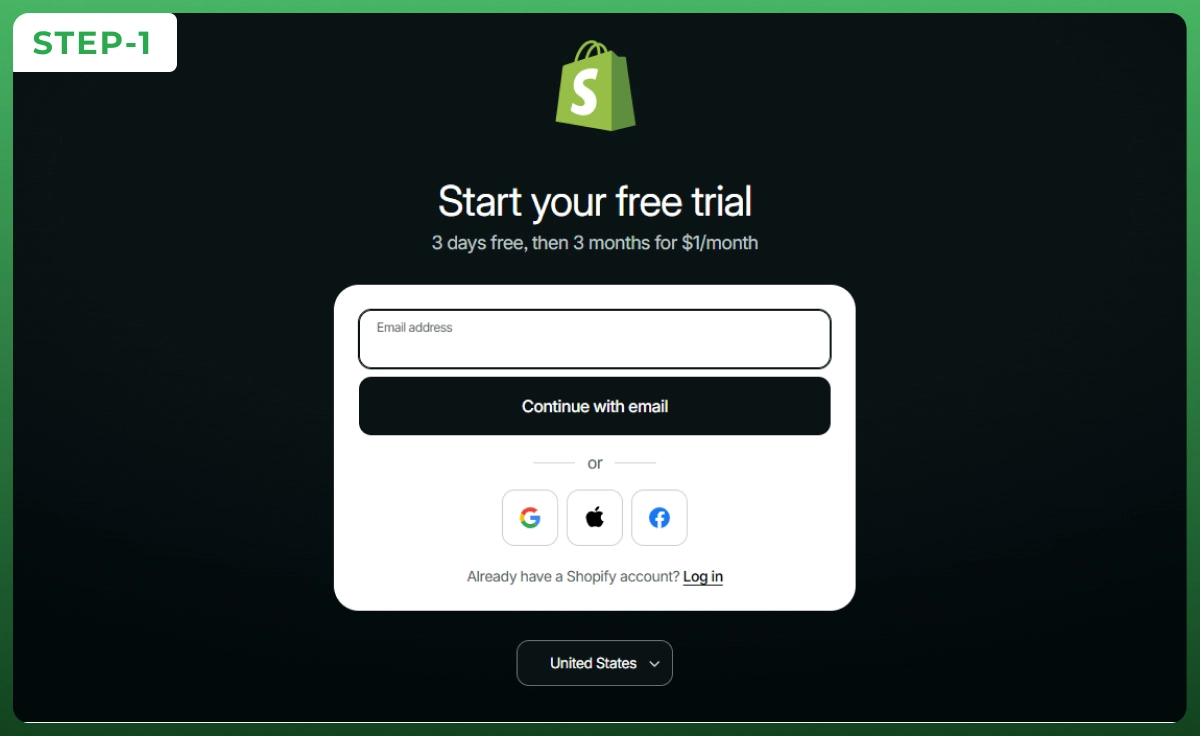
Head to Shopify and start the free trial. You get 3 days free, then $1 per month for the first 3 months on the Basic, Grow, or Advanced plan. Enter your email and a store name, which becomes your temporary my shopify web address.
Step 2: Choose a Shopify Theme
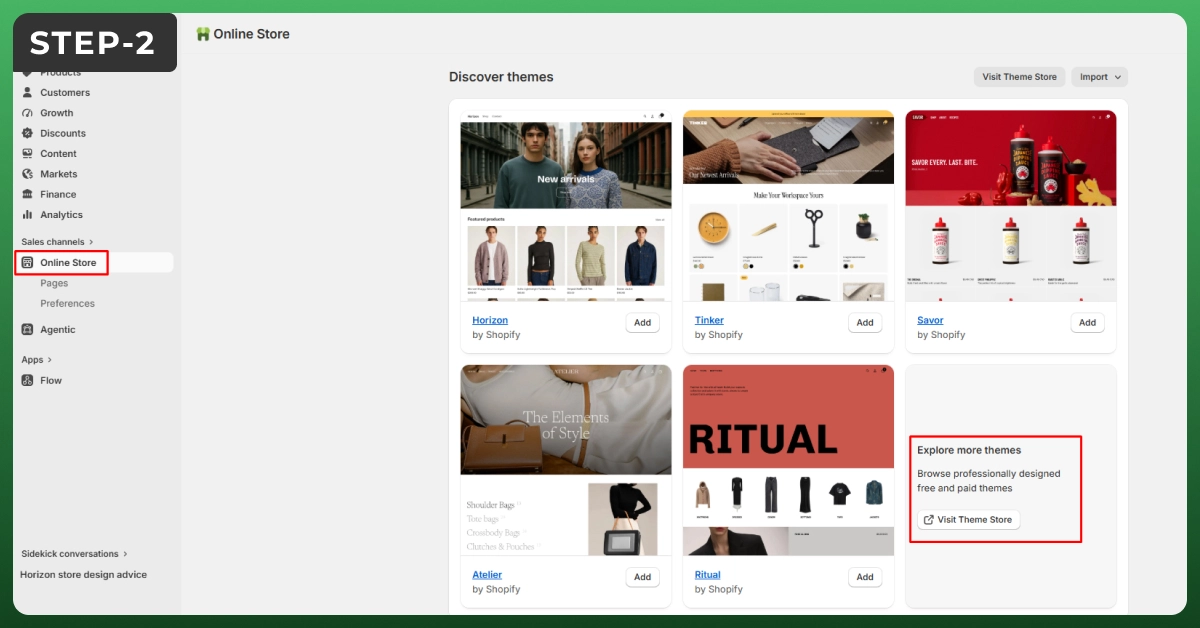
Pick a theme from the Shopify Theme Store. Free themes like Dawn and Horizon are fast and clean, which is perfect for a first store. Check the mobile preview and reviews before you commit. You can switch themes later without losing your products.
Step 3: Customize Your Website Design
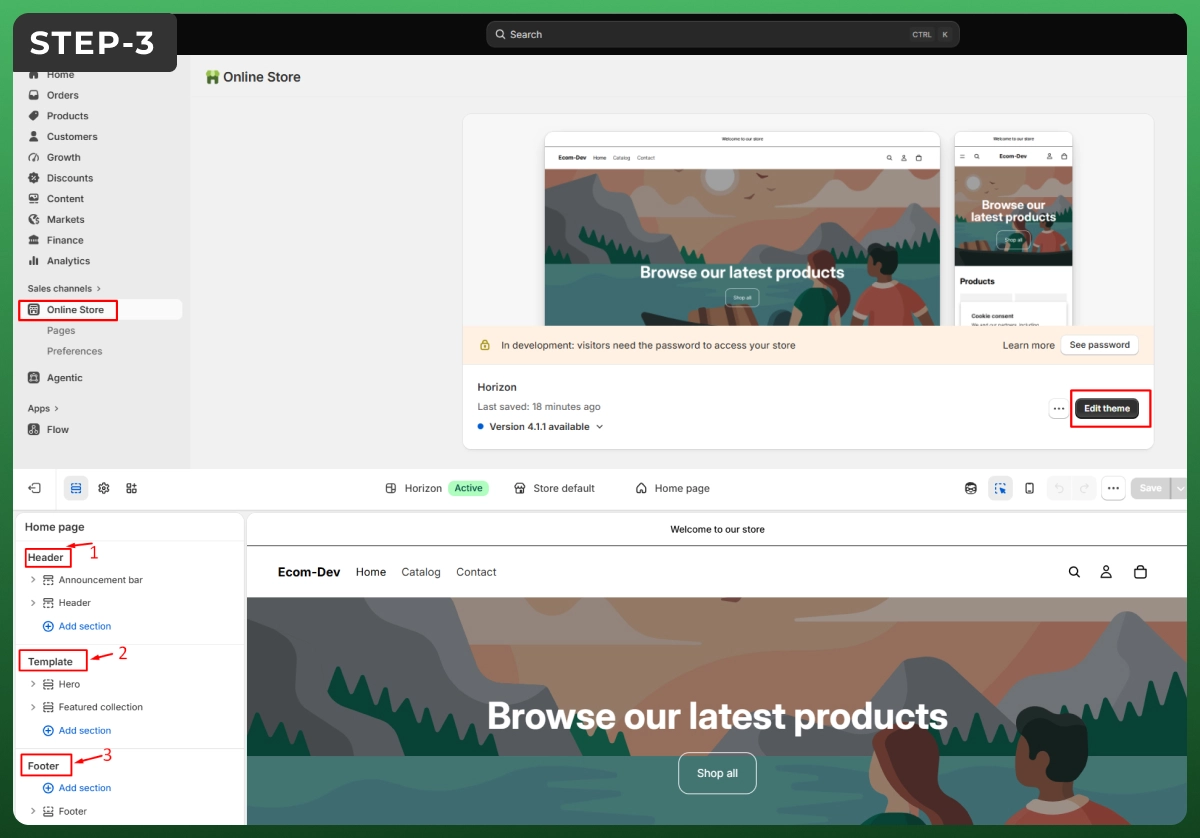
crowded. Focus on four areas:
Want a fully custom Shopify website? You can edit the code with Shopify's Liquid language, but most stores never need to.
Step 4: Add Your Products
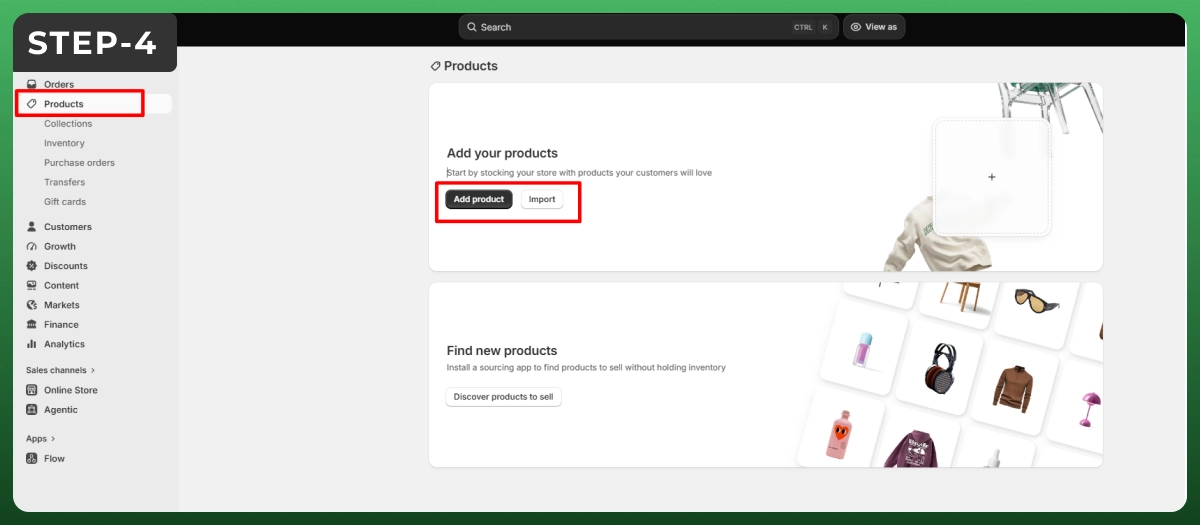
Go to Products, then Add product. Strong listings sell, so give each one care:
Step 5: Organize Products into Collections
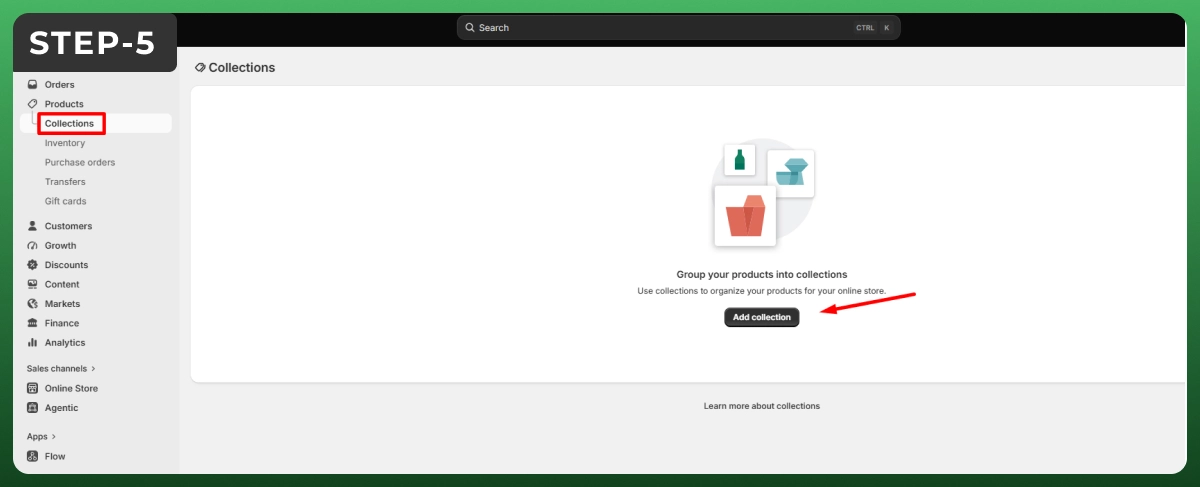
Group products into collections, such as by category, bestsellers, or sale items, so shoppers find things fast. Collections can be manual or set to fill automatically by rules like price or tag. This keeps a growing catalog tidy.
Step 6: Set Up Payment Methods
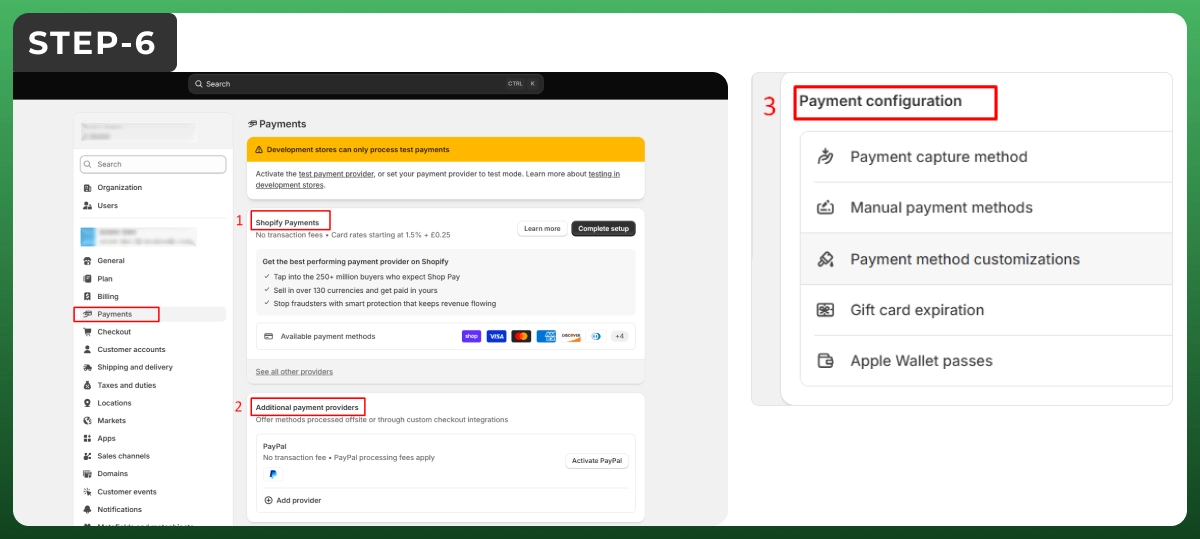
In Settings, open Payments. Turn on Shopify Payments to accept cards and wallets with no extra transaction fee. You can also add PayPal or other gateways, but third-party providers add a small fee on top, so weigh that against the convenience.
Step 7: Configure Shipping Settings
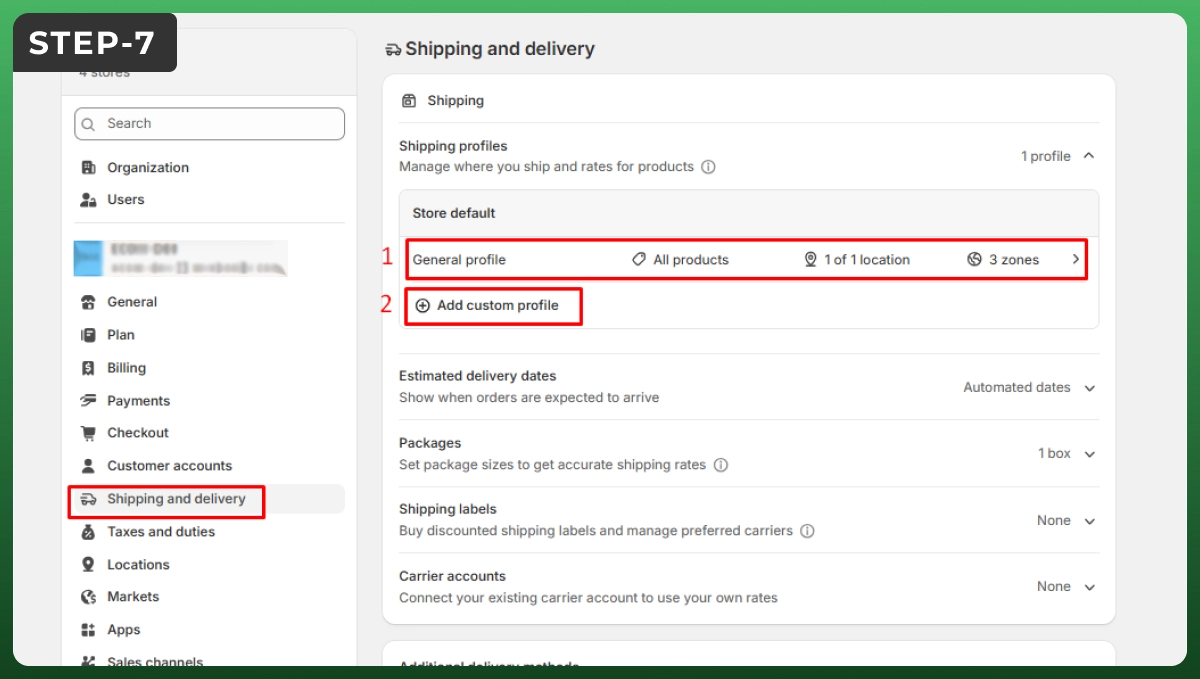
Under Settings, then Shipping, set your zones and rates. You can offer flat-rate, free, or calculated shipping based on weight or carrier. A free shipping threshold, like orders over $50, is a simple way to lift your average order value.
Step 8: Set Up Taxes (US Sales Tax)
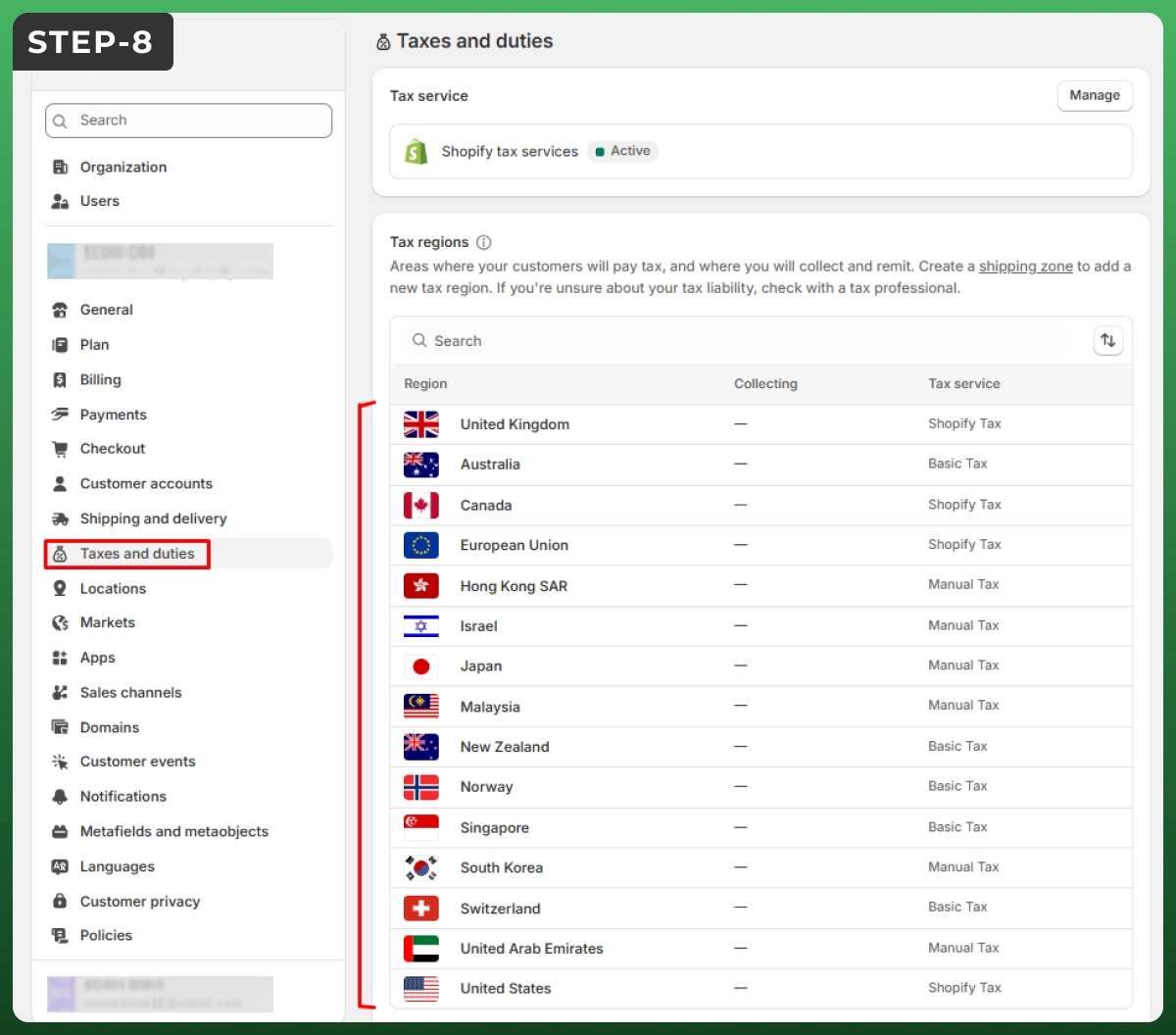
If you sell in the US, Shopify can calculate sales tax for you, but you are responsible for registering where you have nexus. Review the Taxes settings and check Shopify's tax guidance, or speak with an accountant if you are unsure.
Step 9: Connect Your Domain
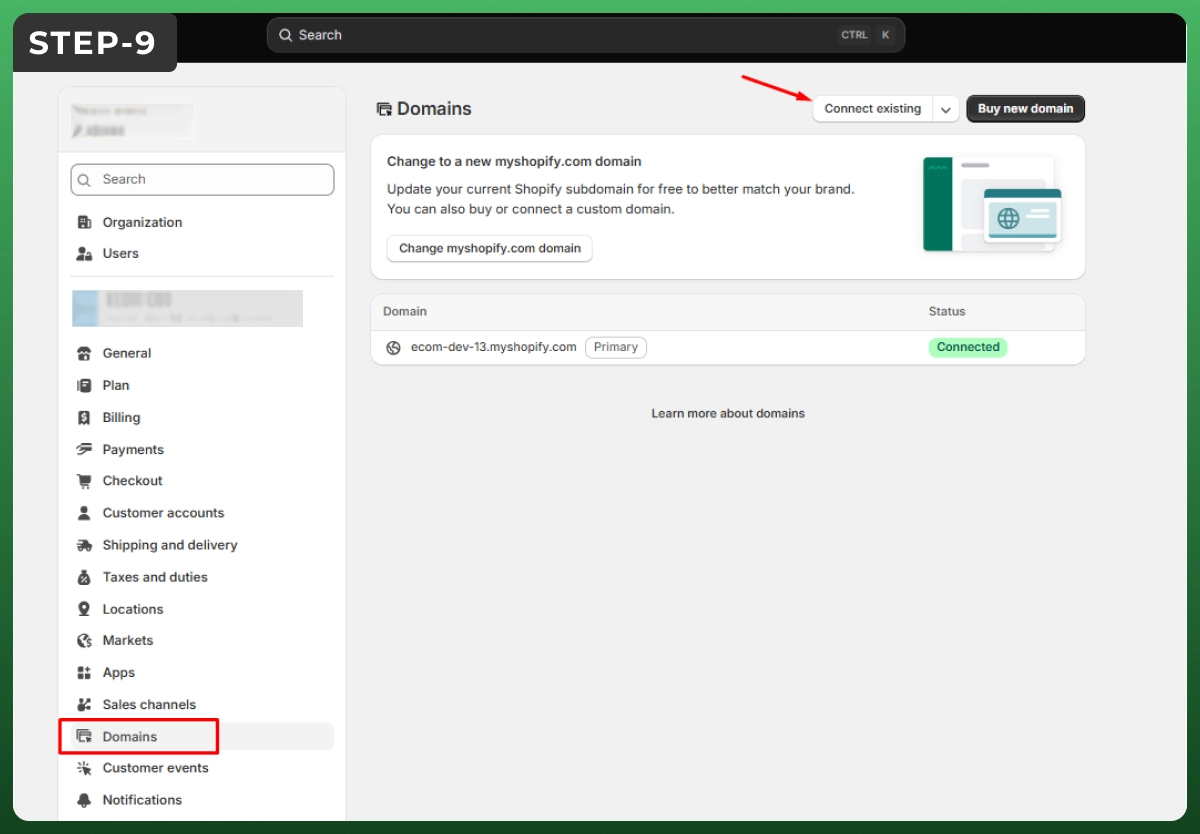
Buy a custom domain through Shopify or connect one you already own by updating its DNS settings. A branded domain, rather than the default myshopify address, looks professional and helps customers trust your store.
Step 10: Install Essential Shopify Apps
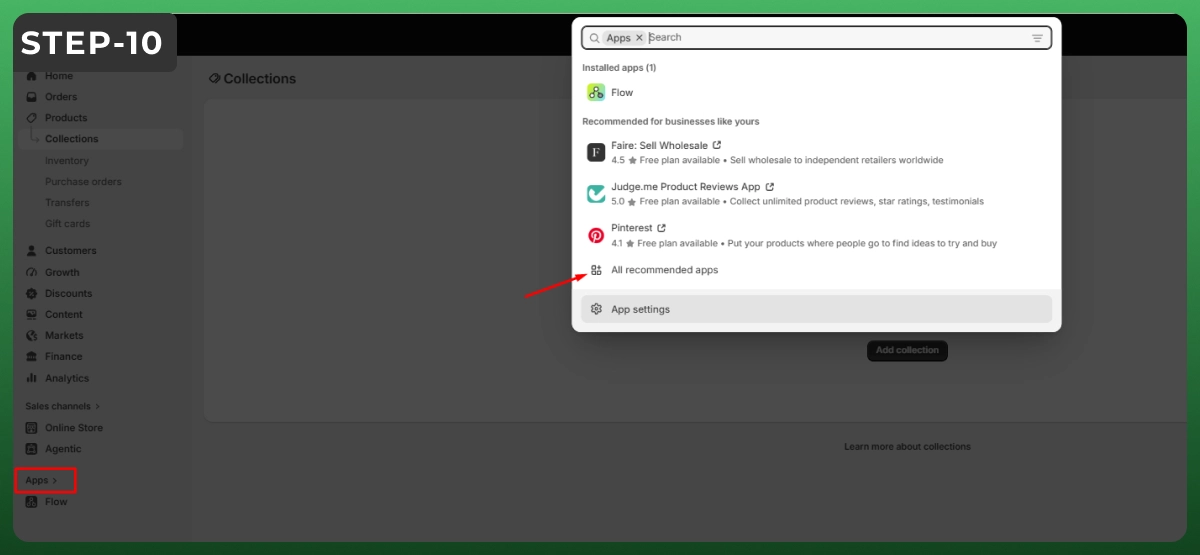
From the Shopify App Store, add only what you need, such as reviews, email marketing, and analytics. Apps add features, but too many slow your site down, so start lean and add more as you grow.
Step 11: Run Pre-Launch Checks and Launch
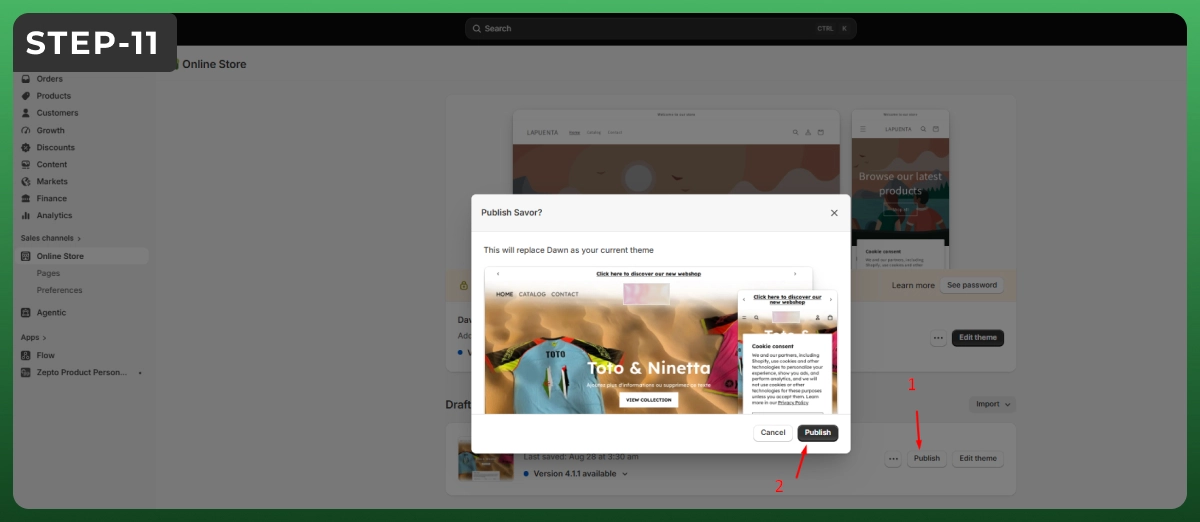
Use Shopify's launch checklist before you go live. Place a test order, view your store on a phone, proofread your copy, and set your policies. When everything looks right, remove the password page, and your store is open for business.
How to Make a Good Shopify Website, Not Just a Working One
Building only the store won’t end your work. You need to optimize it properly to earn the trust of your customers. The website should load fast and be easily navigable for CTAs or purchases. Better performance will increase the conversion rate.
Mobile-responsive design works better today. According to Statista, 60% or more of traffic now comes from mobile phones. While building your store, make sure it becomes easily accessible on smaller screens. All the buttons should be tap-friendly. Most importantly, the journey to the product page and
The faster your site loads, the less your traffic bounces away. A recent stat showed that a 0.1-second gain in mobile load time lifts retail conversions by 8.4%, while 53% of mobile visitors leave a page that takes over three seconds. You should compress images, limit heavy apps, and pick a lightweight theme.
You need to gain the trust of your audience. Almost 93% of young customers visit the review sections of product pages before making any decision. So put some extra effort into showing your product’s authenticity on product pages. Create honest policy pages.
Guide the eye. Use one clear call to action per page, simple navigation, and strong product photos. Shoppers should never wonder what to click next. The fewer decisions they face, the more likely they are to reach checkout.
Shopify has built-in SEO features for better rankings and conversions. The system handles technical functions like clean code and SSL, but the whole on-page SEO depends on your strategy. With a strong strategy, your Shopify store can rank and surface in AI answers.
You need to give unique meta titles and descriptions to all pages. Make sure the main keywords are used naturally in the data. The URL length should also be reasonable. The page structures should have proper h1 and h2 tags. Nonetheless, give valid alt texts to all images.
Use schema and FAQ on almost every product or collection page. Product schema helps with rich results like price and ratings. Content optimized with direct answers and topical coverage will rank well on AI overviews and SERPs.
Besides, you need to focus on Core Web Vitals. Specially the page speeds. Apart from it, you need to create a solid internal linking strategy so that no page remains orphaned. Then, submit your sitemap in Google Search Console and fix any errors it flags.
| Get a complete digital marketing solution for your store from Ecomgiantz. |
If you’re already selling on WooCommerce, BigCommerce, or Magento, you can easily migrate to Shopify. During the process, you won’t lose your catalog, customers, or search rankings. The whole thing might take a few days to make sure nothing remains undone.
At first, you need to import your data from the existing platform you’re using. You can use Shopify’s CSV import or third-party apps like Matrixify for faster imports. After importing the data, do some cross-checking to see if everything’s in the correct order.
While cross-checking, you can also do some QC work. For example, check for image quality, duplicate product pages, product descriptions, etc. It will help you to get an improved kickstart.
Protect your SEO with redirects. This is the step most people skip. Set up 301 redirects from every old URL to its new Shopify URL. This keeps your rankings and avoids broken links. Without them, you can lose hard-won organic traffic overnight.
Switch your domain last. Transfer your domain or point it to Shopify only after you have tested the new store. Place a test order, check mobile, and confirm redirects work. Then update your DNS so customers land on the new site with zero downtime.
Even simple stores lose sales to avoidable errors. Watch for these, since each one quietly costs you traffic or conversions.
Most new stores spend roughly $1,500 to $3,000 in the first year, including the plan, a theme, and a few apps. Your biggest variable is the Shopify plan. Here is the breakdown:
| Cost | Typical price (USD) | Required? |
|---|---|---|
| Shopify plan | Basic $39/mo ($29 annual), Grow $105, Advanced $399 | Yes |
| Domain name | About $10 to $20 per year | Recommended |
| Theme | Free, or $100 to $400 one-time | Optional |
| Apps | $0 to $300+ per month | Optional |
| Payment fees | Around 2.9% + 30c per sale | Per sale |
Using Shopify Payments removes extra transaction fees, so it is the cheapest setup for most sellers. Always check the pricing page for current rates in your region.
You should hire a Shopify developer if you are looking for a custom solution. Enterprise-level or multichannel brands need personalized sites to serve their clients. Basic themes and features won’t be of any help here.
You can start your online journey with Shopify using basic themes and apps. But as soon as you start to grow, you need to make your Shopify website store more robust for your customers. Besides, large names need dedicated people for marketing, store management, maintenance, etc., separately. A single person can’t handle all this work by themselves.
When you delegate the store management and marketing to a team, your hands are free to work on business development. You get the room to think about scaling and improving your product quality.
Global brands like Allbirds, Gymshark, etc., are running their business in shopify platform. But all of them have their own developers and marketing teams. They are working day and night to expand their businesses.
So, consider hiring a vetted Shopify expert if you need custom design, a complex migration, or advanced features that go beyond the standard tools. Start solo, and bring in help only where it pays off.
| Don’t know whom to hand over your store management job? Contact Ecomgiantz. |
Making a Shopify website with basic features takes hours. But enhancing the whole storefront will take a few days, as there are several things to consider.
However, with its page builder and other AI tools, store owners can easily save their time to invest in business development. Unlike WooCommerce and Magento, Shopify is an all-in-one solution where you can even let the platform handle payments and SSL as well.
Even so, if you are facing trouble building your new Shopify store, Ecomgiantz’s seasoned developers can help you out. For any queries or support, feel free to reach out to us.